Troubleshooting
BMP
®
35/37 User’s Manual 198 Rev A
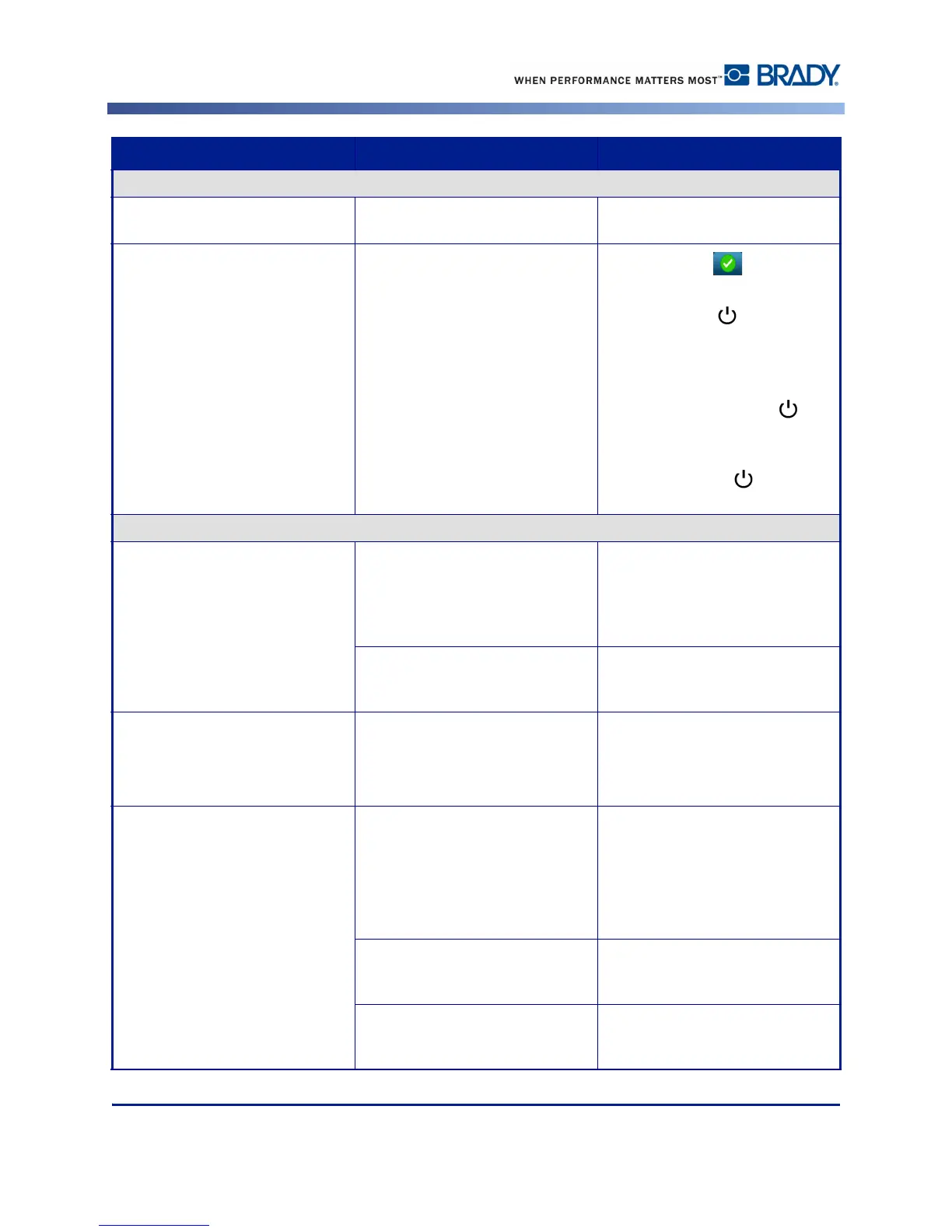
Power Errors
Printer does not power up when
turned on.
Power cord has been pulled out of
printer or wall socket.
Check power cord.
Screen freezes User Interface error
1. Press Power to turn printer
off.
2. Press Power again to turn
printer on.
If power does not shut down
printer:
1. Press and hold Power for
more than 5 seconds to reset the
machine.
2. Release Power after
observing that printer has reset.
Printing Errors
Faint print on labels. Ribbon not advancing correctly.
• Tension the ribbon by rotating the
rewind spool (top spool) in a
downward direction until all slack
is removed.
• Try another ribbon cartridge.
Print energy might be too low. Adjust the print-energy setting.
(See page 93.)
No print on the label. The label or ribbon is not loaded
correctly or out of ribbon.
Reinstall the ribbon cartridge.
- or -
Load a new ribbon.
Poor print quality. Ribbon and label media are
incompatible, or using an
incorrect label material and
ribbon combination.
Verify the correct ribbon for the
label roll is loaded in the printer.
- or -
Change the ribbon or label
combination.
Dust or adhesives accumulated on
the printhead.
Clean the printhead. (See
page 182).
Media wiper dirty. Replace media wiper. (See
page 183).
Problem Cause Corrective Action



 To Next Page