14
User Manual
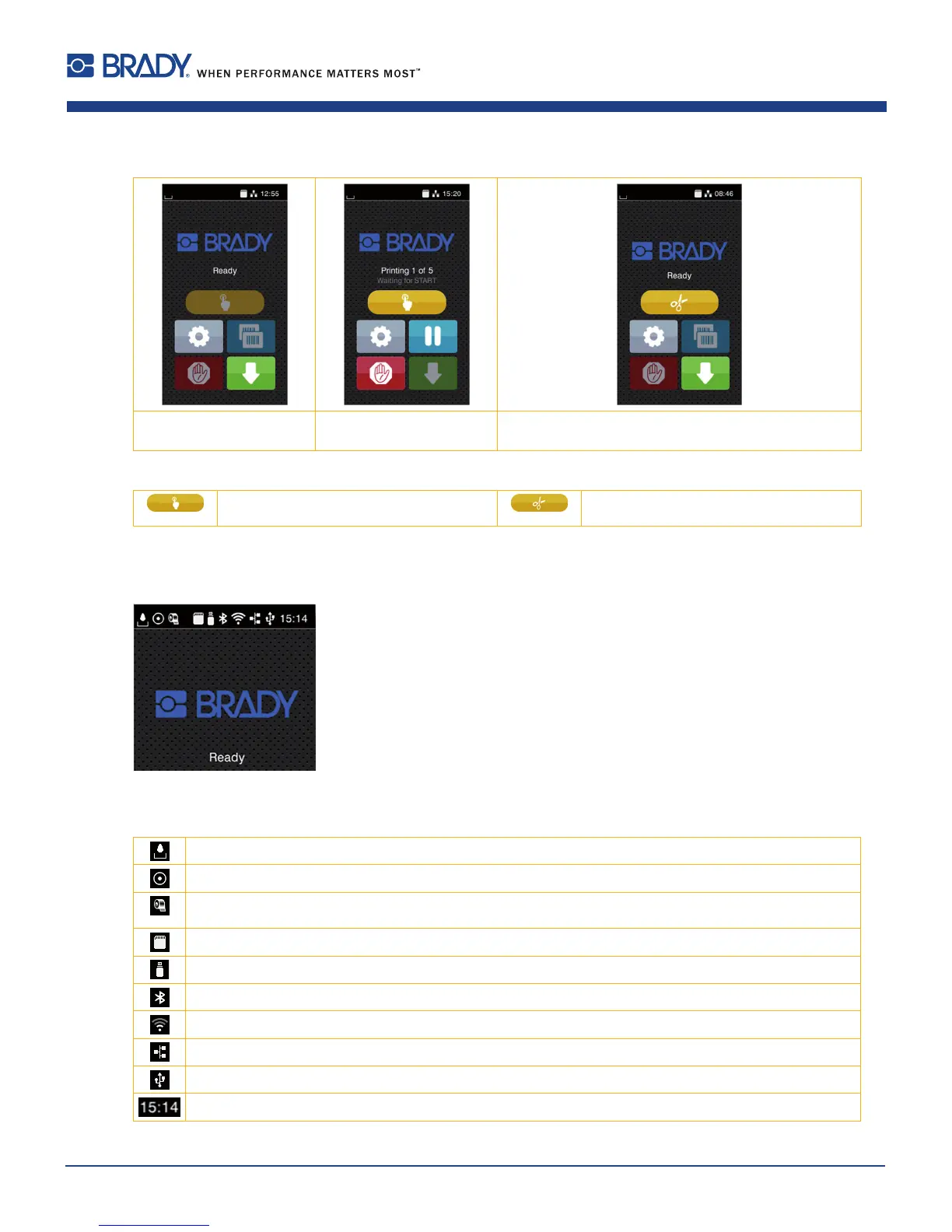
Withspecialsoftwareorhardwarecongurationsadditionalsymbolsappearonthestartscreen:
Printingondemand
withoutprintjob
Printingondemand
withinprintjob
Direct cut
withCUorPCU cutterinstalled
Figure5 Optionalsymbolsonthestartscreen
Releaseprintingofasinglelabelwithina
printjobincludingpeeling-off,cutting...
Releaseadirectcutwithoutmediafeed
Figure6 Optionalsymbolsonthestartscreen
Intheheadlineseveralinformationaredisplayedaswidgetsdependingontheconguration:
Figure7 Widgetsinthestartscreen
Displaysthecurrentdatatransferintheformofafallingdrop.
TheSave data streamfunctionisactiveCongurationmanualAllreceiveddataarestoredina.lblle.
WarningribbonendCongurationmanual.Theremainingdiameteroftheribbonsupplyrollundershoots
thesetvalue.
SDcardinstalled
USBmemoryinstalled
gray:Bluetoothadapterinstalled,white:Bluetoothconnectionactive
WiFiconnectionactive.TheWiFistrengthisdisplayedbythenumberofwhitearcs.
Ethernetconnectionactive
USBconnectionactive
Clock time
Table2 Widgetsinthestartscreen
6 Touchscreen Display















 To Next Page