17
User Manual
7.1.2 Inserting the Media Strip into the Printhead
4
1
5
3
2
76
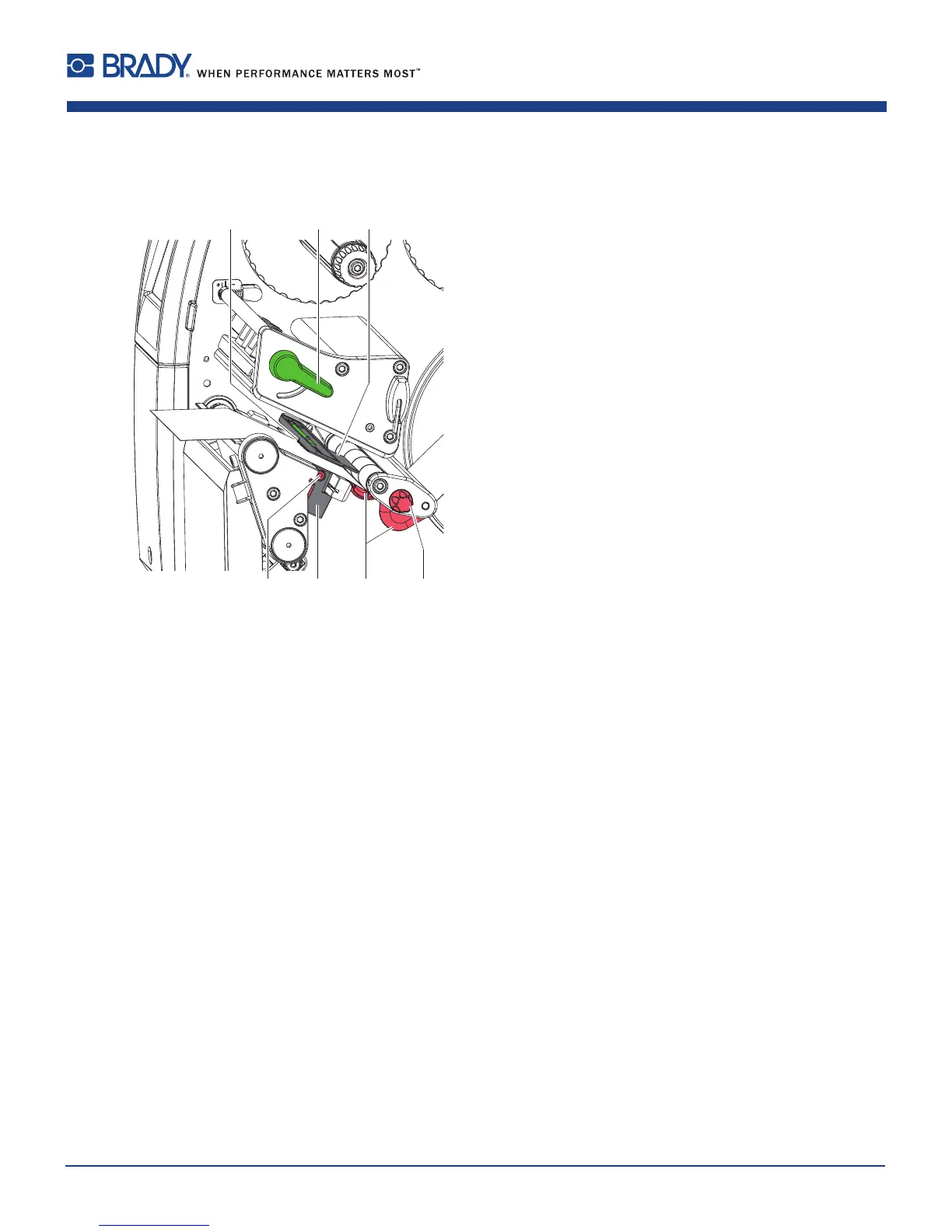
Figure12 Insertingthemediastripintotheprinthead
1. Turnlever(2)counterclockwisetolifttheprinthead.
2. Adjusttheguide(s)(6)withtheknob(7)insuchawaythatthemediacanpassbetweenthetwoguides.
3. Guidelabelstripovertheinternalrewindertotheprintunit.
4. Guidelabelstripthroughthelabelsensor(5)insuchawaythatitexitstheprintunitbetweentheprintheadand
theprintroller.
5. Moveguide(s)(6)againsttheedge(s)ofthematerialbyturningtheknob(7).
7.1.3 Setting the Label Sensor
Thelabelsensorcanbeshiftedperpendiculartothedirectionofpaperowforadaptationtothemedia.Thesensor
unit(1)ofthelabelsensorisvisiblefromthefrontthroughtheprintunitandismarkedwithanindentationinthelabel
sensorretainer.Whentheprinterisswitchedon,ayellowLEDilluminatesthesensorposition.
Loosenscrew(4).
Positionlabelsensorwithtab(5)insuchawaythatthesensor(1)candetectthelabelgaporareexorperfo-
ration mark.
-or,ifthelabelsdeviatefromarectangularshape,-
Alignlabelsensorusingthetab(5)withthefrontedgeofthelabelinthedirectionofpaperow.
Tightenscrew(4).
Foruseintear-offmodeonly:
Turnlever(2)clockwisetolocktheprinthead.
Thelabelrollisloadedforuseintear-off mode.
7 Loading Material















 To Next Page