21
User Manual
7.2 Loading Fanfold Media
6
1
2
3
4
5
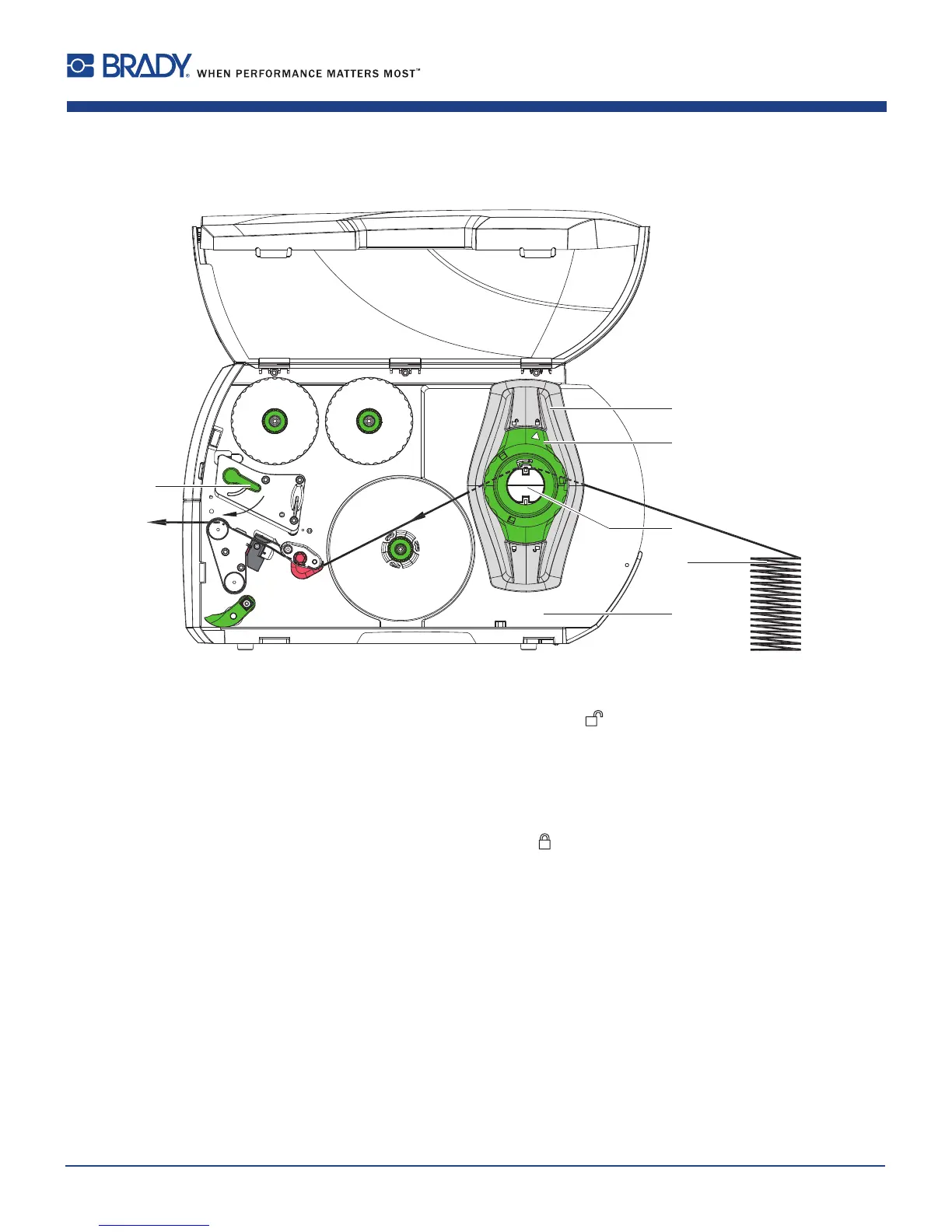
Figure16 Feedpathoffanfoldmedia
1. Turnring(2)counterclockwise,sothatthearrowpointstothesymbol
,andthusreleasethemarginstop(1).
2. Movethemarginstop(s)(1)insuchapositionthat themediacanpassbetweenthetwomarginstops.
3. Positionmediastack(4)behindtheprinter.Ensurethatlabelsonthestriparevisiblefromabove.
4. Guidethemediastripovertherollretainer(3)totheprintunit.
5. Movethemarginstop(1)againstthemediastripuntilchassis(5)andmarginstop(1)orbothmarginstopstouch
themediastripwithoutclampingorbendingit.
6. Turnring(2)clockwise,sothatthearrowpointstothesymbol
,andthusxthemarginstop(1)ontheroll
retainer(3).
7. Insertmediastripintoprinthead(7.1.2onpage17).
8. Setthelabelsensor(7.1.3onpage17).
9. Settheheadlockingsystem(7.3onpage22).
10. Turnlever(6)clockwisetolocktheprinthead.
7 Loading Material















 To Next Page