20
User Manual
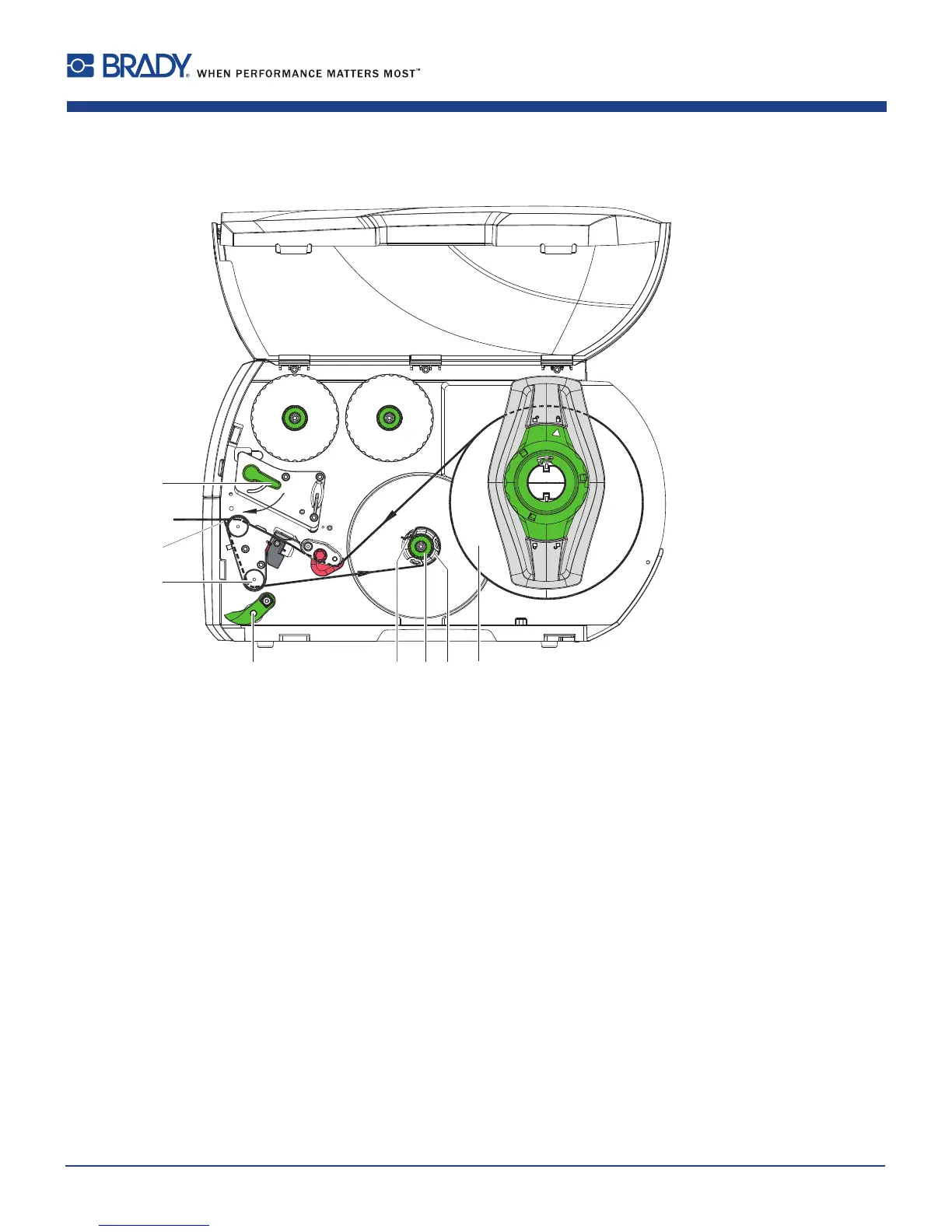
7.1.6 Winding up the Liner in Peel-Off mode
6 75
2
3
4
1
8
Figure15 Guidanceofthematerialinpeel-offmode
InPeel-Offmode,thelabelsareremovedafterprinting,andonlythelineriswoundupinternally.
NOTE: a PEEL conguration printer, or standard printer upgraded with PEEL is required.
1. Liftthepinchroller(5)offtherewindassistroller(3).
2. Removelabelsfromtherst100mmoftheliner.
3. Guidelinertotherewinder(8)aroundthedispenseplate(2)andtherewindassistroller(3).
4. Holdrewinder(8)rmlyandturnknob(7)clockwiseuntilitstops.
5. Pushlinerunderabracket(6)oftherewinder(8)andaligntheouteredgeofthestriptothemediaroll.
6. Turnknob(7)counterclockwiseuntilitstops.
Therewinderisfullyspread,thusgrippingthelinerrmly.
7. Turnrewinder(8)counterclockwisetotightentheliner.
8. Positionthepinchroller(5)centrallytotheliner.
9. Swingthepinchroller(5)againsttherewindassistroller(3).
10. Turnlever(1)clockwisetolocktheprinthead.
Thelabelrollisloadedforuseinpeel-offmode.
7 Loading Material















 To Next Page