22
User Manual
7 Loading Material
7.3
7.3 Setting the Head Locking System
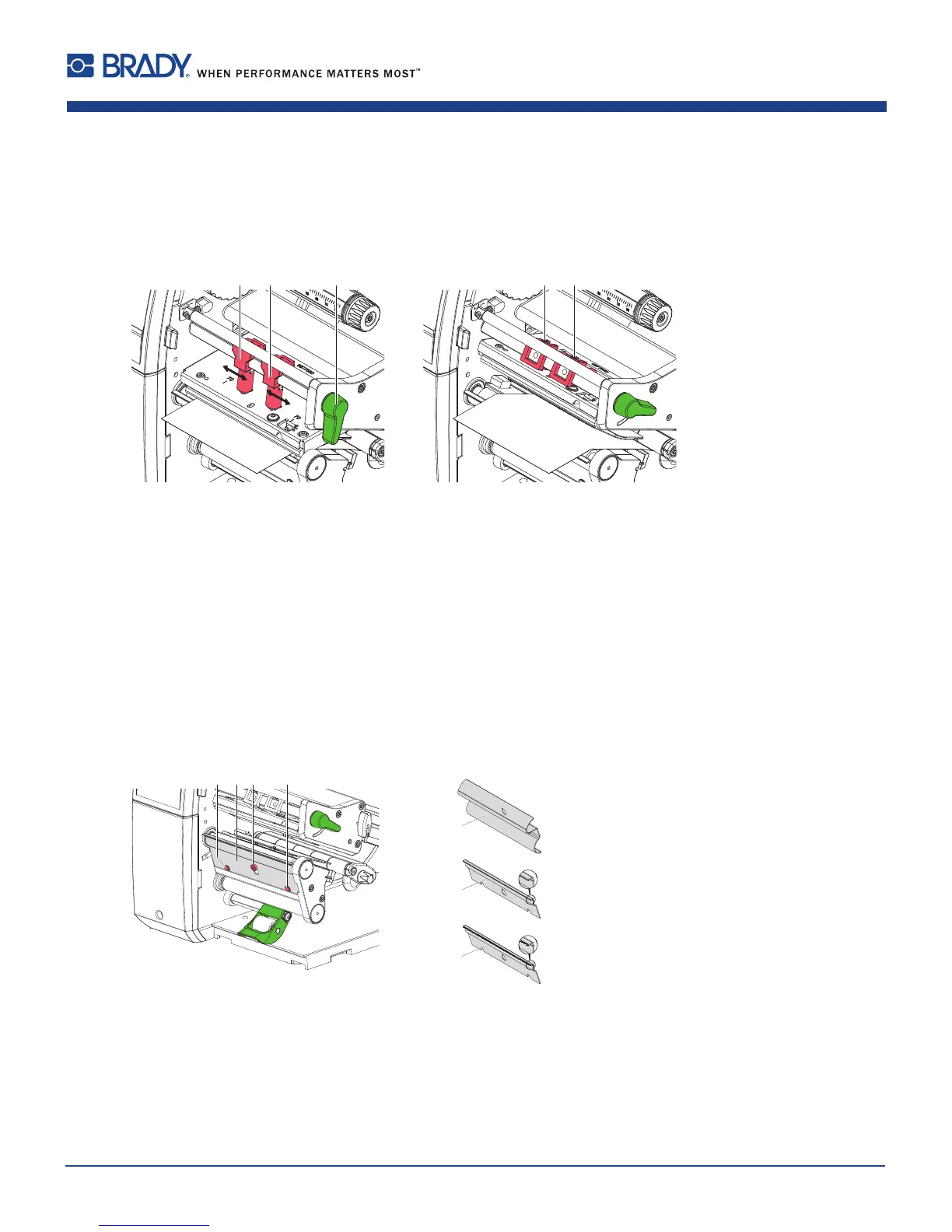
Theprintheadispushedonviatwoplungers(1).Inthebasicsettingtheplungersaresetinthemiddleoftheprinthead
retainer.Thissettingcanbeusedforthemostapplications.
Figure17 Settingtheheadlockingsystem
Iftheprintdensitydecreasesintheouterareaswhenusingverylargemedia,theplungerscanbedisplaced:
Loosenthreadedpins(3)attheplungers(1)withAllenkey.
Turnlever(2)clockwisetolocktheprinthead.
Displaceplungerstothescalevalue70.
Tightenthethreadedpins(3).
7.4 Removing and Installing the Rewind Guiding Plate, Dispense Plate or Tear-off Plate
Toconverttheprinterforuseinanotheroperatingmode,arewindguidingplate(2a),adispenseplate(2b)
oratear-offplate(2c)mayneedtobeinstalled.
2a
2b
2c
Figure18 Removingandinstallingtherewindguidingplate,dispenseplateortear-offplate
Removing a plate
Loosenscrew(3)severalturns.
Slideplate(2)upwardsandremoveit.
Installing a plate
Placeplate(2)ontothescrew(3)andslideit
downwardsbehindthepins(1).
Tightenscrew(3).















 To Next Page