16
User Manual
7 Loading Material
Note!
For adjustments and simple installation work, use the accompanying Allen key located in the top section of
the print unit. No other tools are required for the work described here.
7.1 Loading Media from Roll
7.1.1 Positioning the Media Roll on the Roll Retainer
4
3
8
9
6
1
2
5
10
7
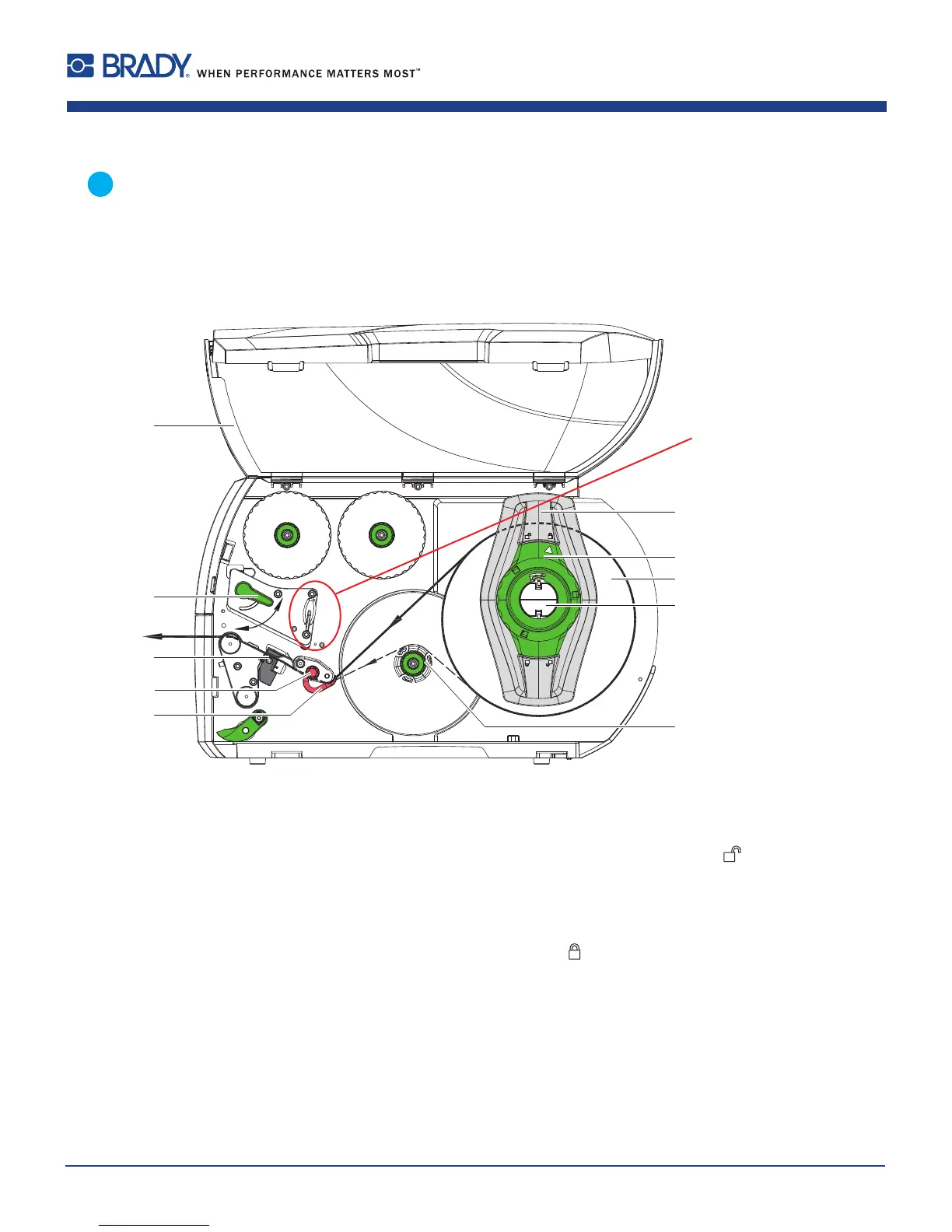
Figure11 Loadingmediafromroll
1. Opencover(10).
2. Turnring(2)atthemarginstop(1)counterclockwise,sothatthearrowpointstothesymbol
,andthusrelease
themarginstop.
3. Removethemarginstop(1)fromtherollretainer(4).
4. Loadlabelroll(3)ontherollretainerinsuchawaythatthelabelscanbeinsertedintotheprintheadintheright
position.Theprintingsideofthelabelsmustbevisiblefromabove.
5. Turnring(2)clockwise,sothatthearrow(10)pointstothesymbol
,andthusxthemarginstop(1)ontheroll
retainer(4).
6. Supplylongerlabelstrips:
ForPeel-OfforRewindmode:approx.60cm
ForTear-Offmode:approx.40cm
AllenKey
(pulltoremove)















 To Next Page