5.7 Top line
The top line will show the USERTAG or the serial number of
the connected instrument.
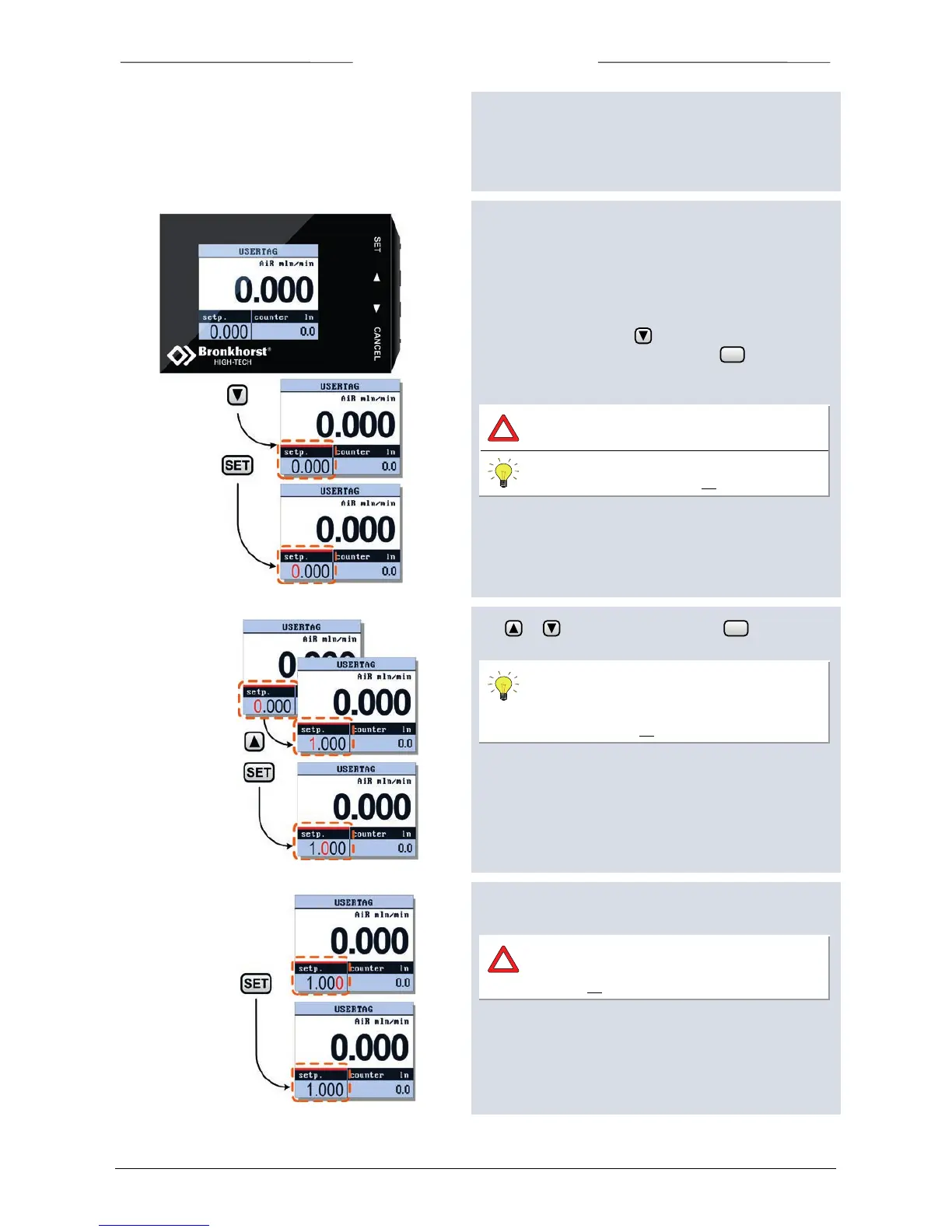
5.8 Edit Setpoint
Setpoint can only be edited when the setpoint parameter is
displayed in custom readout 1 or 2.
Security settings can be set to avoid unauthorised access to
the setpoint parameter.
To edit the setpoint press to select the readout area in
which this parameter is displayed. Press to enter the
edit mode, the first digit will lighten.
Security settings can be set to avoid
unauthorised access to the setpoint.
For changing security settings see chapter
“Security Settings” on page 33.
Use or to change the digits, press to confirm
and select the next digit.
You can change the setpoint edit mode into
‘step’. This enables you to change the setpoint
using fixed steps. See chapter Customize
display info page 30.
After the last digit is confirmed, the setpoint will be sent to
the instrument.
If the entered setpoint is ignored, check
controller mode. See chapter Controller mode
on page 19.



 To Next Page