EasyManua.ls Logo

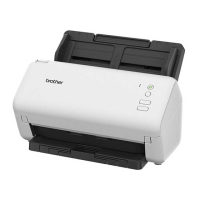
Brother ADS-1300 - User Manual

Brother ADS-1300
297 pages
Print Icon
To Next Page IconTo Next Page
Loading...
Online User's Guide
ADS-1300
ADS-1350W
ADS-1800W
© 2023 Brother Industries, Ltd. All rights reserved.

Table of Contents

Other manuals for Brother ADS-1300

Questions and Answers

  • M
    Michelle TorresSep 23, 2025
    What to do if my Brother Printer displays 'Both Document and Card set'?
    • T
      tracy80Sep 23, 2025
      If your Brother Printer displays 'Both Document and Card set', load either the ADF or the Card Slot, whichever one you want to scan from.
  • D
    Diane KirbyAug 25, 2025
    How to fix 'Card JAM' on Brother ADS-1300?
    • A
      Andrew LongAug 25, 2025
      To resolve the 'Card JAM' error on your Brother Printer, remove the plastic card. To prevent future jams: - Do not leave the card inserted in the machine. - Insert embossed cards with the embossed side up. - Insert the plastic card straight according to the guidelines.
  • D
    Derrick ChristensenAug 25, 2025
    What to do if my Brother ADS-1300 Printer says 'Insufficient USB Storage'?
    • R
      richard25Aug 26, 2025
      If your Brother Printer shows 'Insufficient USB Storage', press 'Close' and either delete unused files from the USB flash drive or use a USB flash drive with more free space.
  • B
    Bianca AlexanderAug 27, 2025
    What to do if my Brother ADS-1300 Printer displays 'Wrong Network Key'?
    • C
      christopher71Aug 27, 2025
      If your Brother Printer displays 'Wrong Network Key', confirm the Network Key and try again.
  • S
    suzanne17Aug 27, 2025
    What to do if my Brother ADS-1300 displays 'USB Host is write protected'?
    • S
      Stacey ThomasAug 27, 2025
      If your Brother Printer displays 'USB Host is write protected', remove the write-protected USB flash drive, press 'Close', and then either turn off the USB flash drive’s write-protection or use a USB flash drive that is not write-protected.
  • E
    Edward OrtegaSep 13, 2025
    What to do if my Brother ADS-1300 Printer displays 'Replace Separation Pad'?
    • I
      icainSep 14, 2025
      If your Brother Printer displays 'Replace Separation Pad', replace the Separation Pad with a new one.
  • K
    Kevin BrownSep 12, 2025
    What to do if my Brother ADS-1300 Printer displays 'Setting Lock'?
    • S
      sheatonyaSep 12, 2025
      If your Brother Printer displays 'Setting Lock', disable the Setting Lock.
  • K
    Kelly KruegerSep 12, 2025
    What to do if my Brother ADS-1300 displays 'No Certificate'?
    • M
      Molly PhillipsSep 12, 2025
      If your Brother Printer displays 'No Certificate', start Web Based Management. In the left navigation bar, click Administrator > Signed PDF, and then configure the settings.
  • A
    Adam CookSep 4, 2025
    What to do if my Brother ADS-1300 Printer displays 'No Access Point'?
    • J
      john51Sep 4, 2025
      If your Brother Printer displays 'No Access Point', check that you did not press the WPS button on two or more wireless access point/routers. Restart the machine and the wireless access point/router.
  • R
    Roger KleinSep 2, 2025
    What to do if my Brother Printer displays 'No Document / Card'?
    • E
      Erik PollardSep 2, 2025
      If your Brother Printer displays 'No Document / Card', load a document or card.

Brother ADS-1300 Specifications

General IconGeneral
BrandBrother
ModelADS-1300
CategoryPrinter
LanguageEnglish

Related product manuals