and start-up
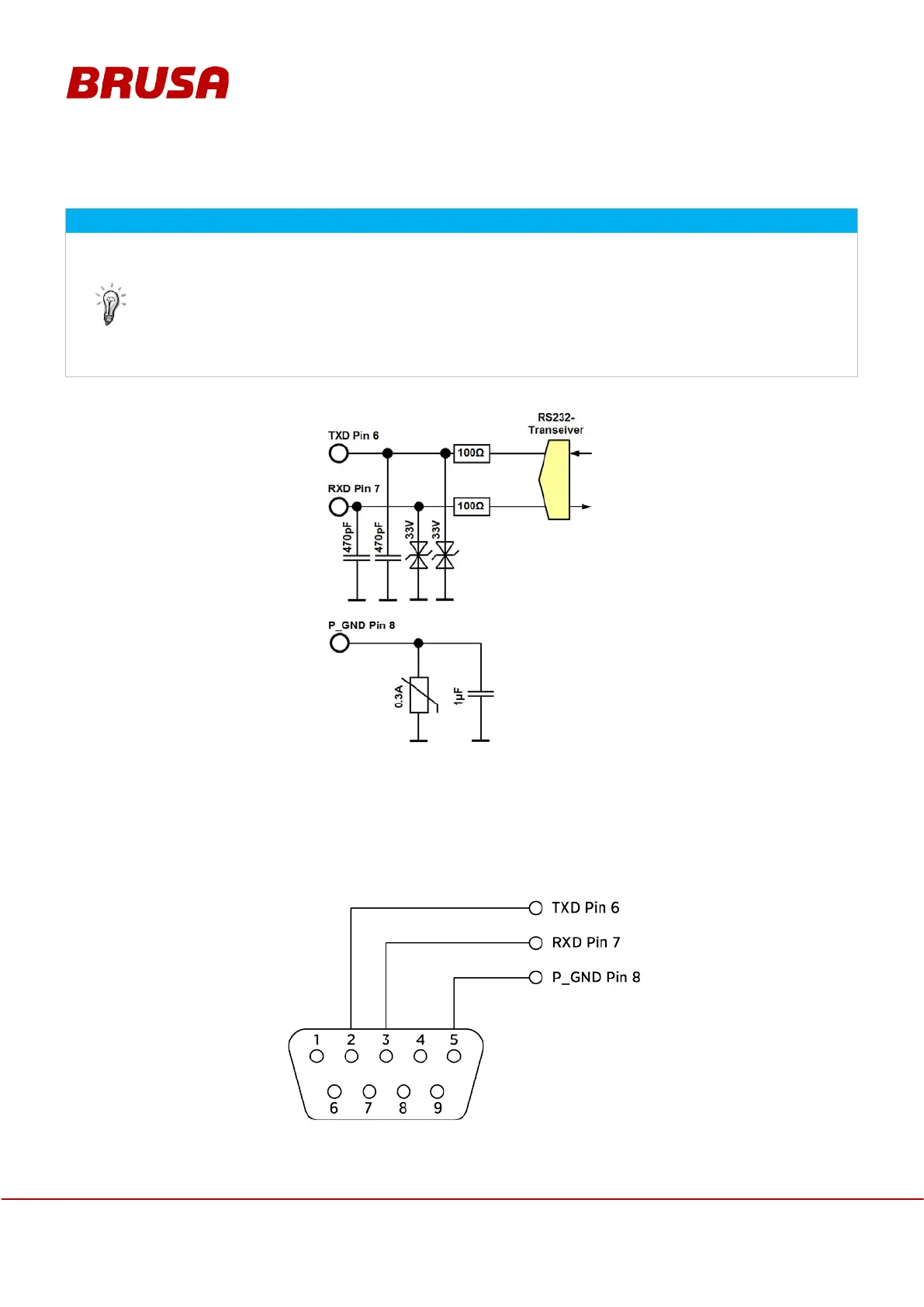
7.1.3 Pin 6 TXD, pin 7 RXD, pin 8 P_GND
This RS232 interface is exclusively designed for firmware updates, monitoring or adjustments of
CAN parameters.
The RS232 interface enables a direct serial connection between the device and a PC. For test
benches or prototype vehicles in particular, this connection is highly recommended to be able to
execute a firmware update if required!
Should you have any questions regarding this subject, please refer to the BRUSA support at the
manufacturer's address provided in chapter 4.5.
For wiring of the RS232 ground, an additional grounding connection P_GND is provided. It is connected with
the GND supply ground via one PTC fuse.
The
microprocessor firmware can be downloaded via this interface (provided by BRUSA). Pin 13 PRO must
be high for this.
Pin assignment of the 9 pole D-Sub cable bushing


 To Next Page