and start-up
10 Parameterization and operation
10.1 Parameterization by means of PARAM tool
For further information on the PARAM tool, refer to PARAM_Manual_Installation_Usage.pdf
For customer support with regard to the PARAM tool, a support package has to be ordered at
BRUSA Elektronik AG.
Support in connection with the PARAM tool is only to be requested after purchasing this support
package. (
chapter 4.5 Manufacturer contact information).
10.1.1 PARAM application
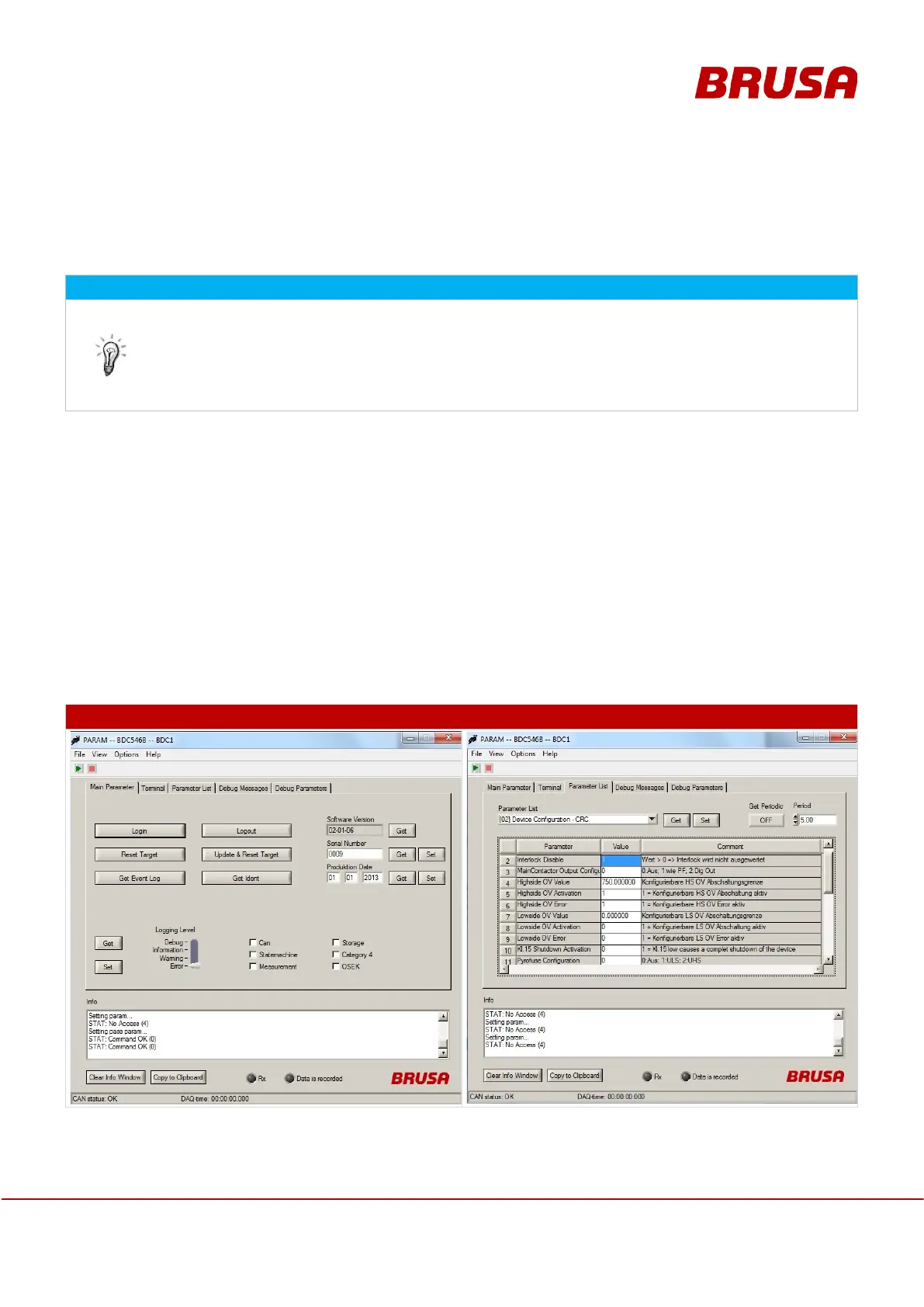
The PARAM software provided by BRUSA is used for parameterization and configuration of BRUSA devices.
PARAM provides access to the various parameters and functions of the BDC546 via CAN interface. This provides
the possibility of individually adjusting parameters (e.g. activation of interlock signal evaluation or overvoltage shut-
down functions at a specific voltage).
Parameters and functions or their addresses may deviate for various software versions. For this reason, it is crucial
to always use the latest firmware XML file!
With the password monitor, the customer can log into PARAM or the BDC546.
Changes can be applied to the non-volatile memory of the BDC546 by pressing Update & Reset Target.


 To Next Page