and start-up
10.4.2 CVI operation
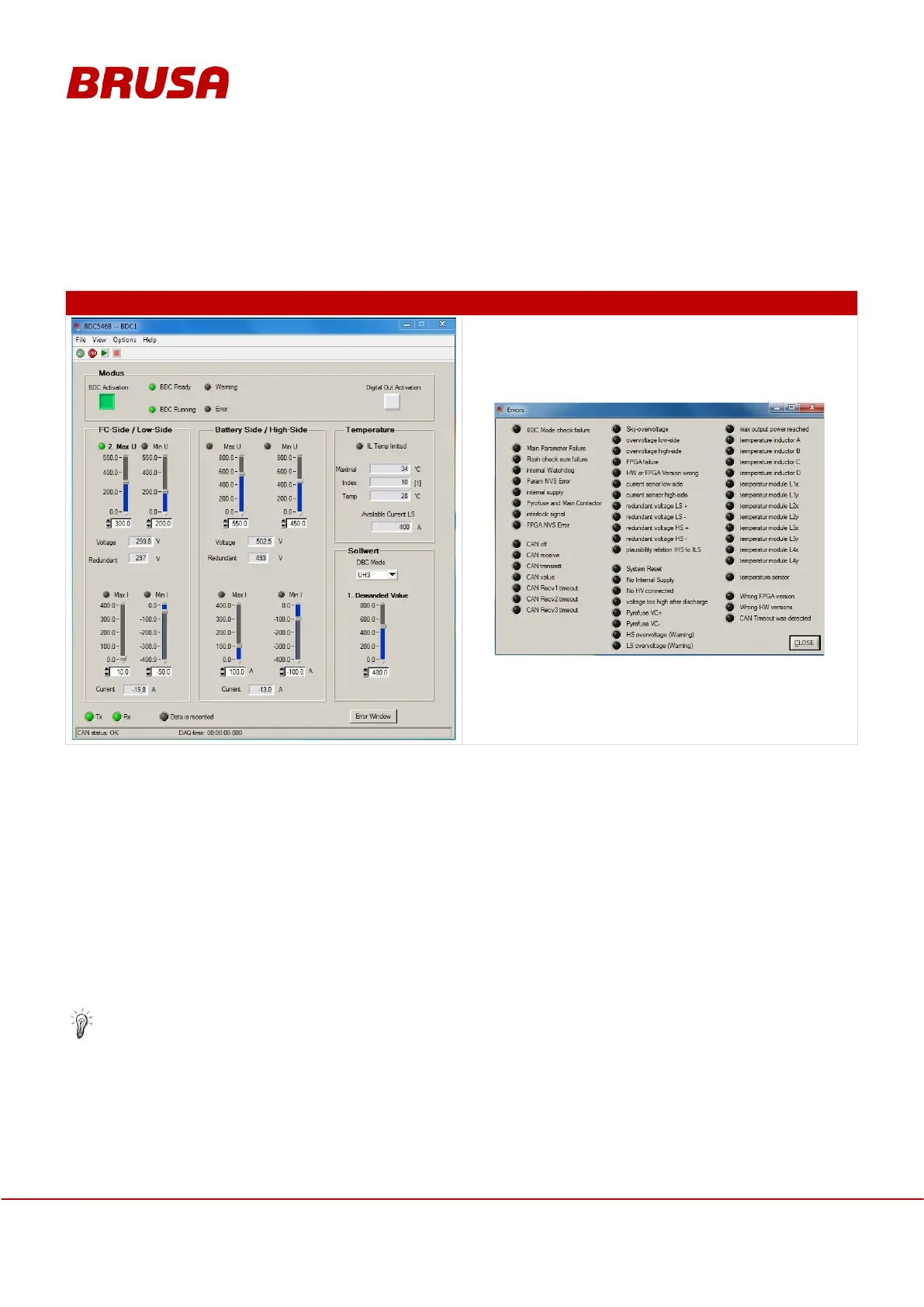
As illustrated below, the CVI software can be used to comfortably specify voltage values, voltage limits and current
limits for the DC/DC converter. Voltages and temperatures measured by the BDC546 as well as error and warning
messages are transmitted to the CVI and displayed.
Please observe that the highside / lowside of the BDC546 has to be pre-charged by means of a pre-
charging resistor as described in chapter 9.4 Voltage pre-charging.
Connect pin 16 EN with pin 2 AUX (e.g. actuate ignition key, close switch etc.).
Start the CAN user interface and press the Go button in order to enable communication with the device.
Press the Run button in order to activate the power stage. Communication with the device is ensured
when the displays Tx and Rx are flashing.
To enable the main controller to fulfil its function, it is to be guaranteed that no limiting controller is
meshed.
The device can be switched off in every operating mode by pressing the BDC Activation button again and
deactivation of pin 16 EN. In case of an emergency, the high voltage can immediately be disconnected by
opening the contactors.


 To Next Page