Commissioning
6
ekr CON 600, ekr CON 600 net – Master-Slave Guiding with Sensor Positioner 23/47
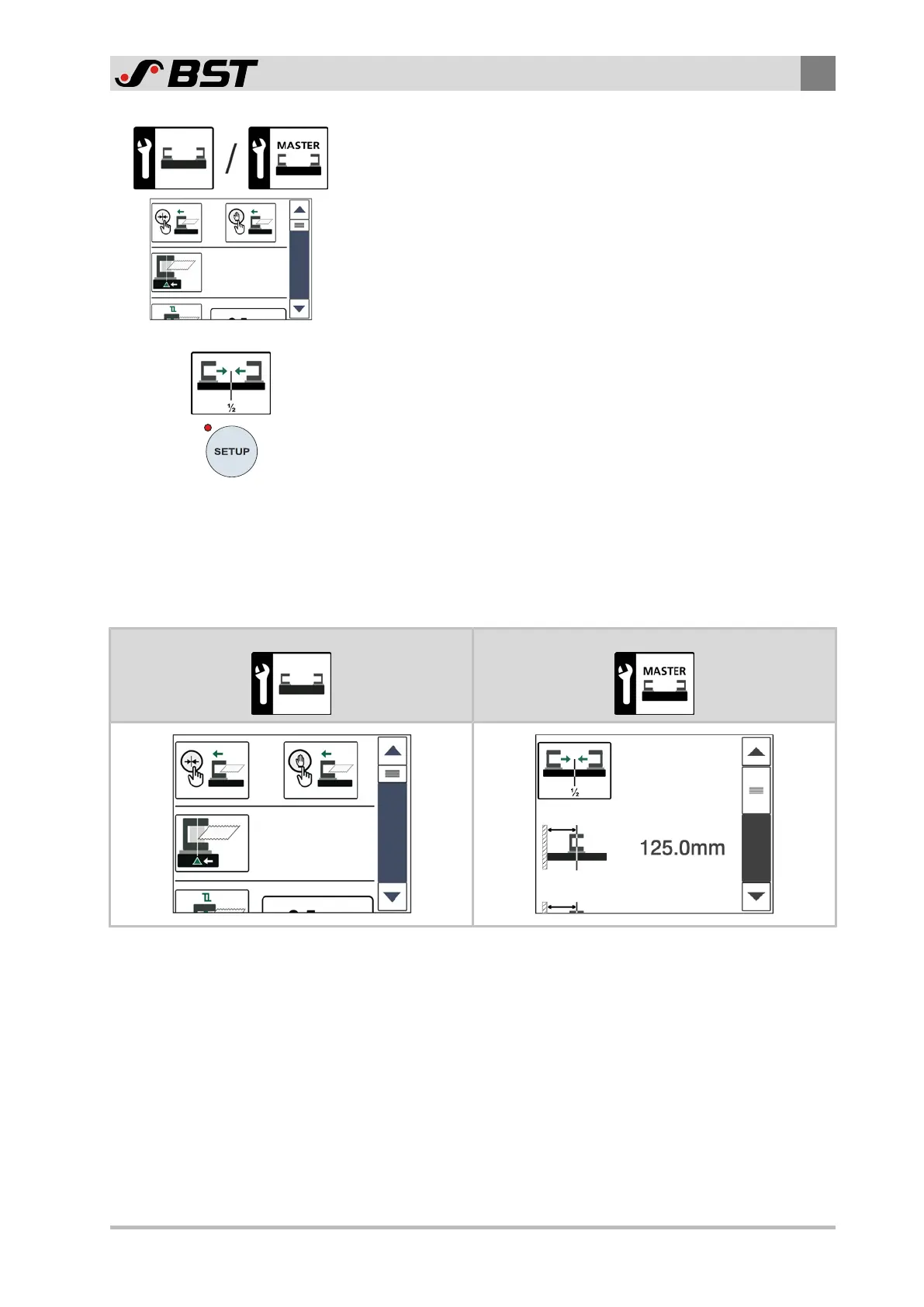
4. Call up the setting menu for the sensor positioner at the MASTER
or SLAVE web by pressing the corresponding button.
The setting menu for the selected sensor positioner is displayed.
The setting menu includes a list of different functions that goes
beyond the height of the display.
An overview of the available setting functions can be found in
chapter Overview Setting Menu, page 23.
5. Using the scroll bar on the right side of the menu, navigate to
the desired setting function in the menu.
6. Switch the desired setting function on or off by tapping on the
respective button, or enter the parameter values in the input
fields.
7. Press the SETUP key.
The settings made are saved.
The setup menu is displayed.
6.5.2 Overview Setting Menu
The following table shows the two setting menus for the sensor
positioners at the SLAVE and at the MASTER web. Please note that
the setting menu for the sensor positioner at the SLAVE web has
more setting functions.
SLAVE Setting Menu MASTER Setting Menu
The meaning of the different buttons in the two setting menus
can be found in the following table.



 To Next Page
 Loading...