Speed Programming
SMART MATRIX MTC 2 - 40
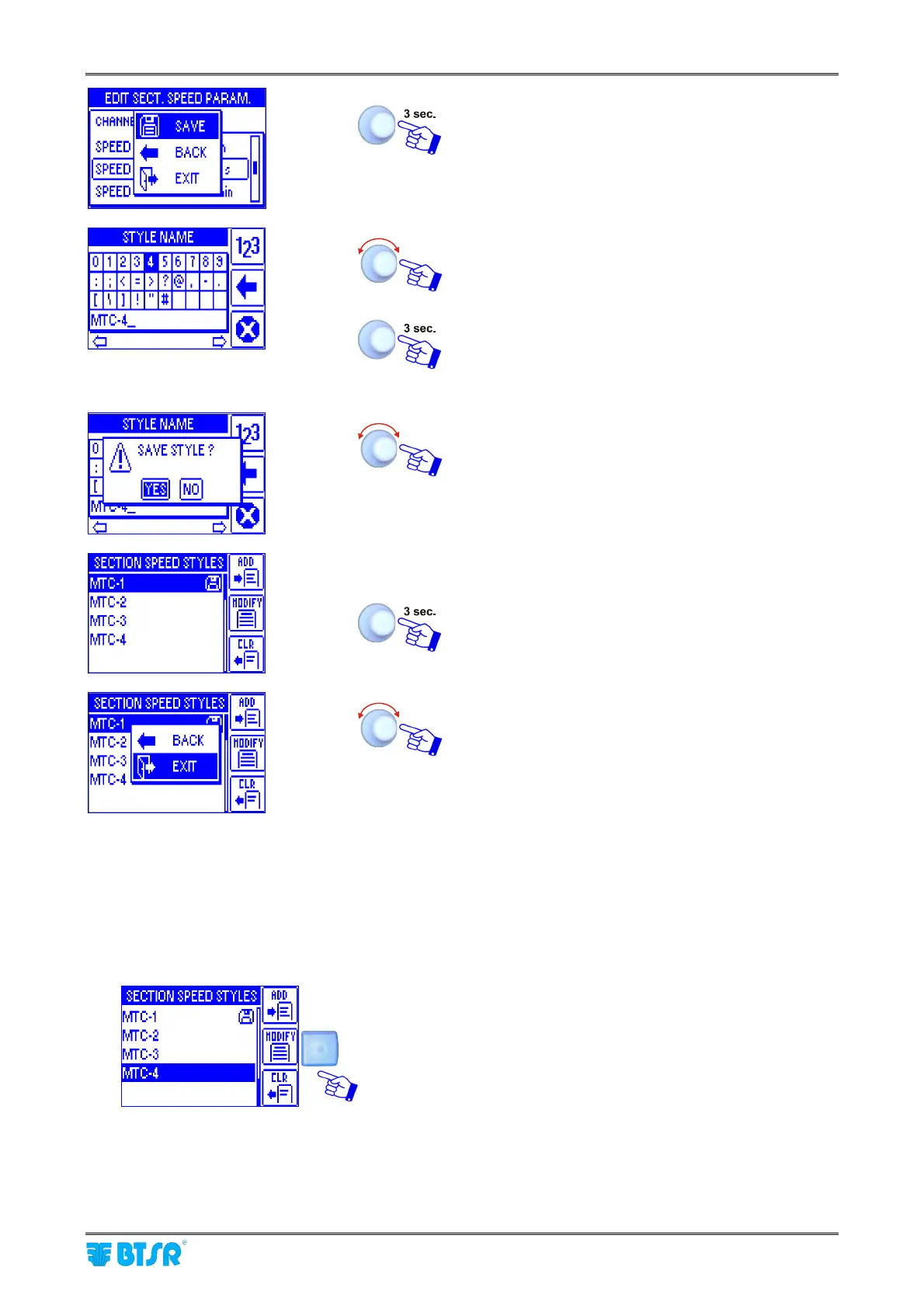
SAVE to save the set parameters and move to the
STYLE NAME setting screen.
Set the speed name (e.g.. MTC-4) operating as
described on paragraph - Navigation throughout the
Display Windows.
Once you have setup the speed name. If the set
name was already used for another style, the
warning “DOUBLE STYLE NAME!” appears
YES to save the speed (MTC-4) to the database.
List of the speeds in the database (included MTC-4).
To exit the function SPEED EDIT.
EXIT to go back to main menu.
Speed Modify
The Style Modify function is basically identical to the Programming a New Speed function.
The main differences are the following:
1) once you have activated the SPEED EDIT window from Main menu, choose from the database the
speed you want to modify (es. MTC-4) and press MODIFY
Program all the steps described on Programming a New Speed
sequence, to bring all the desired changes with respect to the
reference speed MTC-4.
2) the bottom line of STYLE NAME screen that contains the style name setting keyboard shows the name
of the selected style, to be modified (MTC-4).












 To Next Page