Speed Programming
SMART MATRIX MTC 2 - 39
Speed Programming (option)
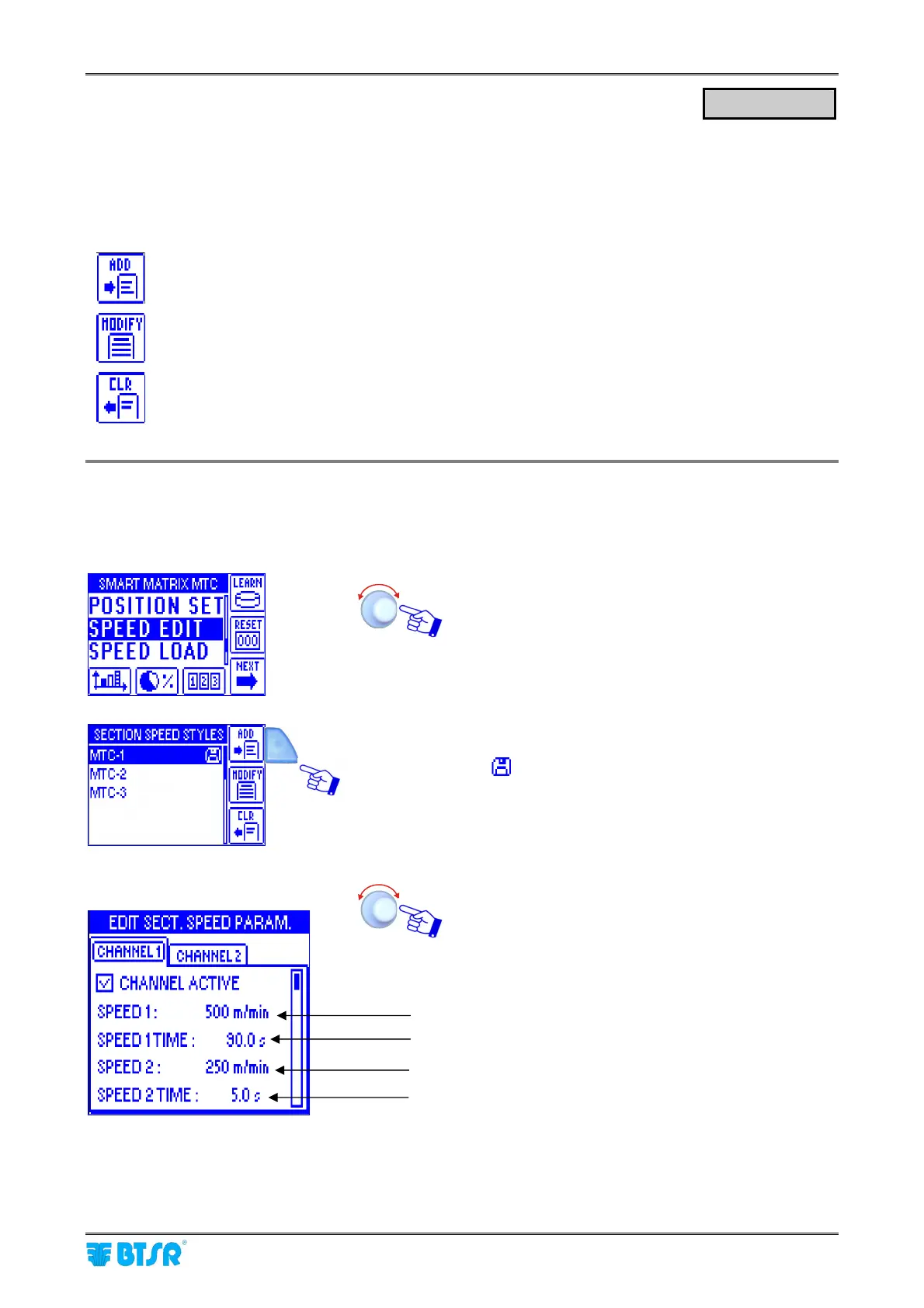
This function allows you to set the 2 square wave forms on the DACs.. For each selected channel, the
SPEED 1, the SPEED 2, the SPEED 1 TIME and the SPEED 2 TIME values have to be set .
A different speed on the cylinder allows an uniform distribution of the yarn.
The STYLE EDIT function provides 3 options selectable using the immediate activation buttons.
To create a “new” speed and add it to the speed database.
To either change the parameters of an existing speed, or to create a new speed starting from
a similar already existing speed.
To remove a speed from the database.
Programming a New Speed
This example shows how to create a new speed (MTC-4)
Select SPEED EDIT.
Press ADD
(the
symbol indicates that MTC-1 is the speed
currently loaded on the devices)
The selectable parameters on CHANNEL 1 and
CHANNEL 2 windows are the same. Select
CHANNEL ACTIVE on the channel you want to
activate.
SPEED EDIT
Speed 1 (range 1-500 m/min)
Speed 1 time (range 0,0-100 s)
Speed 2 (range 1-500 m/min)
Speed 2 time (range 0,0-100 s)












 To Next Page