PC ↔ SMART MATRIX ↔ SM-DIN Connection
SMART MATRIX MTC 1 - 1
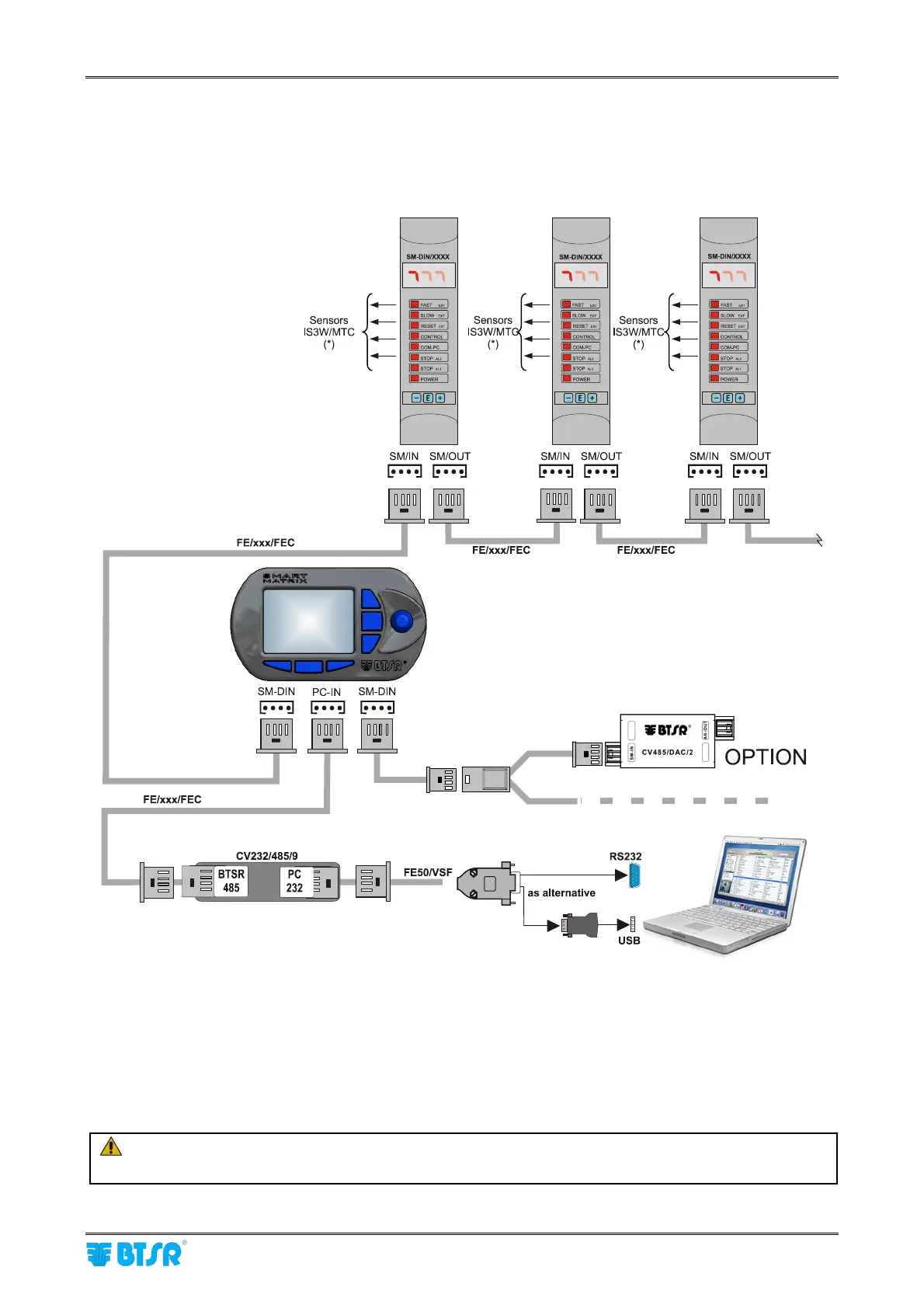
PC ↔ SMART MATRIX ↔ SM-DIN Connection
The following diagram shows the interconnections among: SMART MATRIX Terminal, SM-DIN Sensor
Interface Boards and PC.
The PC is mainly used for firmware update operations on SMART MATRIX Terminal.
(*) To connect the sensors, please refer to the following paragraphs:
SMART MATRIX
↔
SM-DIN
↔
IS3W/MTC Connection and Sensor Interface
Prior to operate the SMART MATRIX terminal, make sure you have programmed the communication
speed on all the SM-DIN/MTC Boards as well as on CV232/485/9 module.
For more details, please refer to paragraph SMART MATRIX
↔
SM-DIN/PC Interface on Section 1
and to paragraph ID and Transmission Speed Configuration on Each SM-DIN Board on Section 3.
On all electrical systems, you are kindly recommended to connect the ground cable (GND)
to the support on which the devices are installed.












 To Next Page