Style Programming (TS5/TS7)
SMART MATRIX QUILT 2 - 28
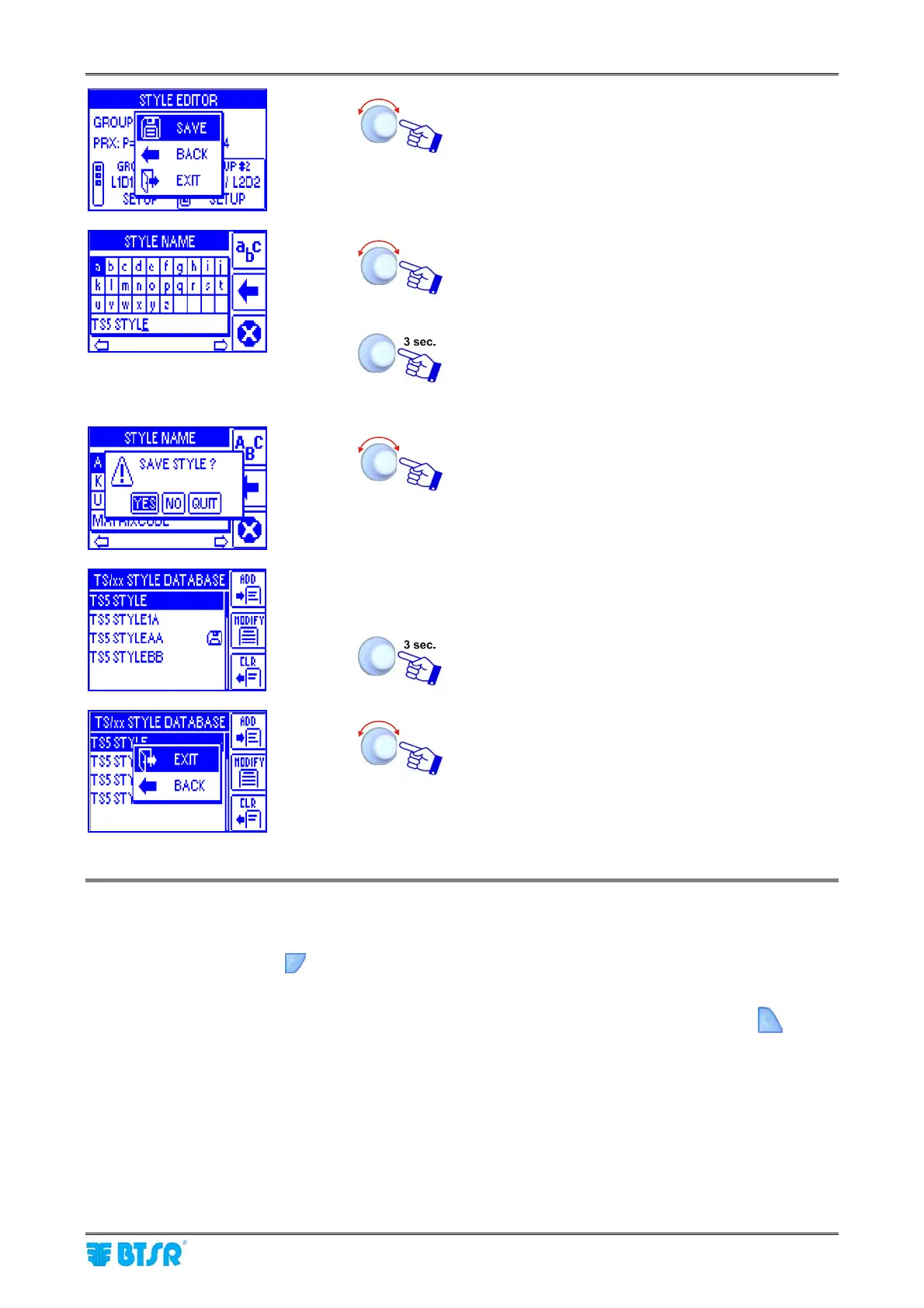
SAVE to save the set parameters and move to the
STYLE NAME setting screen.
Set the Style Name (e.g. TS5 STYLEBB), to replace
the TS5 STYLE default name (*), operating as
described on paragraph - Navigation throughout the
Display Windows.
Once you have setup the Style Name.
(*) Maximum style name = 15 characters
YES to save the style (TS5 STYLEBB) to the
database.
List of styles contained in the database (including the
TS5 STYLEBB style).
To leave the function: Programming a New
Style.
EXIT to return to previous menu
General Notes to speed-up the parameter programming
1) The parameters set on one of the two windows (either FAST or SLOW) can be copied to the other window
pressing the shortcut button when the built-in lamp is lit.
A confirmation message: “Copy from XXXX?” will appear.
2) The parameters setup for a group can be copied to another group pressing the shortcut button g when
the built-in lamp is lit.
A confirmation message: “Copy ALL from group N?” will appear.












 To Next Page