7 | Operating the interface pro BÜCHI Labortechnik AG
48/88 Operation Manual FatExtractor E-500
7 Operating the interface pro
CAUTION
Risk of injury from glass splinters
Sharp objects can damage the display.
u Keep sharp objects away from the display.
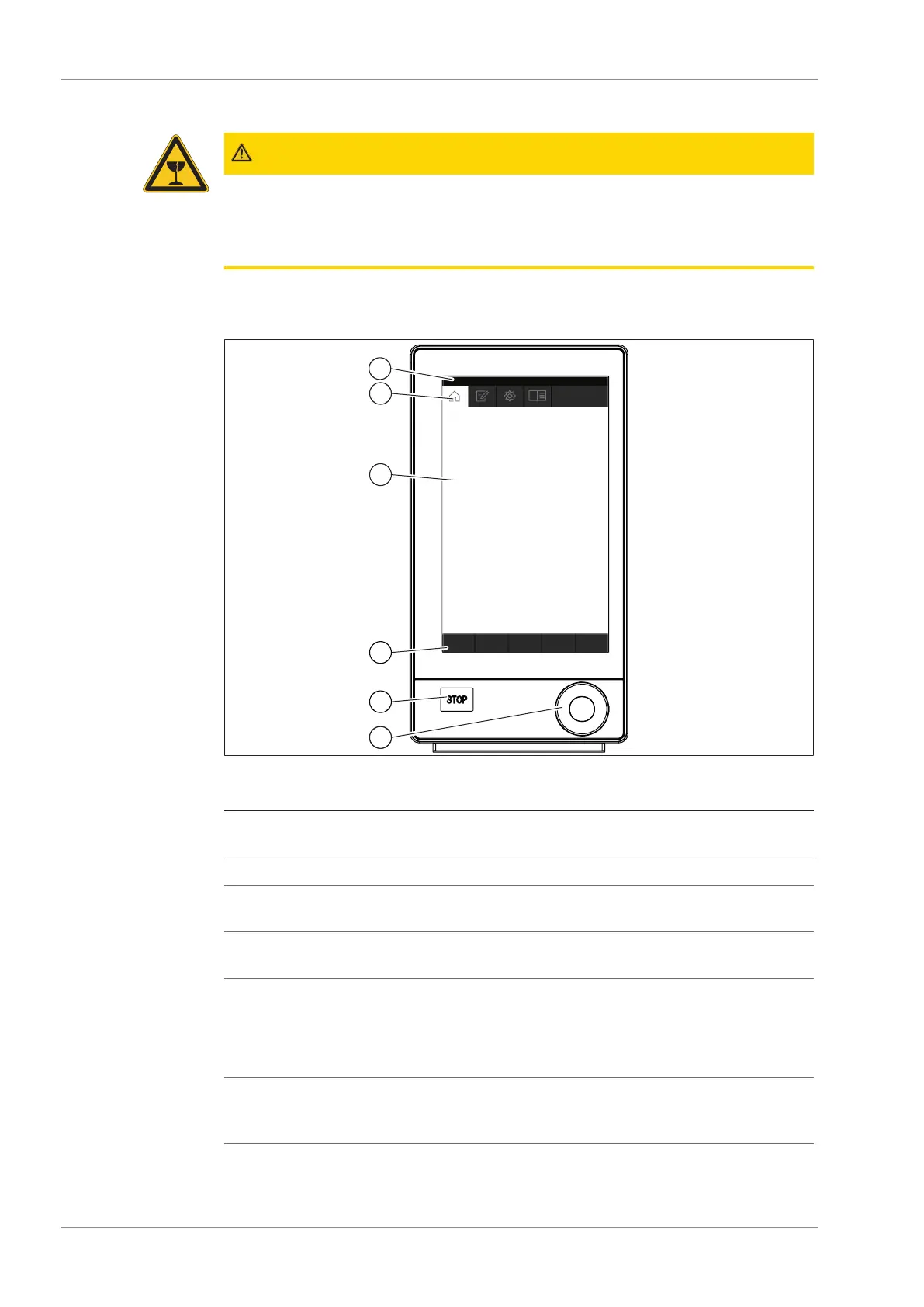
7.1 Layout of the interface
Fig.14: Interface Pro
No. Description Function
1 Status bar Shows the currently used solvent and extrac-
tion method.
2 Menu bar Shows symbols representing the menus.
3 Content area Shows current settings, submenus or actions
depending on the current operation.
4 Function bar Shows functions that can be performed ac-
cording to the current operation.
5 Stop button The extraction stops.
The valves close.
The heaters switch off.
The coolant keeps running 15 min.
6 Navigation control Used for navigating the user interface. Press-
ing the control performs the assigned func-
tion on the function bar.











 To Next Page