86
STATUS CHANNEL SOURCE
On the Status Channels tab, click the […] icon under the Source heading to configure the source for this channel.
There are six options:
Selected by default. Indicates that a status
channel is not in use.
Not supported in Version 5
This option allows you to map a Plus-X
channel. This is the most common selection.
Allows you to calculate a value for this
channel. Use the onscreen text for syntax
help.
This option allows a macro to set this
channel’s state. To assign the state, use the
Set command in a macro (Click or turn to
MACRO EXPRESSIONS) or in Jet™
Active Flowcharts in AutoPilot®.
This option instructs the ARC Plus to populate
the status channel based on data retrieved
from an SNMP-enabled device.
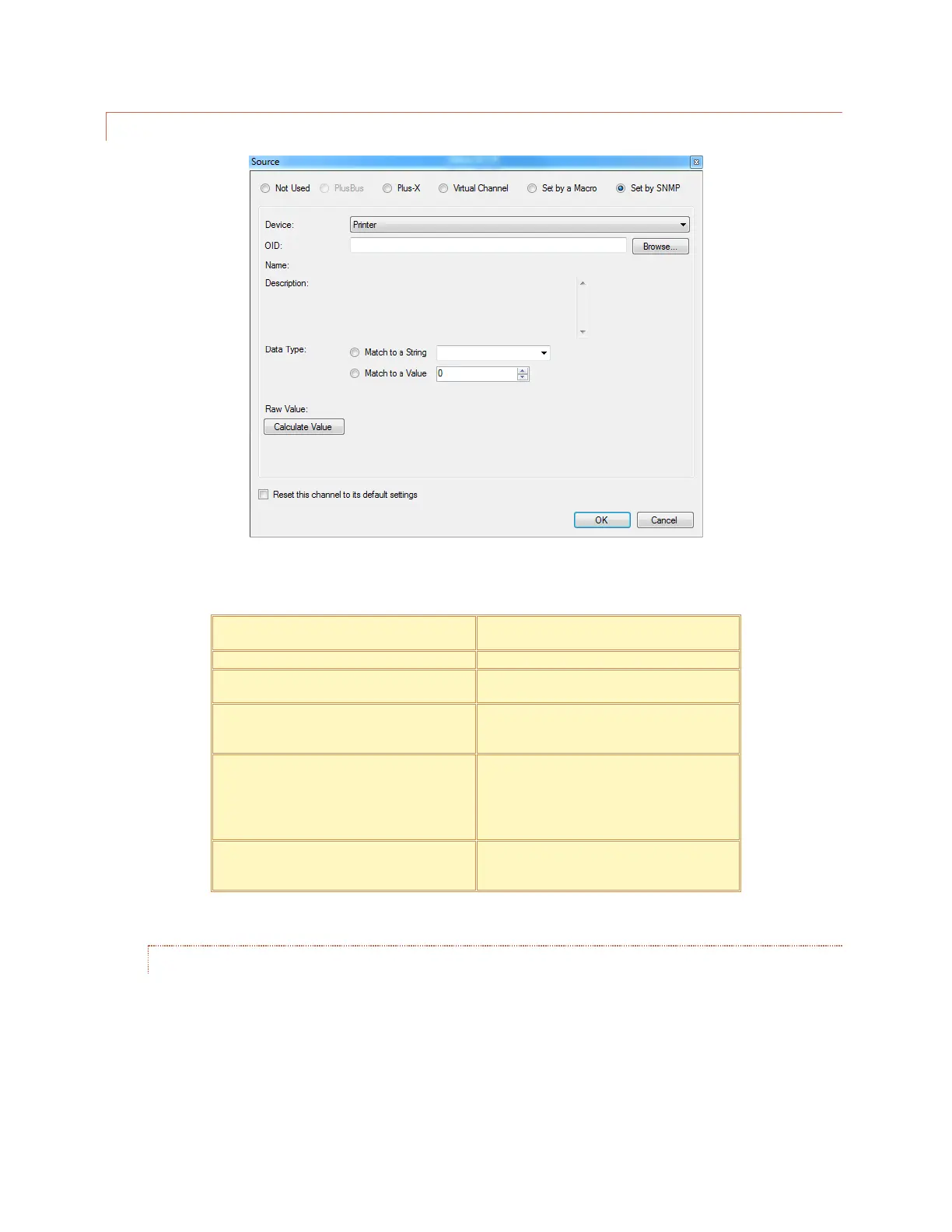
USING AN SNMP PARAMETER AS A STATUS CHANNEL SOURCE
“Set by SNMP” has been selected in the Source dialog shown above. Clicking the Browse button invokes the
AutoLoad Plus SNMP MIB BROWSER to identify the desired source parameter for the selected channel.
Status channels will be set to either the “ON” state or the “OFF” state based on the input data. If the
retrieved SNMP value is in the form of an ASCII string, then Match to a String should be selected. The string
corresponding to the ON condition for this parameter should be entered in the corresponding text box.
During operation, if the polled value of the parameter matches the entered string, the status channel will be



 To Next Page