49
49
EN
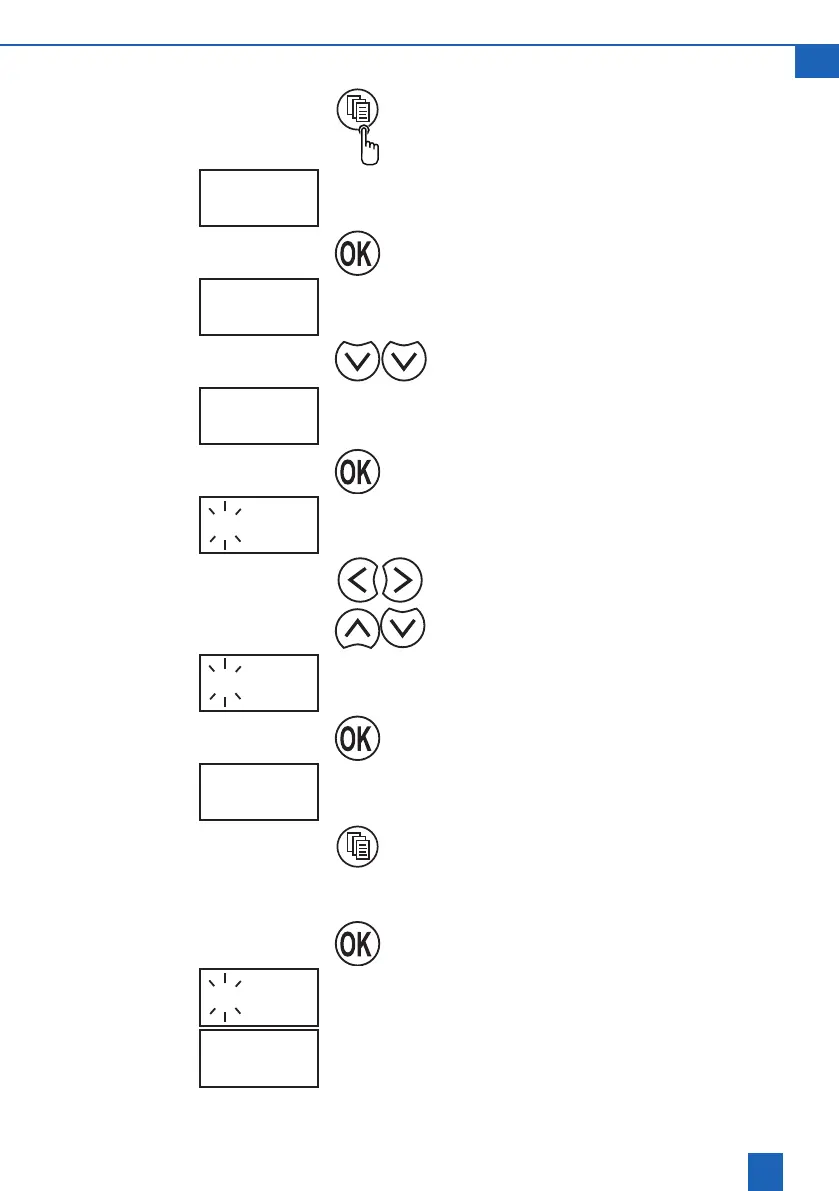
8.3 Modifying the regeneration time
Use the Change mode button to switch to
programming mode.
SEt
The display shows SEt
Conrmprogrammingmode.
5 07:43
Switch to the regeneration time setting.
r 09:15
The regeneration time that is currently set is
highlighted by the “r” before it.
Conrmthesettingfortheregenerationtime.
r 09:15
The view of the current setting ashes on the
display.
Move the cursor to the digits to be changed.
Set the new regeneration time.
r 02:00
Conrmthenewregenerationtime.
r 02:00
Close programming mode.
8.4 Starting manual regeneration
Hold down the OK button for approx. 4 sec. until
regeneration begins.
26:45
The screen alternately shows the remaining
regeneration time in minutes (with flashing
symbol)andrEG On.
rEG On



 To Next Page