66
NICE - MIRIAM - CRISTAL - LEONORA - PRETTY - DIANA - KRISS - MARY
EN
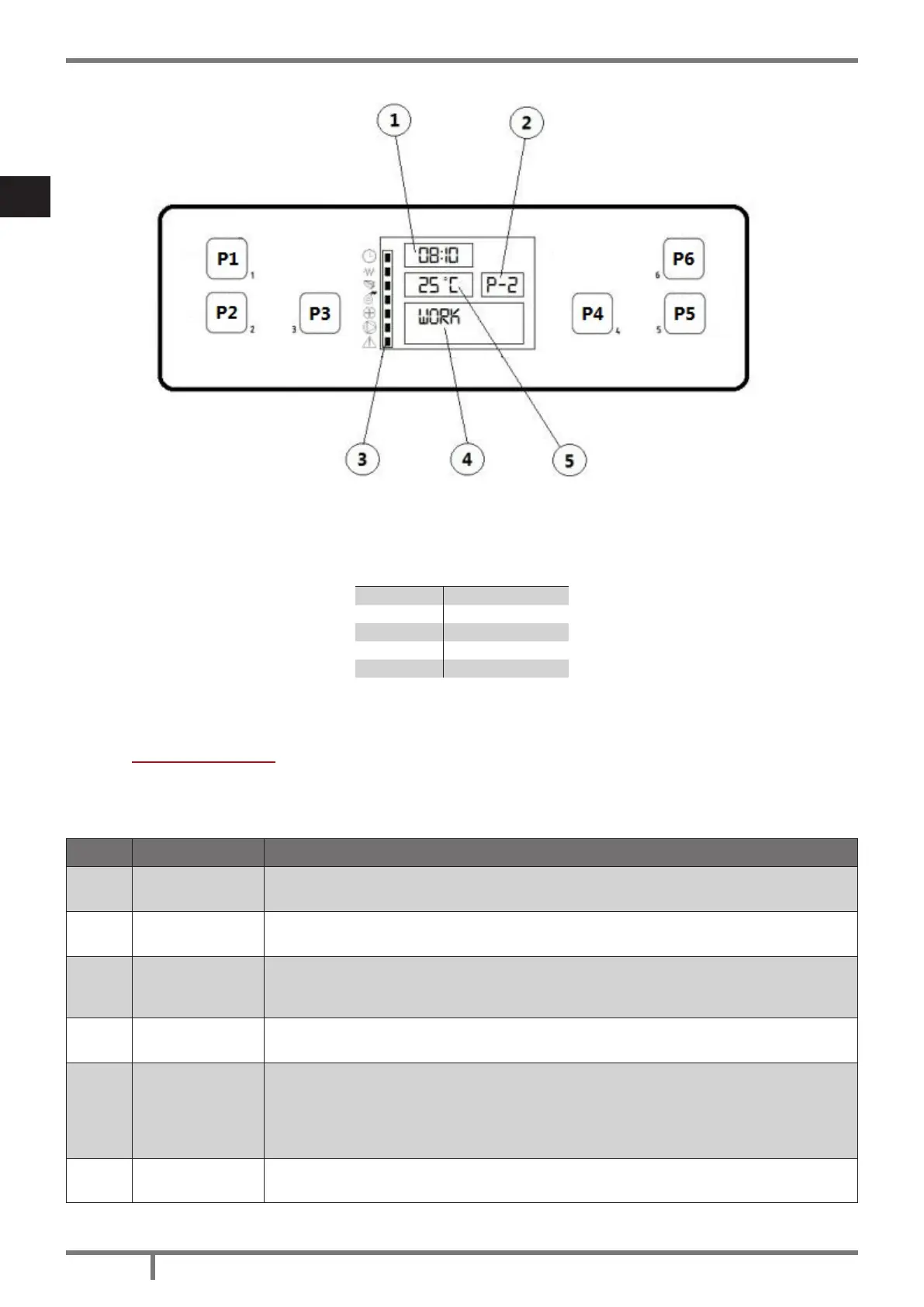
Fig. 21 - LCD control display
LEGEND Fig. 21 page 66
1 Time
2 Power
3 State
4 Message
5 Temperature
10.4 USER MENU
By once pressing P3 key you can hace access to user parameter controlling. To let them slide press P5 and
P6 keys. They are:
POS. REFERENCE DESCRIPTION
1
FAN ADJUST
(supplementary)
Module not included in this type of stove.
2 SET CLOCK
Set date and time. The board is provided with a lithium battery which enables a clock
autonomy of 3/5 years. See CLOCK SETTING page 69.
3 SET CHRONO
Press once P3: “CHRONO ENABLE” appears. Press P3 again and with P1 and P2
put in “OFF” or “ON”. For daily, week-end or weekly programming, see DAILY
PROGRAMMING page 69. CAUTION: do not active if STAND-BY function is active!
4
SELECT
LANGUAGE
Press once P3 key and with P1 and P2 keys select the desired language.
5 STAND-BY MODE
It activates a function which, if the set ambient temperature has been exceeded for
more then 10 minutes, start the switching off phase up. If the ambient temperature
has fall at more than 2°C, the stove will restart automatically up, starting from START
UP page 67. Press once P3 key and with P1 and P2 keys put in “OFF” or “ON”.
CAUTION: do not activate if CHRONO function is active!
6
BUZZER MODE
(audio alarm)
Press once P3 key and with P1 and P2 keys put in “OFF” or “ON”.


 To Next Page
 Loading...