39
Hydronic Heating
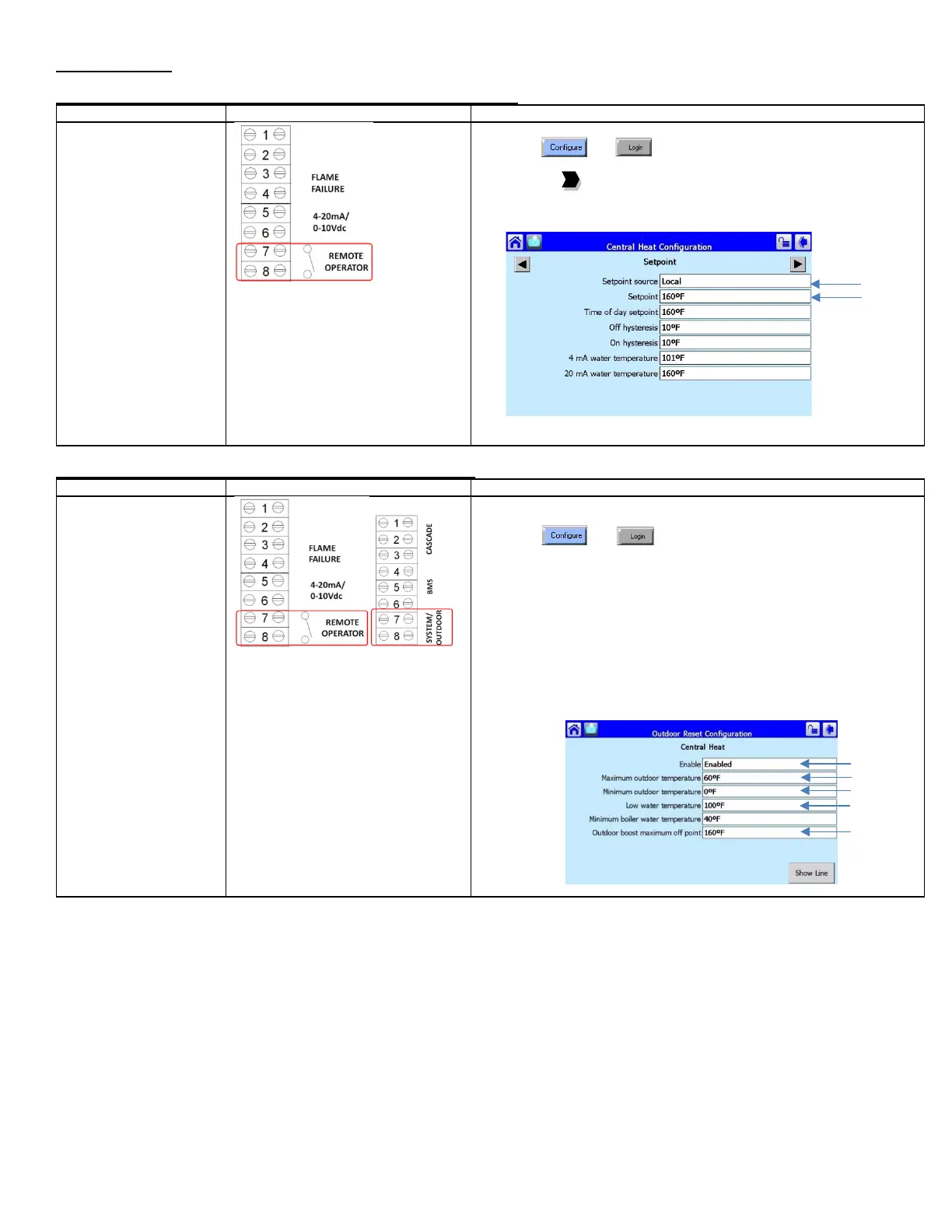
Modulation: Boiler Inlet, Boiler Fixed Setpoint Operation (Standalone)
fixed CH setpoint
• Modulates on boiler
inlet sensor (default)
• Heat demand is
generated when inlet
temperature drops
below setpoint minus
on hysteresis
• If set to local enable
constant pumping is
required
• For remote enable
intermittent pumping is
allowed.
1) Place toggle switch to LOCAL
2) Press and
3) Press [CH – Central Heat Configuration]
4) Press the to arrive at Setpoint
5) Select Setpoint source: Local
6) Enter desired Setpoint
7) Place toggle switch to REMOTE for remote enable operation (if required)
Modulation: Boiler Inlet, Outdoor Reset Operation (Standalone)
variable setpoint
determined by outdoor
reset curve
• Modulates on inlet
sensor (default)
• Heat demand is
generated when inlet
temperature drops
below setpoint minus
on hysteresis
1) Connect outdoor sensor to System/Outdoor contacts
2) Place toggle switch to LOCAL
3) Press and
4) Press Outdoor Reset Configuration
5) Select Enable: Enable
6) Select Maximum outdoor temperature (WWSD)
7) Select Minimum outdoor temperature (Outdoor Design)
8) Select Low Water Temperature (Min. Water Temp.)
9) Select Outdoor boost maximum off point (Design Max.)
10) Press [CH – Central Heat Configuration]
11) Select Outdoor Reset = Enabled
12) Set CH Setpoint = Outdoor boost maximum off point
13) Press Sensor Configuration
14) Select Outdoor temperature source = S5 (J8-11) sensor
15) Place toggle switch to REMOTE for remote operation (if required)






 To Next Page