45
5) The control will proceed into a Lockout 2 condition
6) Press [Verify] > [Begin] > [Yes]
7) Press the reset button on the ignition control within the alotted time
Master Boiler
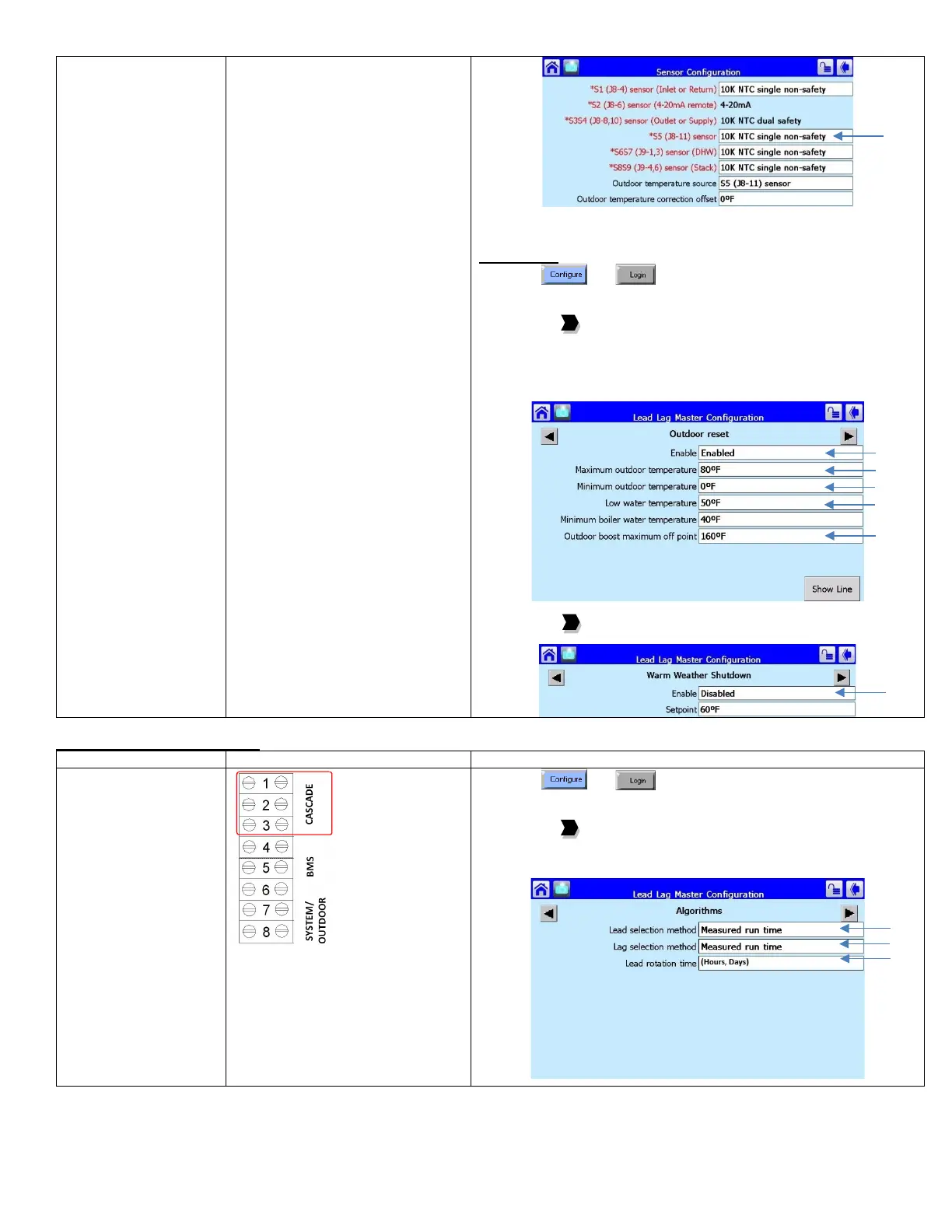
8) Press and
9) Press [Lead Lag Master Configuration]
10) Press [Advanced Settings >]
11) Press the to arrive at Outdoor Reset
12) Select Enable: Enabled
13) Select Maximum outdoor temperature (WWSD)
14) Select Minimum outdoor temperature (Outdoor design)
15) Select Low Water Temperature (Min. water temp)
16) Select Outdoor boost maximum off point (Design max.)
17) Press [Show Line] to confirm reset curve
18) Press the to arrive at Warm Weather Shutdown
19) Select Enable = Shutdown after demand ends
Rotation Schedule Adjustment
schedule is based on
equalizing run time on
a 1-hour schedule
• To vary the rotation to a
fixed schedule based
on (hours, days)
1) Press and
2) Press [Lead Lag Master Configuration]
3) Press [Advanced Settings >]
4) Press the to arrive at Algorithms
5) Select Lead selection method: Sequence order
6) Select Lag selection method: Sequence order
7) Select Lead rotation time: (user defined)






 To Next Page