149
You can select the pixel count and the image quality. There are ten
JPEG image-recording quality settings: 73, 83, 7K, 8K, 75,
85, 7a, 8a, b, c. There are three RAW image quality settings:
1, 41, 61 (p.152).
1
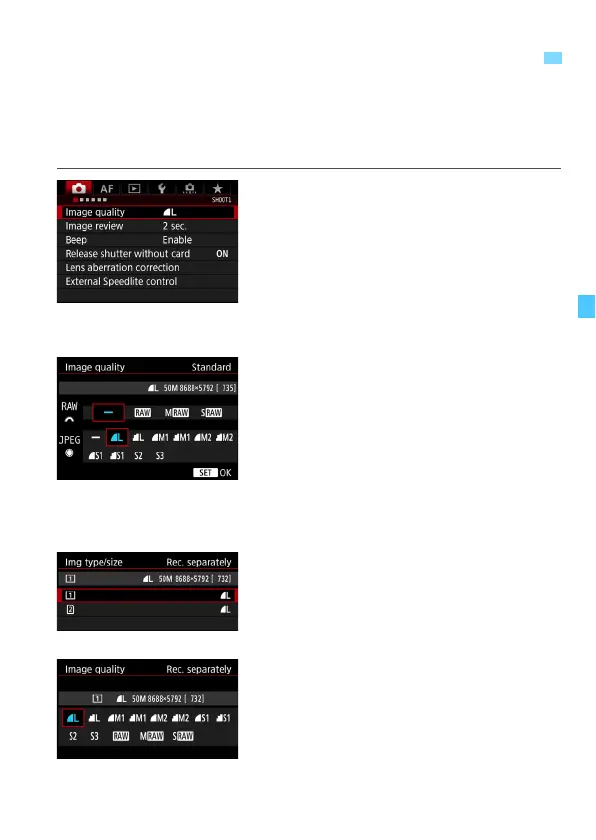
Select [Image quality].
Under the [z1] tab, select [Image
quality], then press <0>.
2
Select the image-recording quality.
To select a RAW quality, turn the
<6> dial. To select a JPEG quality,
turn the <5> dial.
On the upper right, the “**M
(megapixels) ****
x
****” number
indicates the recorded pixel count,
and [***] is the number of possible
shots (displayed up to 9999).
Press <0> to set it.
Under [51: Record func+card/
folder sel.], if [Record func.] is set to
[Rec. separately], select CF card
[f] or SD card [g], then press
<0>.
Select the desired image-recording
quality, then press <0>.
3 Setting the Image-Recording Quality
Standard / Auto switch
card / Rec. to multiple













 To Next Page