95
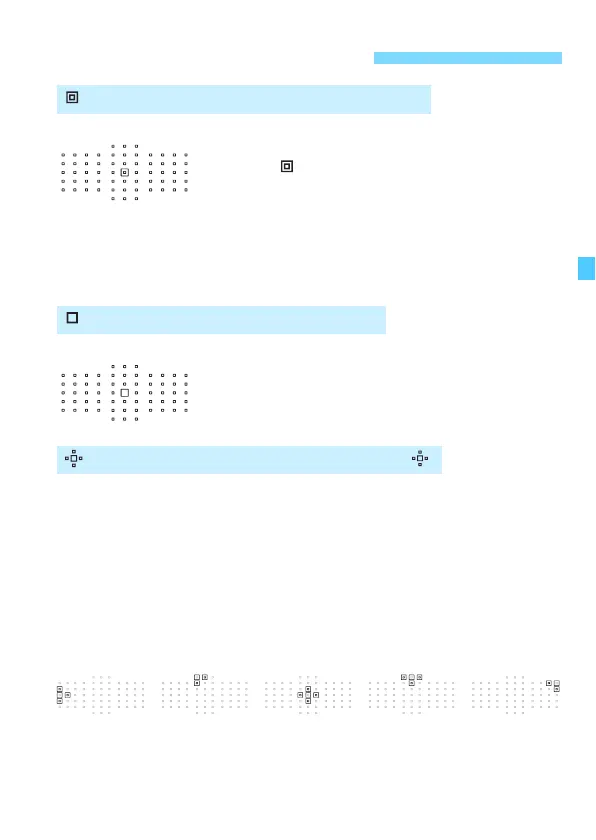
For pinpoint focusing over a narrower area than
with single-point AF (manual selection). Select one
AF point < > to focus.
Effective for pinpoint focusing or focusing
overlapping subjects such as an animal in a cage.
Since Single-point Spot AF (manual selection)
covers a very small area, focusing may be difficult
during hand-held shooting or for a moving subject.
Select one AF point <S> to be used for focusing.
The manually-selected AF point <S> and adjacent AF points <w>
(above, below, on the left, and on the right) are used to focus. Effective
when it is difficult to track a moving subject with just one AF point.
With AI Servo AF, the initial manually-selected AF point <S> must
focus-track the subject first. However, it is superior to Zone AF in
focusing on the target subject.
With One-Shot AF, when focus is achieved with expanded AF points,
the expanded AF points <S> will also be displayed along with the
manually-selected AF point <S>.
AF Area Selection ModesN
Single-point Spot AF (Manual selection)
Single-point AF (Manual selection)
AF point expansion (Manual selection )






 To Next Page