77
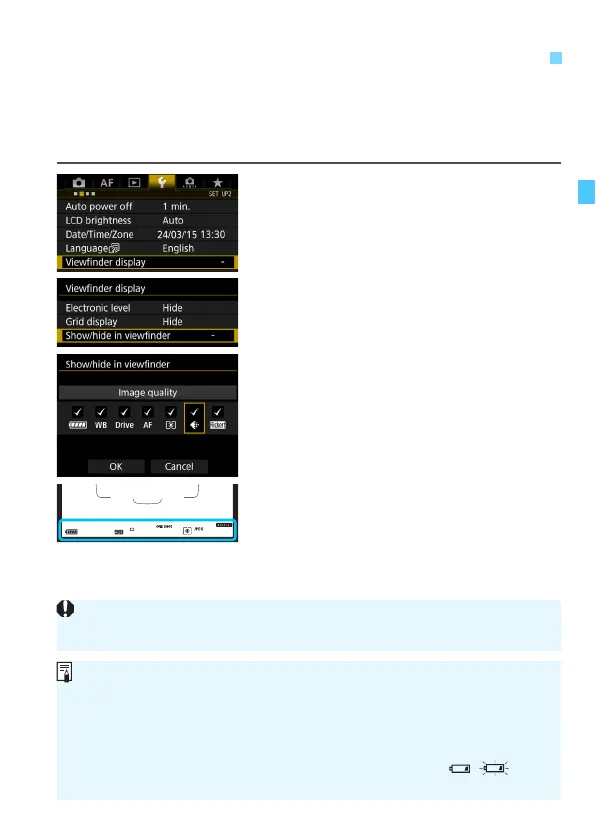
The shooting function settings (Battery, White balance, Drive mode, AF
operation, Metering mode, Image quality: JPEG/RAW, Flicker
detection) can be displayed in the viewfinder.
By default, only Flicker detection is checkmarked [X].
1
Select [Viewfinder display].
Under the [52] tab, select
[Viewfinder display], then press
<0>.
2
Select [Show/hide in viewfinder].
3
Checkmark [X] the information to
be displayed.
Select the information to display and
press <0> to append a checkmark
<X>.
Repeat this procedure to append a
checkmark [X] to all the information
to be displayed. Then select [OK].
X When you exit the menu, the
checkmarked information will appear
in the viewfinder (p.31).
3
Setting the Viewfinder Information Display
N
If no card is inserted in the camera, the image-recording quality will not be
displayed.
When you press the <n> or <o> button, operate the lens’s
focus mode switch, or when a lens equipped with electronic manual
focusing function is used and the AF/MF switches as the lens’s focusing
ring is turned (p.120), the respective information will appear in the
viewfinder regardless of whether it is checkmarked.
If [Battery] is not checkmarked, the battery check icon ( / ) will
be displayed in the viewfinder when the battery level is low.













 To Next Page