EasyManua.ls Logo

Canon EOS 5DS - Page 27

Canon EOS 5DS
534 pages
Print Icon
To Next Page IconTo Next Page
To Previous Page IconTo Previous Page
Loading...
27
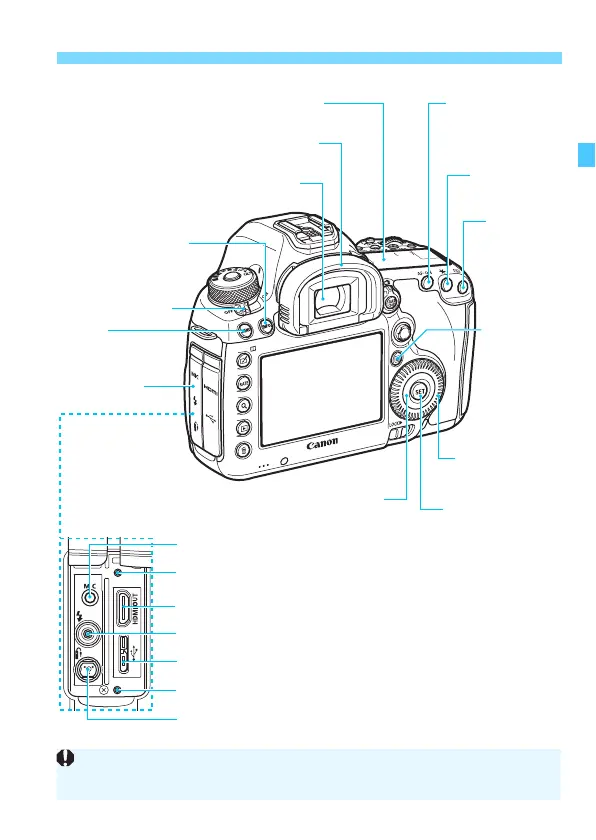
Nomenclature
<B> Info button
(p.60, 75, 78, 258,
289, 320, 442)
LCD panel (p.29-30)
Eyecup (p.236)
Viewfinder eyepiece
Power switch (p.47)
<M>
Menu button (p.64)
Terminal cover
<p>
AF start button
(p.55, 86, 257, 291)
<A> AE lock
button (p.217)
<S>
AF point
selection
button
(p.92-93)
<Q> Quick
Control
button (p.61)
<5> Quick
Control Dial (p.57)
<0> Setting button
(p.64)
Touch pad (p.58)
<Y> External microphone IN terminal (p.301)
<g> Digital terminal (p.380, 393, 519)
<D> PC terminal (p.245)
<D> HDMI mini OUT terminal (p.351)
Cable protector socket
<F> Remote control terminal (N3 type) (p.237)
Cable protector socket
When connecting the interface cable to a digital terminal, you must use the
provided cable protector (p.36).

Table of Contents