Nomenclature
14
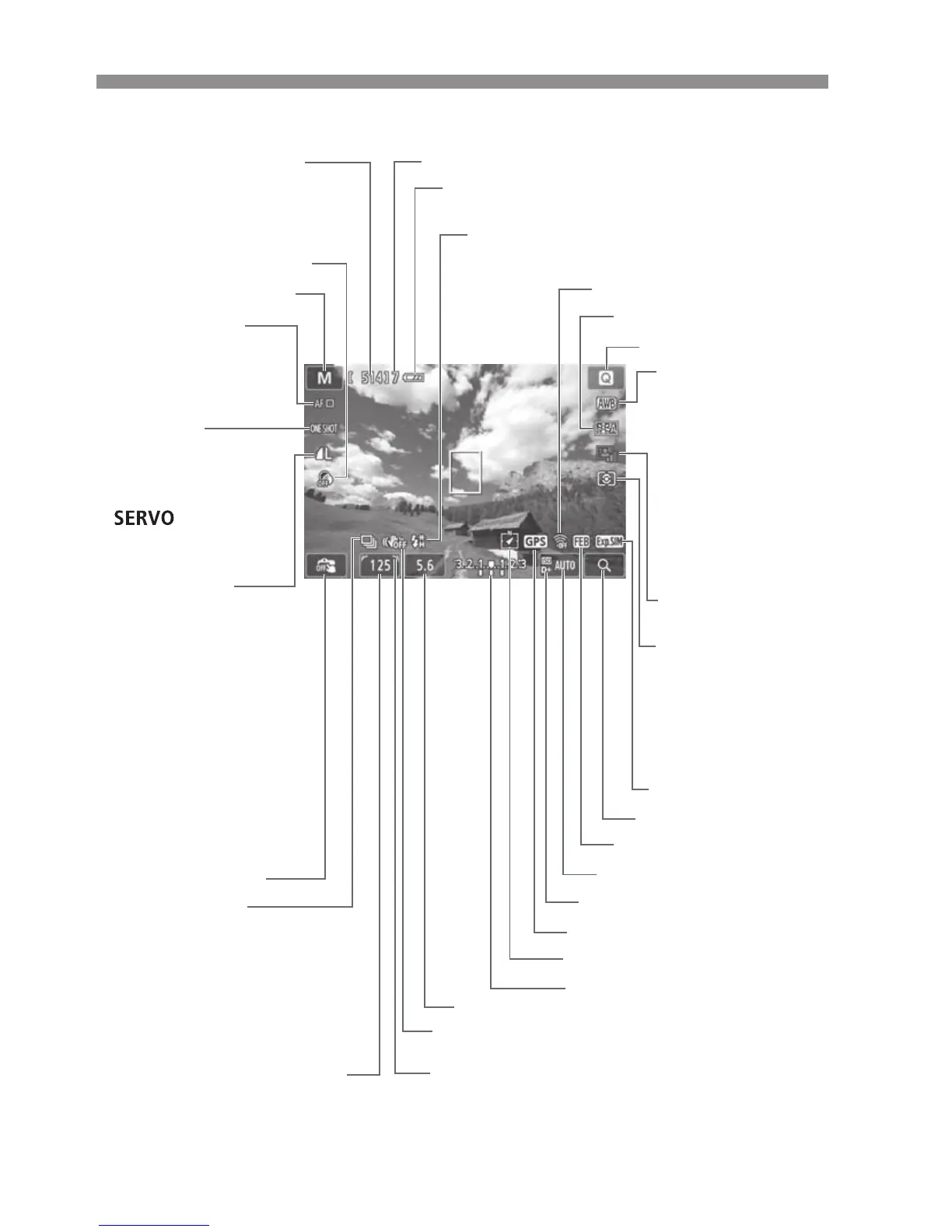
Screen Display
*: Displayed when an Eye-Fi card is used.
The display will show only the settings currently applied.
Image recording
quality (9?)
73 Large/Fine
83 Large/Normal
74 Medium/Fine
84 Medium/Normal
7a Small 1/Fine
8a Small 1/Normal
b Small 2 (Fine)
c Small 3 (Fine)
1+73
RAW+Large/Fine
1 RAW
Shutter speed
Eye Fi transmission status*
Maximum burst
e High speed sync (FP flash)
d FE lock/FEB in progress
Picture Style
Q Quick Control
Exposure simulation
Magnified view
AEB/FEB
AF method (p.65)
c u+Tracking
o FlexiZone Multi
d
FlexiZone Single
Self timer countdown
Number of possible shots
Number of possible shots
during WB bracketing
AF operation
(9?)
X
One Shot AF
Servo AF
MF Manual Focus
Drive mode (p.74)
u Single shooting
i Continuous shooting
Q Self timer:10 sec/
Remote control
l Self timer:2 sec
q Self timer:Continuous
Main Dial pointer
Image Stabilizer
<OFF>
(only when a lens with IS function is attached)
Aperture
Exposure level indicator
Exposure compensation amount
AEB range
Highlight tone priority
GPS connection indicator
Digital compass
ISO speed
Metering mode
q
Evaluative metering
w Partial metering
r Spot metering
e Center weighted
average metering
Auto Lighting
Optimizer (p.47)
Creative filters
Touch shutter (p.73)
White balance
Q Auto
W Daylight
E Shade
R Cloudy
Y Tungsten light
U White
fluorescent light
I Flash
O Custom
Battery check (p.26)
zxcn
Shooting mode


 To Next Page