153
Set exposure compensation if the exposure (without flash) does not come out
as desired. This feature can be used in Creative Zone modes (except <
a
>).
You can set the exposure compensation up to ±3 stops in 1/3-stop increments.
You can set exposure compensation on the Live View screen or B
Quick Control screen. On the Live View screen, you can adjust the
exposure compensation while checking the effect on the screen.
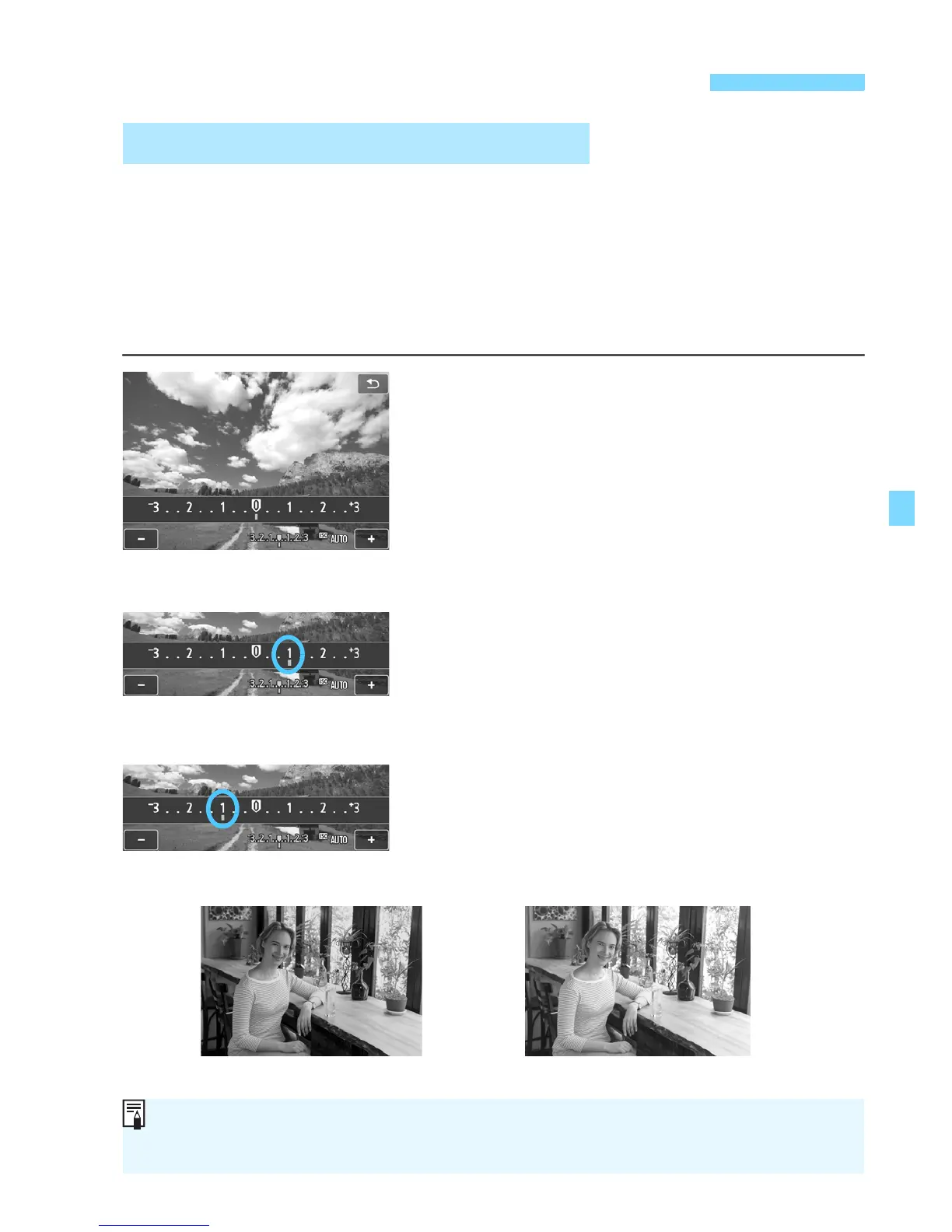
Using the Live View screen
When you tap the exposure
compensation scale, the setting
screen appears. Tap [+]/[-] to adjust
the exposure compensation.
Using the B Quick Control screen
On the
B
Quick Control screen, select
exposure compensation. Either tap [
+
]
/
[
-
]
or press the <
YA
>/<
ZO
> button to
adjust the exposure compensation.
Making it brighter:
Tap [+] or press the <ZO> button.
(Increased exposure)
Making it darker:
Tap [-] or press the <YA> button.
(Decreased exposure)
After taking the picture, cancel the exposure
compensation by setting it back to 0.
Setting Exposure CompensationN
O Setting Exposure Compensation
Increased exposure for a
brighter image
Decreased exposure for a
darker image
If you combine it wi h AEB (p.155), you can set it beyond ±3 stops. Set it
with [A3: Expo.comp./AEB] or the B Quick Control screen.
Dark exposure Increased exposure for a brighter image



 To Next Page