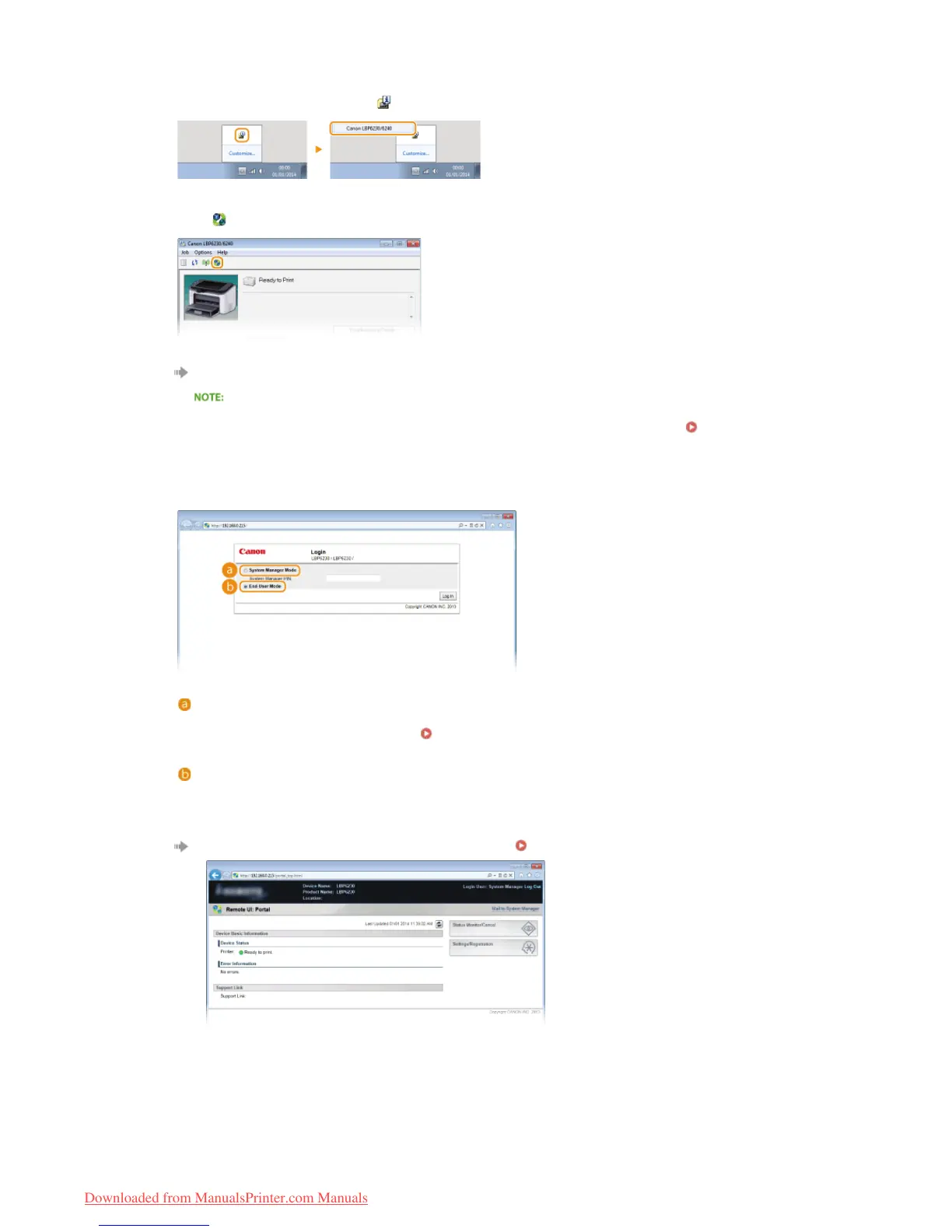
If you do not know the machine's IP address, you can start the Remote UI from the Printer Status Window.
Select the machine by clicking in the system tray.
Click .
Your Web browser starts, and the login page of the Remote UI appears.
If a security alert is displayed
A security alert may be displayed when communication with the Remote UI is encrypted (
Enabling SSL
Encrypted Communication for the Remote UI). If there are no problems with certificate settings or SSL
settings, continue browsing to the Remote UI site.
Select [System Manager Mode] or [End-User Mode].
[System Manager Mode]
You can perform all Remote UI operations and make all settings. If a PIN (system manager password) has been
set, enter it in [System Manager PIN]. (
Setting System Manager Passwords). If a PIN has not been set
(factory default setting), you do not need to input anything.
[End-User Mode]
You can check print documents, check the status of the machine, and view machine settings.
Click [Log In].
The Portal Page (main page) of the Remote UI appears. Remote UI Screens
1




 To Next Page