0JFC-02X
Remote UI Screens
This section describes the main screens of the Remote UI.
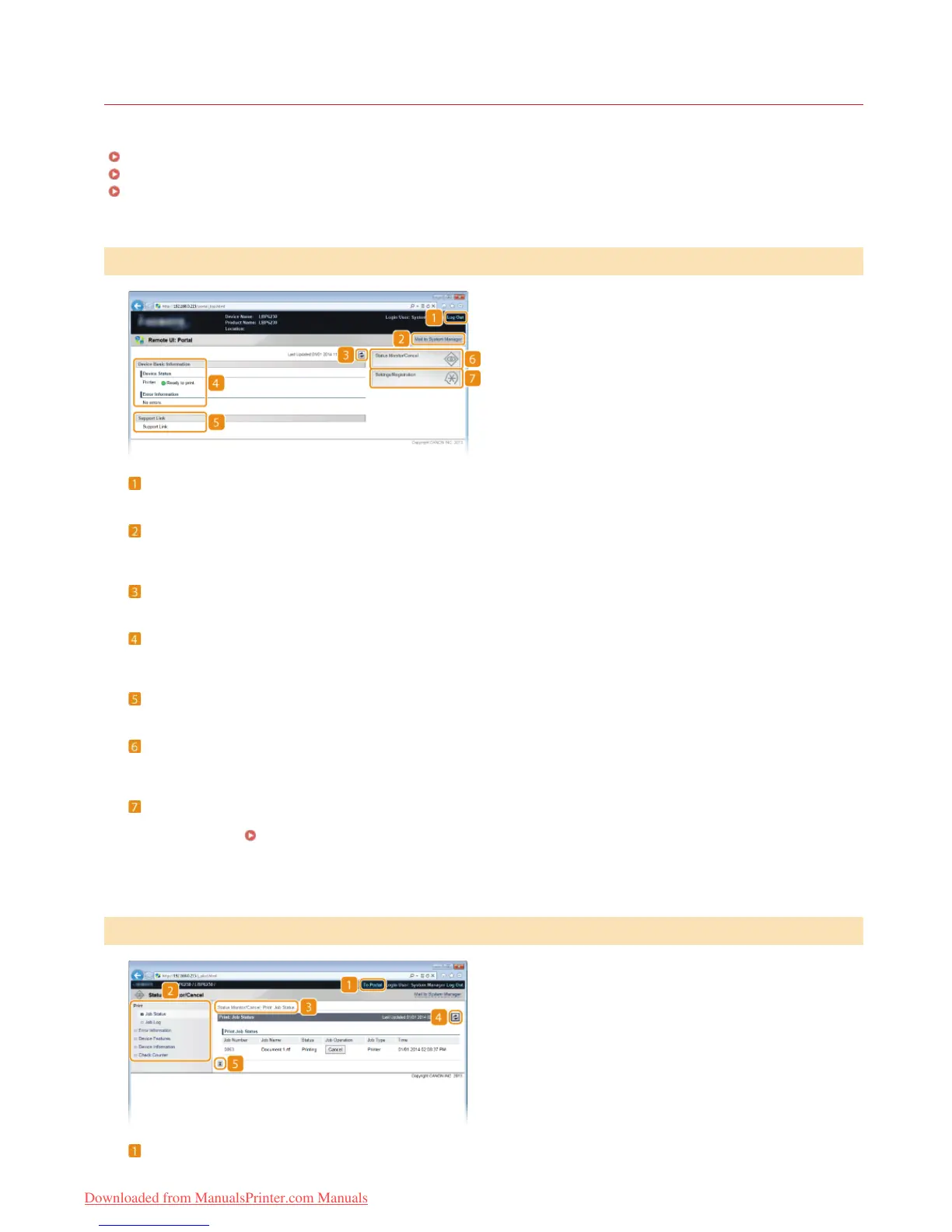
Portal Page (Main Page)
[Status Monitor/Cancel] Page
[Settings/Registration] Page
[Log Out]
Logs out from the Remote UI and returns to the log on page.
[Mail to System Manager]
Displays a window for creating an e-mail to the system manager. Contact information for the system manager is specified in
[System Manager Information] under [System Management].
Refresh Icon
Refreshes the current page.
Device Basic Information
Displays the current status of the machine and error information. If an error has occurred, a link to the Error Information page is
displayed.
Support Link
Displays a link to support information, as specified in [Device Information] under [System Management].
[Status Monitor/Cancel]
Displays the [Status Monitor/Cancel] page. You can use this page to check the current printing status, cancel print processing, and
view a history of print jobs.
[Settings/Registration]
Displays the [Settings/Registration] page. When you are logged on in System Manager Mode, you can use this page to change
machine settings.
Changing Machine Settings
[To Portal]
Returns to the Portal Page (main page).
Portal Page (Main Page)
[Status Monitor/Cancel] Page
㻝㻠㻞㻌㻛㻌㻞㻠㻜
Downloaded from ManualsPrinter.com Manuals














 To Next Page