0JFC-018
Printing Watermarks
You can print watermarks such as "COPY" or "CONFIDENTIAL" on the document. You can create new watermarks
or use pre-registered watermarks.
[Page Setup] tab
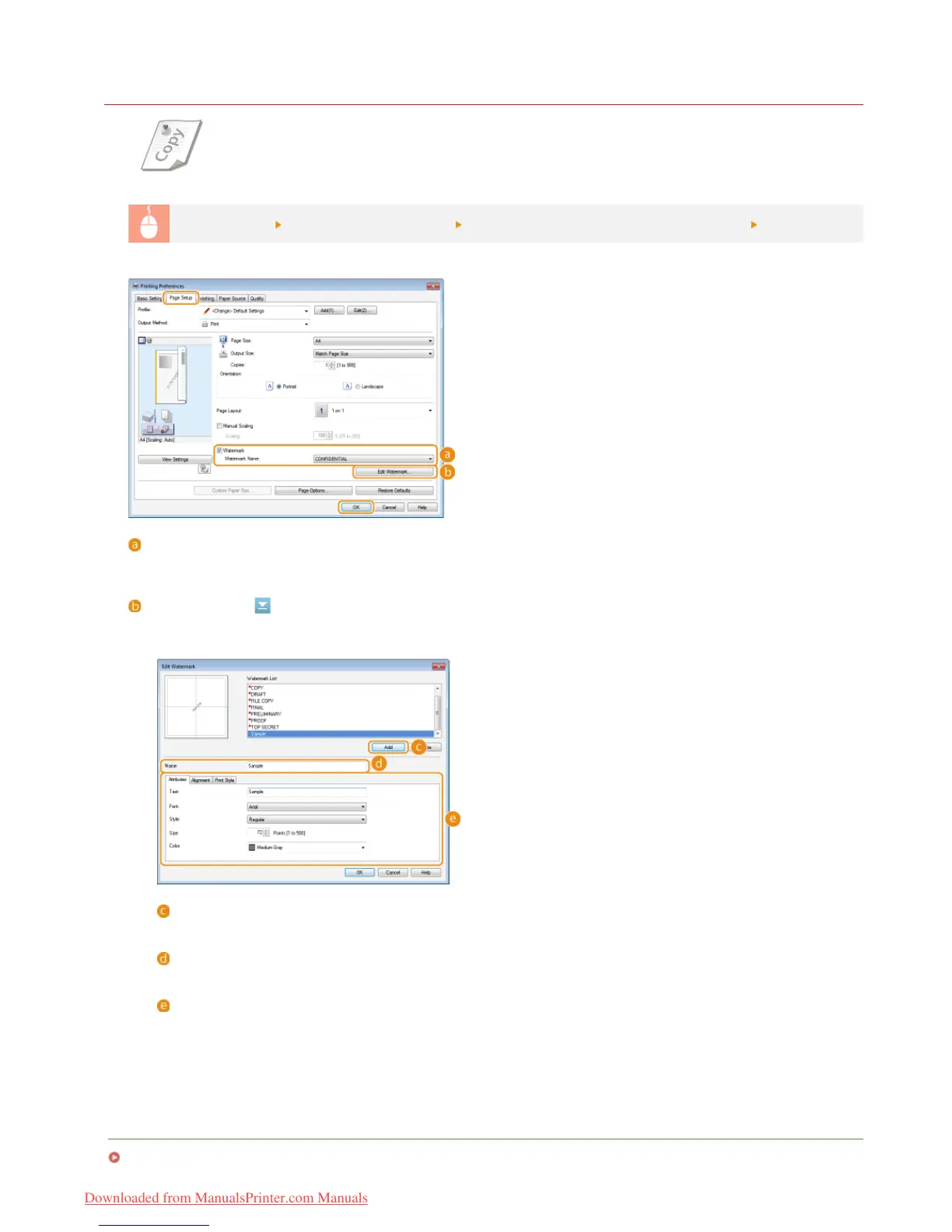
Select [Watermark] check box Select the watermark type with [Watermark Name] [OK]
[Watermark]/[Watermark Name]
Select the [Watermark] check box to display a list of watermarks in the [Watermark Name] drop-down list. Select a watermark to
use from the list.
[Edit Watermark]
Displays the screen to create or edit watermarks.
LINKS
Basic Print Operations
[Add]
Click to create a new watermark. Up to 50 watermarks can be registered.
[Name]
Enter the name of the new watermark.
[Attributes]/[Alignment]/[Print Style]
Click each tab to specify the text, color, or print position of the watermark name. For more information about the
settings, click [Help] on the printer driver screen.
㻡㻥㻌㻛㻌㻞㻠㻜
Downloaded from ManualsPrinter.com Manuals












 To Next Page