0JFC-052
Connecting to a Wired LAN
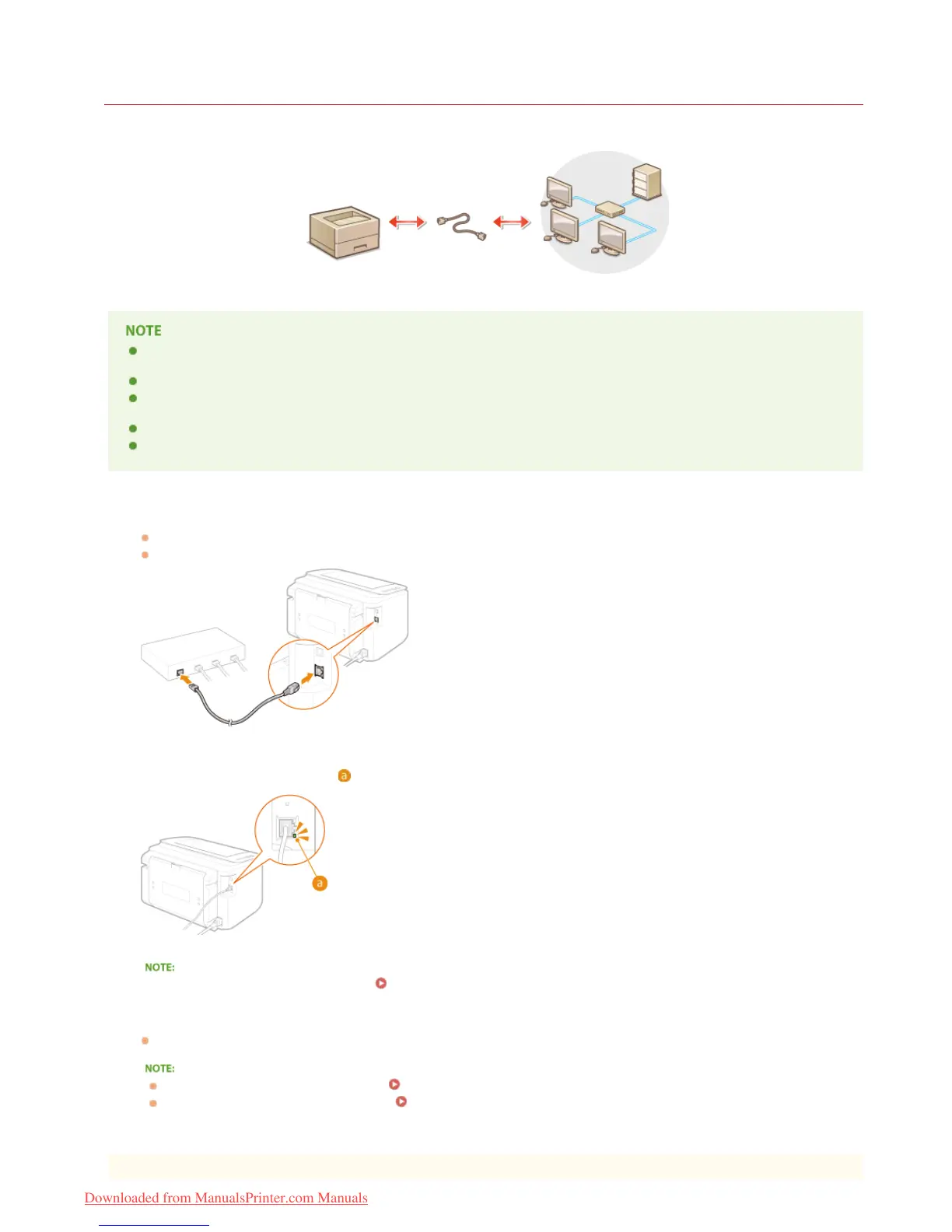
Connect the machine to a computer via a router. Use a LAN cable to connect the machine to the router.
The machine does not come with a router or LAN cable. Have them ready as necessary. Use a Category 5 or higher twisted
pair cable for the LAN.
Make sure that there are ports available on the router to connect the machine and the computer.
The machine supports 10BASE-T and 100BASE-TX connections. If you want to connect the machine to a 100BASE-TX Ethernet
network, all the devices connected to the LAN (router, LAN cable, and network board for computer) must support 100BASE-TX.
Wired LAN and wireless LAN cannot be used at the same time.
If you are using the machine in your office, consult your network administrator.
Connect a LAN cable.
Connect the machine to a router by using a LAN cable.
Push the connector in until it clicks into the port.
Check that the LNK indicator ( ) is lit.
When the LNK indicator does not light up Problems with the Wireless/Wired LAN Connection
Wait approximately 2 minutes.
The IP address is automatically set during this time.
If the IP address is not set automatically Problems with the Wireless/Wired LAN Connection
You can also set the IP address manually.
Setting IP Addresses
1
2
3
㻣㻞㻌㻛㻌㻞㻠㻜
Downloaded from ManualsPrinter.com Manuals














 To Next Page