0JFC-051
Printing Booklet
You can print two pages of a document on both sides of paper. If the paper is folded at the center, a booklet is
formed. The printer driver controls the print order in such a way that the page numbers are correctly arranged.
Booklet printing may not be available with some sizes or types of paper. Paper
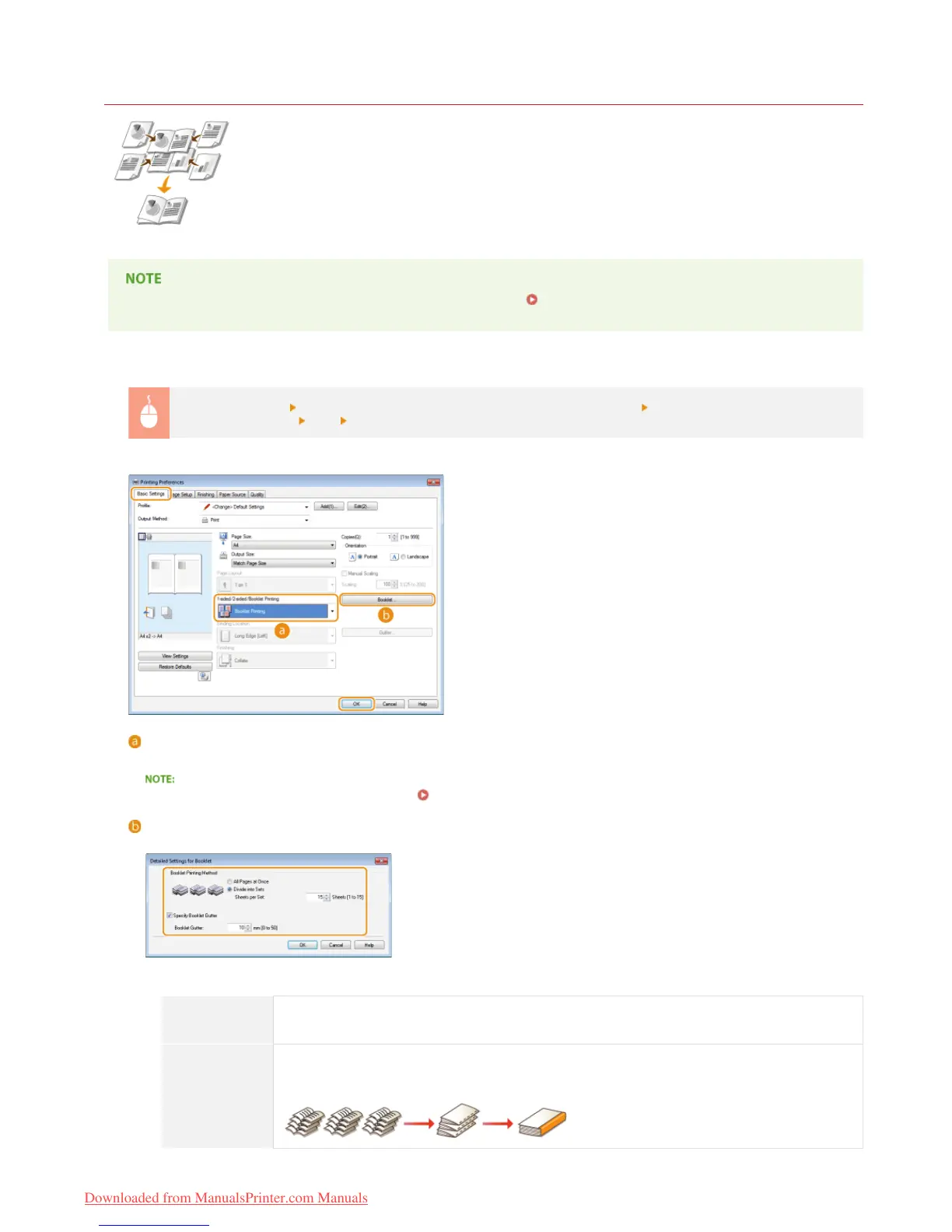
[Basic Settings] tab
Select [Booklet Printing] in [1-sided/2-sided/Booklet Printing] Click [Booklet] to specify detailed
settings as necessary
[OK] [OK]
[1-sided/2-sided/Booklet Printing]
Select [Booklet Printing].
For [1-sided Printing] and [2-sided Printing], see Switching between 1-Sided and 2-Sided Printing.
[Booklet]
The screen shown below appears.
[Booklet Printing Method]
[All Pages at
Once]
Prints all of the pages at once as a single bundle. You can make a booklet just by folding the printed
pages in half.
[Divide into
Sets]
Select this setting when there are too many pages that they cannot be bound all at once. The number
of sheets specified for [Sheets per Set] are allocated to a single set for printing. Fold the smaller sets,
and then collect them to form a booklet.
㻡㻡㻌㻛㻌㻞㻠㻜
Downloaded from ManualsPrinter.com Manuals














 To Next Page