0JFC-03R
Printing Setting Lists
You can print setting lists from the Printer Status Window. This is convenient when you want to print a list of network settings or a list of
power saving and other configuration settings for the machine. Setting lists are formatted to print on A4 size paper. Before starting, load
A4 size paper in the multi-purpose tray or manual feed slot.
Loading Paper in the Multi-Purpose Tray Loading Paper in the
Manual Feed Slot
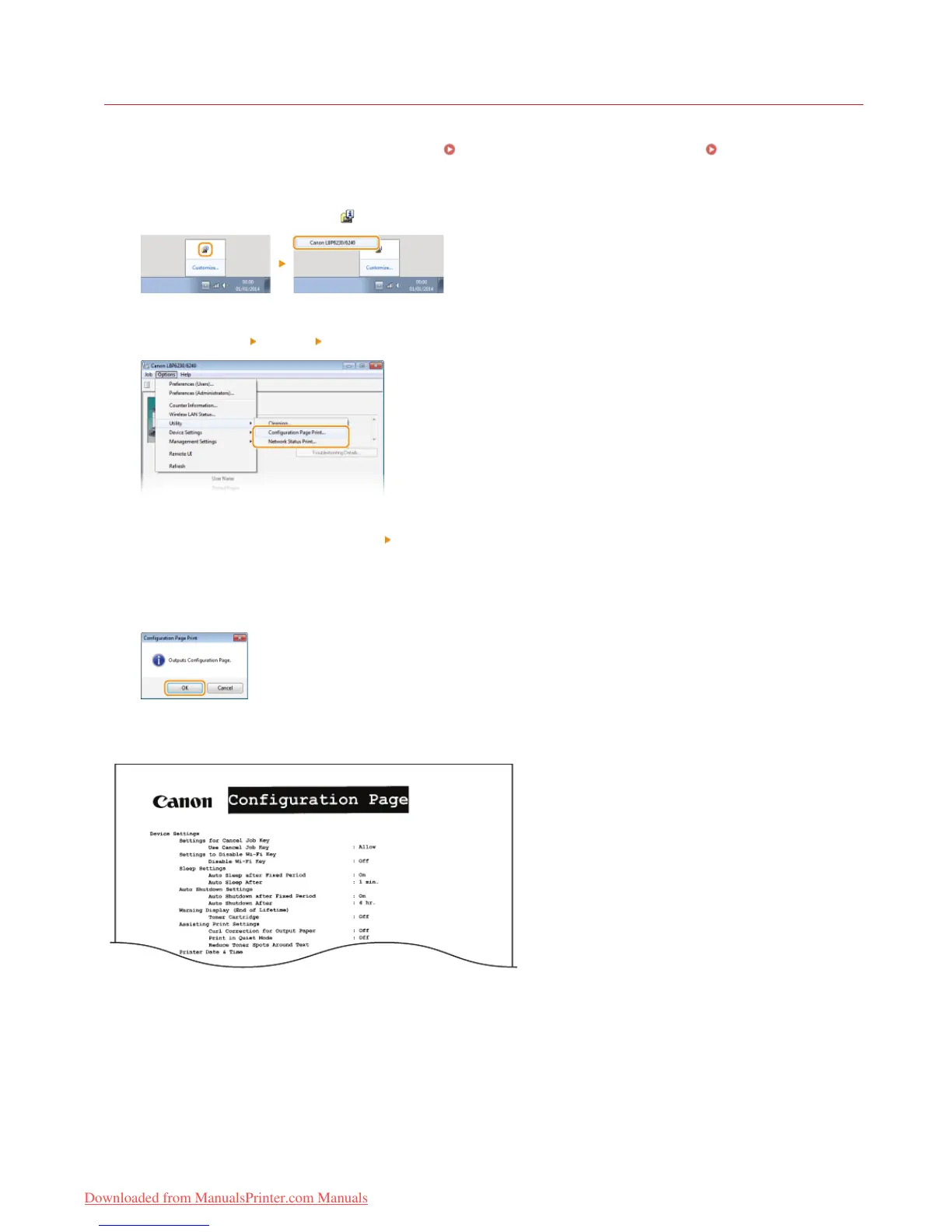
Select the machine by clicking in the system tray.
Select [Options] [Utility] [Configuration Page Print] or [Network Status Print].
[Configuration Page Print]
Prints a list of the settings under [Options]
[Device Settings] together with machine version information.
[Network Status Print]
Prints a list of the network settings of the machine.
Click [OK].
Output example: [Configuration Page Print]
Output example: [Network Status Print]
1












 To Next Page