0JFC-017
Printing Dates and Page Numbers
You can print information such as dates or page numbers, and you can specify where to print this information
on the document (upper left, lower right, etc.).
[Page Setup] tab
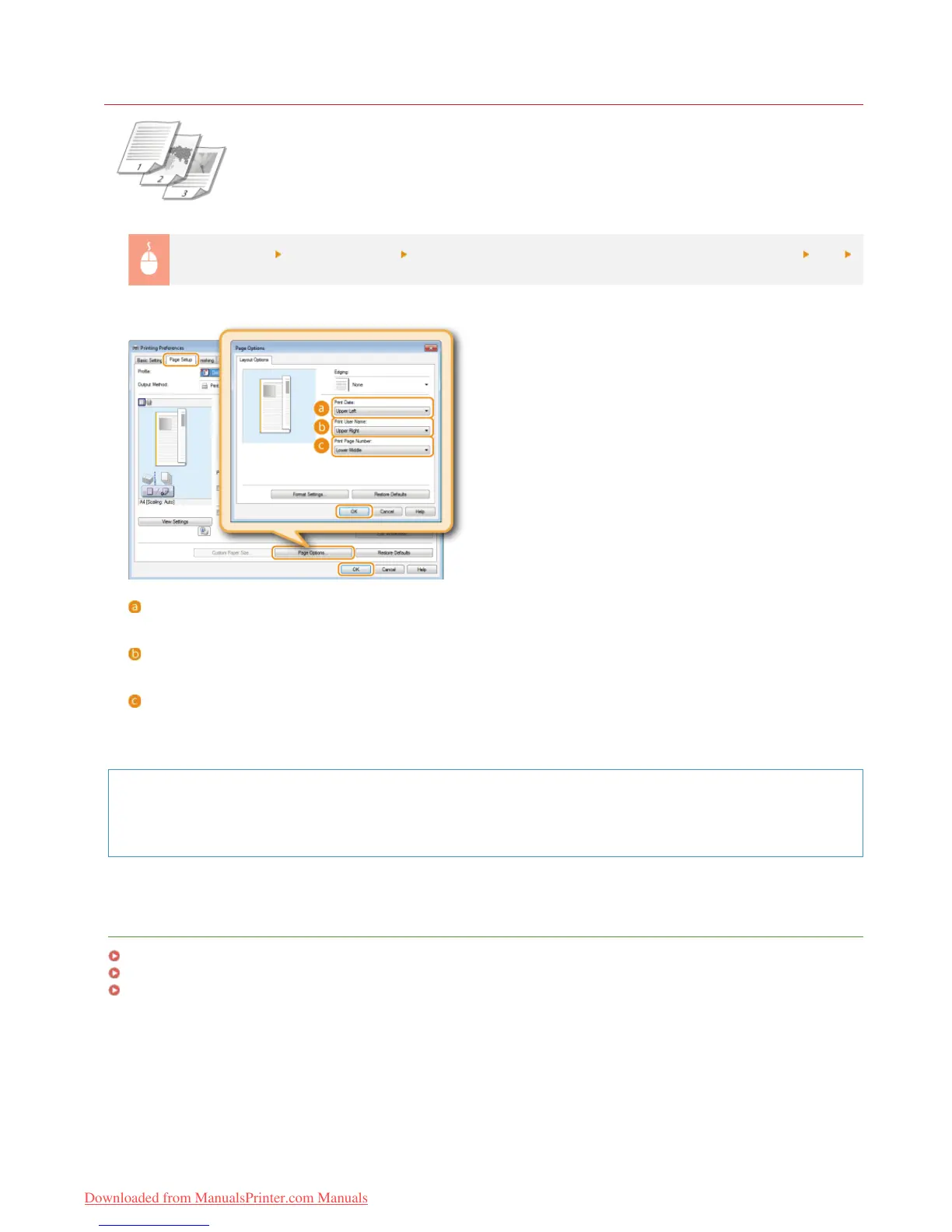
Click [Page Options] Select the printing position for the date, user name, and page number [OK]
[OK]
[Print Date]
Specifies the printing position for the print date.
[Print User Name]
Specifies the position to print the user name (logon name) of the person using the computer that printed the document.
[Print Page Number]
Specifies the position to print the page number.
Changing the Print Format of Dates and Page Numbers
You can change formatting details such as font and font size when printing dates, logon names, or page numbers. Click [Format
Settings] on the [Page Options] screen shown above to specify the details.
LINKS
Basic Print Operations
Printing Borders
Printing Watermarks
㻡㻤㻌㻛㻌㻞㻠㻜
Downloaded from ManualsPrinter.com Manuals












 To Next Page