0JFC-053
Configuring Ethernet Settings
Ethernet is a standard for communicating data in a LAN. You can set the communication mode (Half Duplex/Full Duplex) and the
Ethernet type (10BASE-T/100BASE-TX). The factory default setting, the communication mode and type of Ethernet are automatically
detected. Usually, the Ethernet settings can be used as is, but use the following procedure to manually specify the settings as necessary.
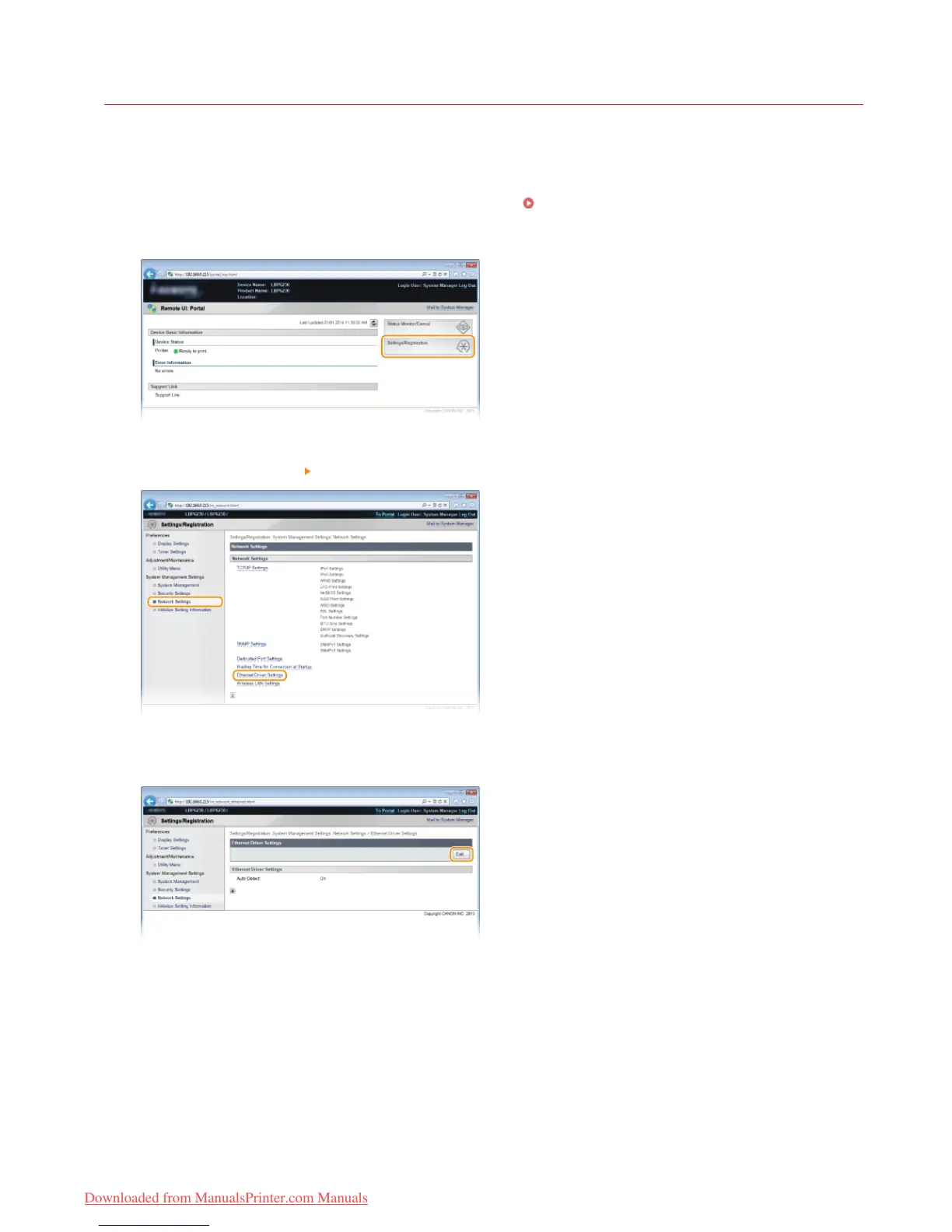
Start the Remote UI and log on in System Manager Mode. Starting the Remote UI
Click [Settings/Registration].
Click [Network Settings] [Ethernet Driver Settings].
Click [Edit].
Clear the [Auto Detect] check box, and then configure the Ethernet settings.
1
2
3
4
5
㻥㻟㻌㻛㻌㻞㻠㻜
Downloaded from ManualsPrinter.com Manuals














 To Next Page