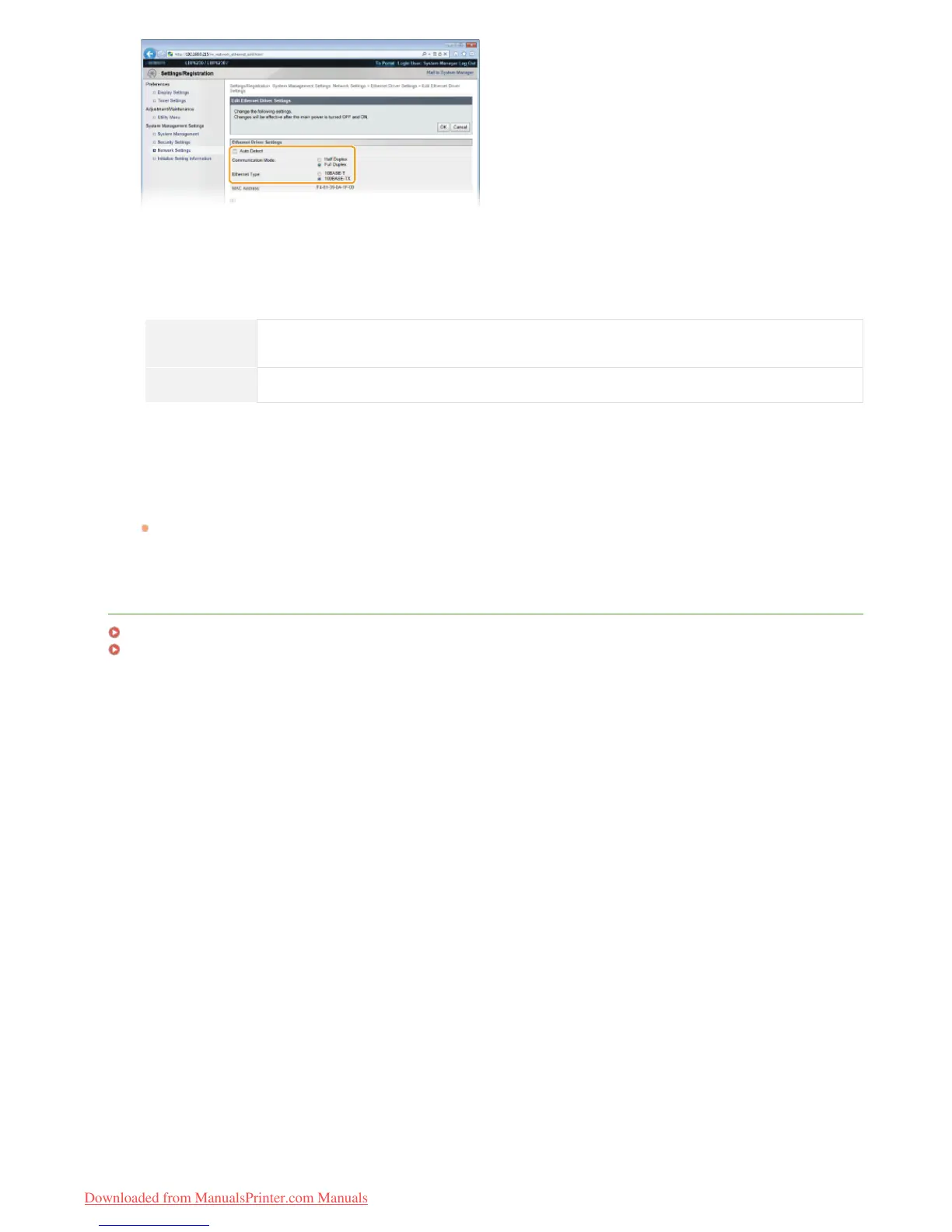
[Auto Detect]
Clear the check box to configure the Ethernet settings manually. Select the check box to detect the Ethernet settings
automatically.
[Communication Mode]
Select the Ethernet communication mode.
[Half Duplex]
Alternately sends and receives communication data. Select this when the machine is connected to a
networking device using half duplex.
[Full Duplex] Simultaneously sends and receives communication data. Use this setting for most environments.
[Ethernet Type]
Select [10BASE-T] or [100BASE-TX] as the Ethernet type.
Click [OK].
Restart the machine.
Turn OFF the machine, wait for at least 10 seconds, and turn it back ON.
LINKS
Changing the Maximum Transmission Unit
Setting a Wait Time for Connecting to a Network
6
7
㻥㻠㻌㻛㻌㻞㻠㻜
Downloaded from ManualsPrinter.com Manuals





 To Next Page