0JFC-01W
Viewing Network Settings
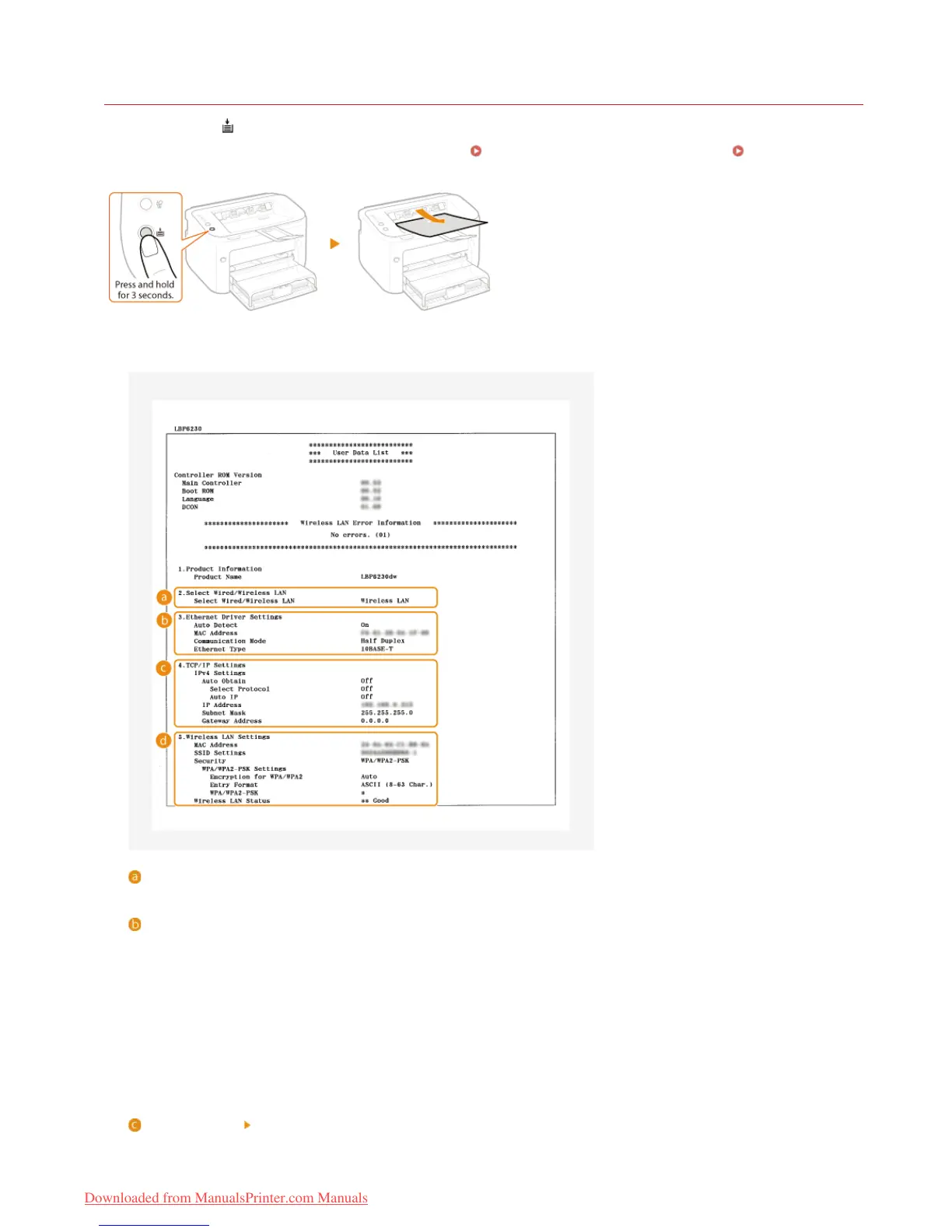
Press this machine's (Paper) key and hold it down for 3 seconds to print a partial list of network settings. This allows you to check
IPv4 settings, the MAC address, and wired/wireless LAN settings. The setting list is formatted to print on A4 size paper. Before printing,
load A4 size paper in the multi-purpose tray or manual feed slot.
Loading Paper in the Multi-Purpose Tray Loading Paper in
the Manual Feed Slot
Output example:
Select Wired/Wireless LAN
Displays whether the connection is by wired LAN or wireless LAN.
Ethernet Driver Settings
Displays the wired LAN (Ethernet) settings and MAC address.
Auto Detect
Displays whether the setting to automatically detect the communication mode and Ethernet type is enabled or disabled.
MAC Address
Displays the MAC address on the wired LAN.
Communication Mode
Displays the communication mode (Half Duplex/Full Duplex).
Ethernet Type
Displays the Ethernet type (10BASE-T/100BASE-TX) setting.
TCP/IP Settings IPv4 Settings
Lists IPv4 settings.
Auto Obtain
㻤㻞㻌㻛㻌㻞㻠㻜
Downloaded from ManualsPrinter.com Manuals














 To Next Page