0JFC-009
Back Side
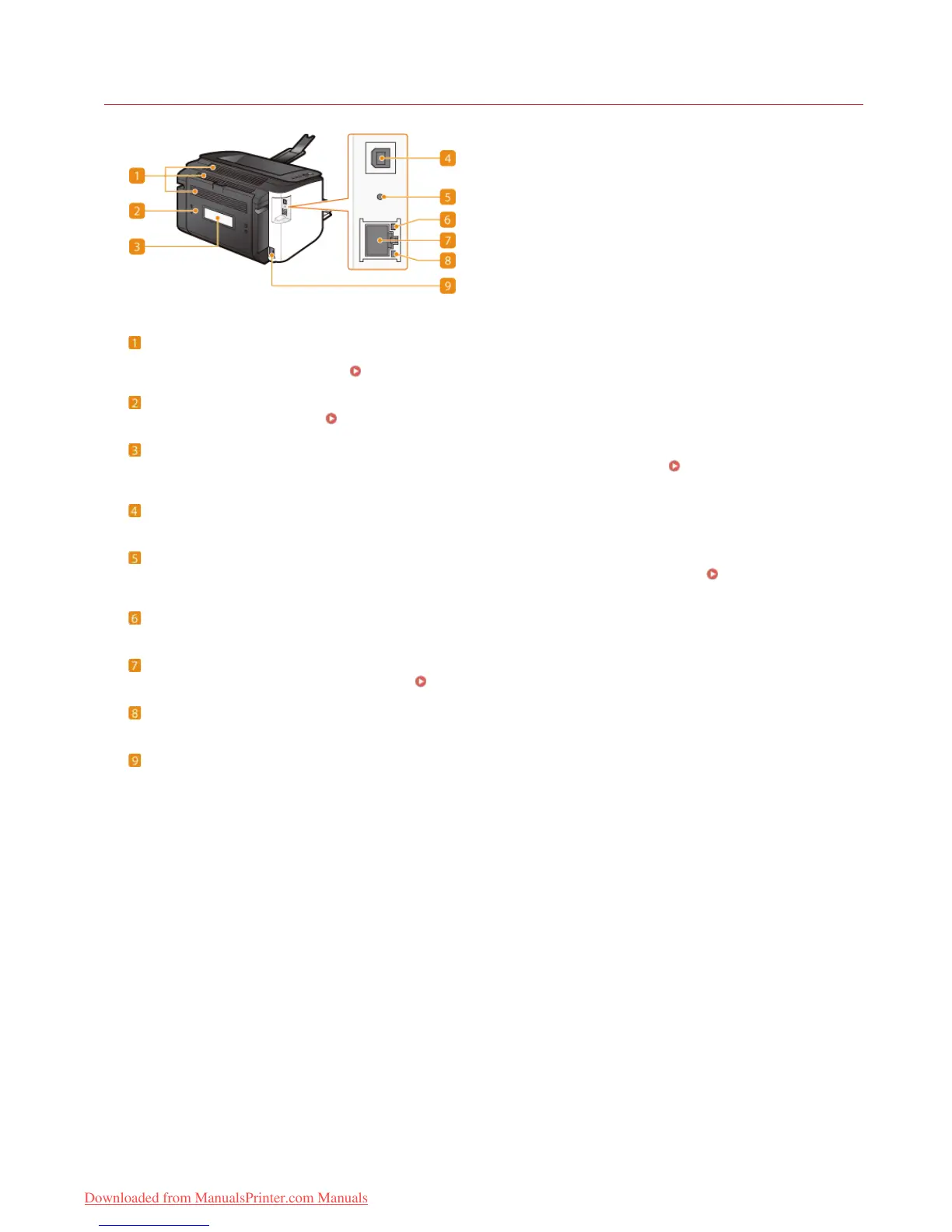
Ventilation slots
Air from inside the machine is vented out to cool down the inside of the machine. Note that placing objects in front of the
ventilation slots prevents ventilation.
Installation
Rear cover
Open to remove jammed paper.
Clearing Paper Jams
Rating label
The label shows the serial number, which is needed when making inquiries about the machine.
When a Problem Cannot Be
Solved
USB port
Connect a USB cable when connecting the machine and a computer.
Reset button
You can also press this key while turning ON the power to initialize the system management settings.
Initializing by Using the
Reset Button
ACT indicator
Flashes when data is sent and received via wired LAN.
LAN port
Use a LAN cable to connect to a hub (or router).
Connecting to a Wired LAN
LNK indicator
Lights up when the machine is connected to wired LAN.
Power socket
Connect the power cord.
㻝㻣㻌㻛㻌㻞㻠㻜
Downloaded from ManualsPrinter.com Manuals












 To Next Page