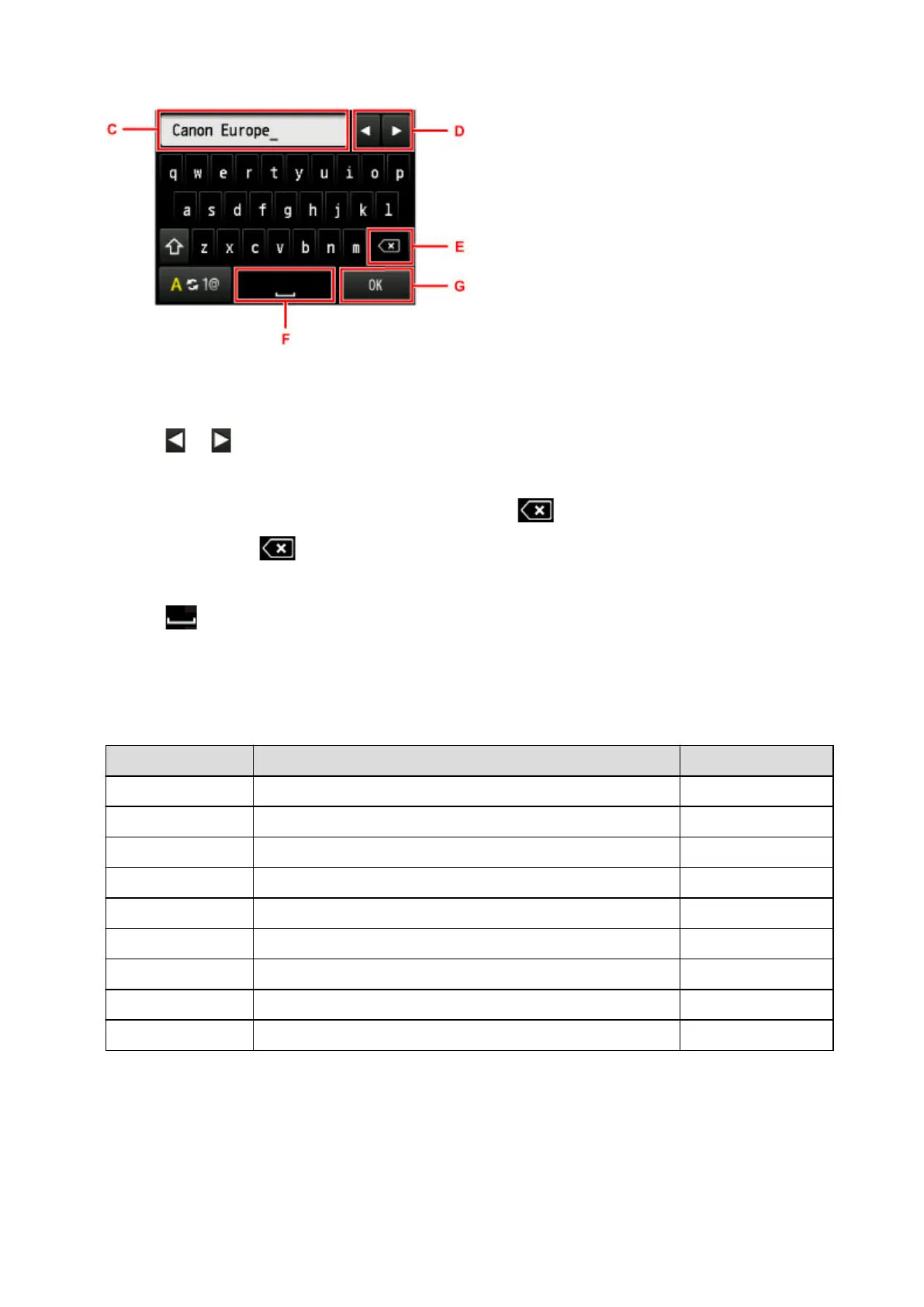
Entering or Editing Numbers, Letters, and Symbols
The input method is as follows.
• To move the insertion position (cursor position) in the entry field (C)
Tap or (D).
• To delete an entered character
Move the cursor under the character to delete, then tap (E).
Keep on touching to continue deleting characters.
• To insert a space
Tap (F).
After entry is complete, tap OK (G).
Key assignments for multiple languages
Repeatedly tap the same key until the character you want to enter is displayed in the entry field (C).
Key Lower case Upper case
a / A a å ä á à ã â æ A Å Ä Á À Ã Â Æ
c / C c ç C Ç
e / E e ë é è ê E Ë É È Ê
i / I i ï í ì î I Ï Í Ì Î
n / N n ñ N Ñ
o / O o ø ö ó ò õ ô O Ø Ö Ó Ò Õ Ô
p / P p þ P Þ
u / U u ü ú ù û U Ü Ú Ù Û
y / Y y ý Y Ý
158













 To Next Page