Reducing or Enlarging a Copy
You can specify the magnification optionally or select the preset-ratio copying or fit-to-page copying.
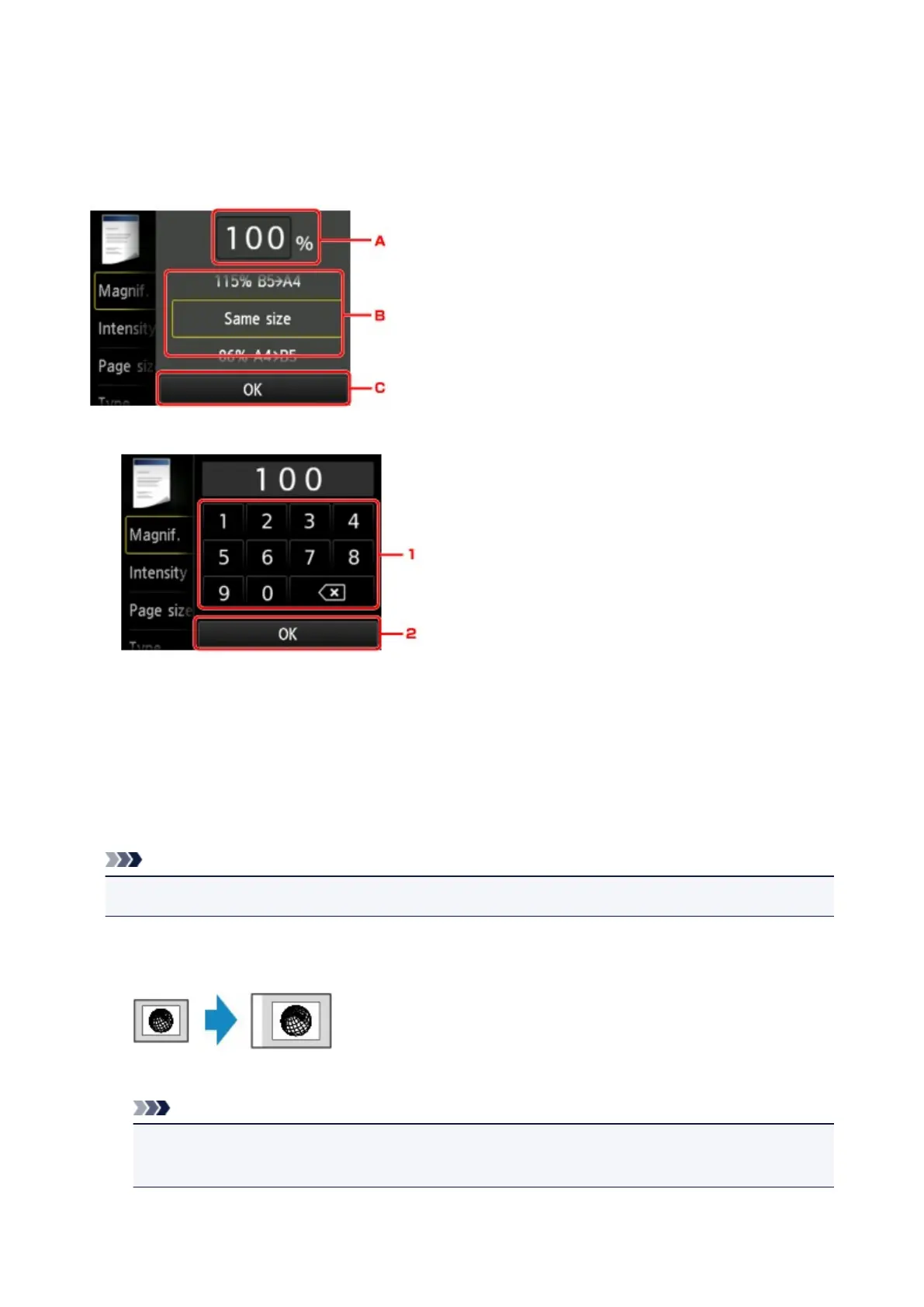
The screen below is displayed when you tap Settings in the Copy standby screen and tap Magnif. to select
the reduction/enlargement method.
A. Tap to display the screen below.
1. Tap the numbers to specify the magnification.
2. Tap to confirm the magnification.
B. Flick to specify the magnification.
C. Tap to confirm the magnification.
Reduction/enlargement Method
Note
• Some of the reduction/enlargement methods are not available depending on the copy menu.
• Fit to page
The machine automatically reduces or enlarges the image to fit the page size.
The setting in Magnif.: Fit to page
Note
• When you select Fit to page, the page size may not be detected correctly depending on the
original. In this case, select the setting other than Fit to page.
• Preset ratio
550













 To Next Page