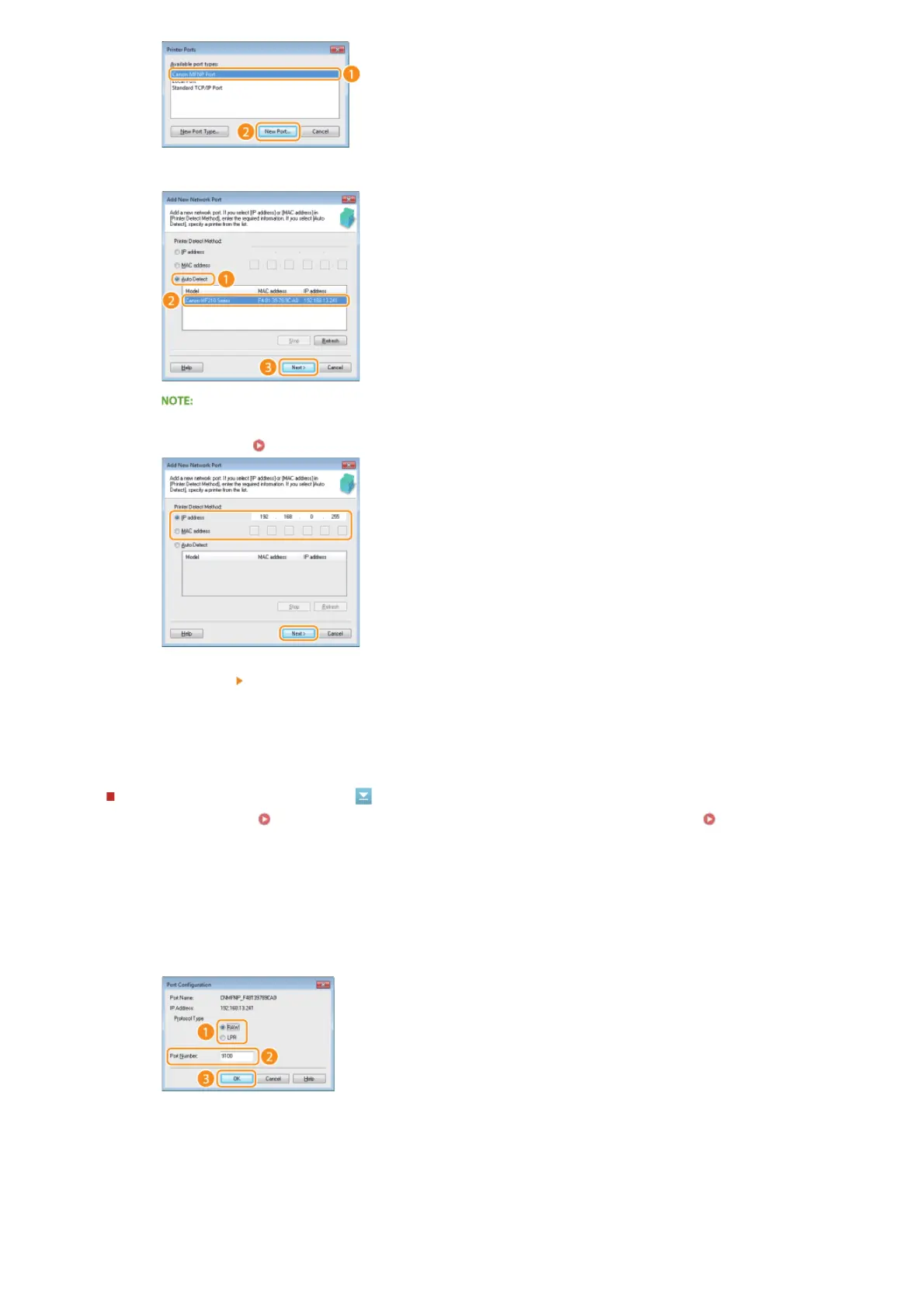
Changing the port type or number
If the printing protocols ( Configuring Printing Protocols and WSD Functions) or port numbers ( Changing Port
Numbers(MF212w)) have been changed on the machine, the corresponding settings on the computer must also be configured.
This change is only available for LPR or RAW ports.
Click [Close].
3
Click [Auto Detect], select the machine when it is detected, and click [Next].
If the machine is not detected
Click [Refresh]. If the problem persists, click [IP address] or [MAC address], enter the IP address or MAC address
of the machine
Viewing Network Settings, and then click [Next].
4
Click [Add] [Finish].
5
Click [Close].
1
Click [Configure Port].
2
Click the [LPR] or [RAW] radio button in [Protocol Type], change the number in the [Port Number] text
box as necessary, and then click [OK].
4
㻝㻣㻣㻌㻛㻌㻟㻟㻢





 To Next Page