0L40-01R
Copying Multiple Documents onto One Sheet (2 on 1/4 on 1)
You can copy two or four documents onto a single sheet at a reduced size. This decreases the number of
pages, enabling you to save paper.
Using <2 on 1>/<4 on 1> reduces the copy ratio automatically (the copy ratio is displayed on the screen). You can increase
or further reduce the copy ratio before pressing
, but the edges of the document might not be copied if you increase it.
<2 on 1>/<4 on 1> is not available when using <ID Card Copy>.
When you copy multiple documents onto one page, margins may be created in the copied image.
(COPY/SCAN) <N on 1> Select <2 on 1> or <4 on 1> Select the document size on the <Scan
Size> screen
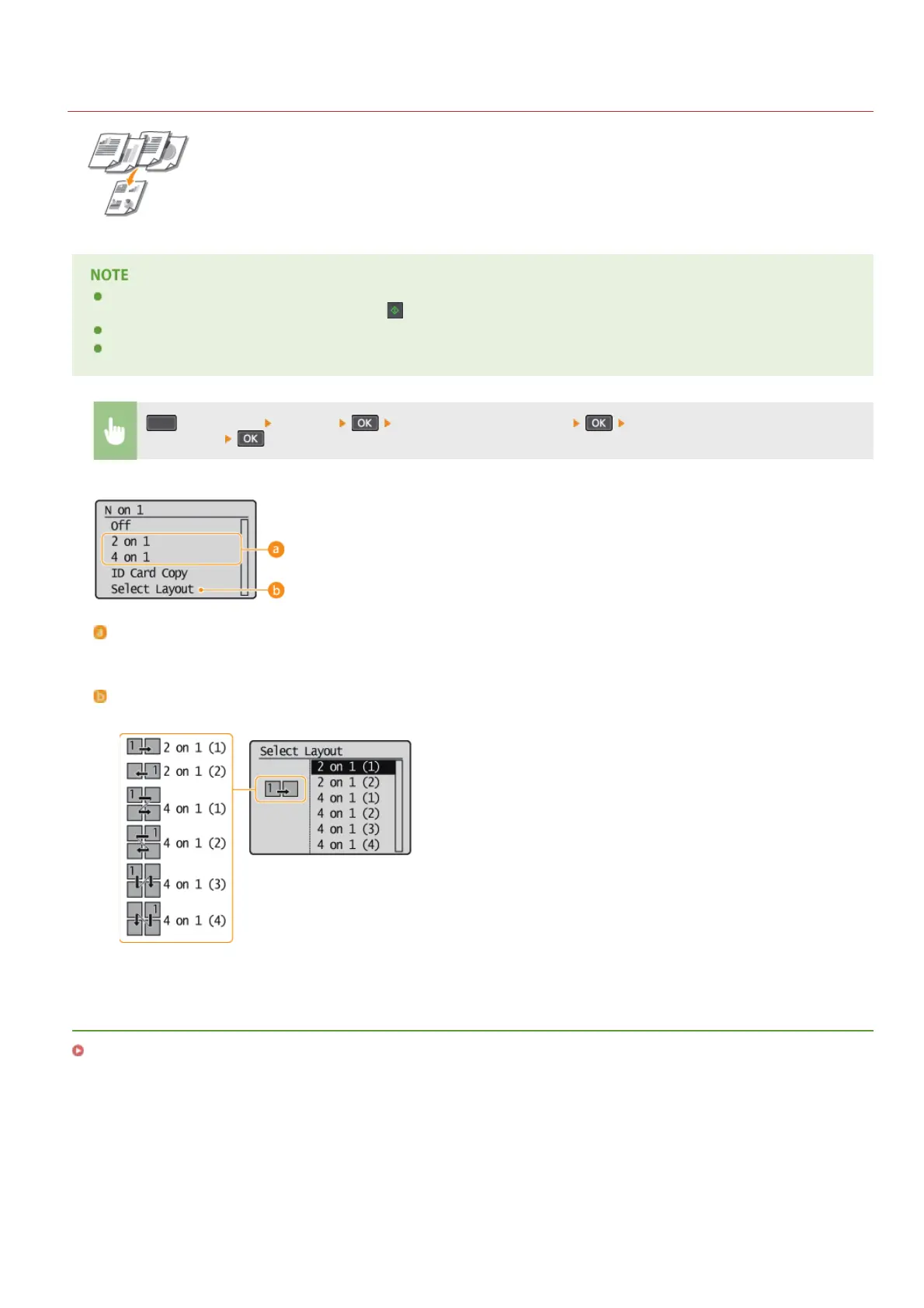
<2 on 1>/<4 on 1>
Select <2 on 1> to copy two pages of documents onto a single sheet, or select <4 on 1> to copy four pages of documents onto a
single sheet.
<Select Layout>
Specify how to arrange the documents on the page.
LINKS
Basic Copy Operations
㻢㻟㻌㻛㻌㻟㻟㻢








 To Next Page