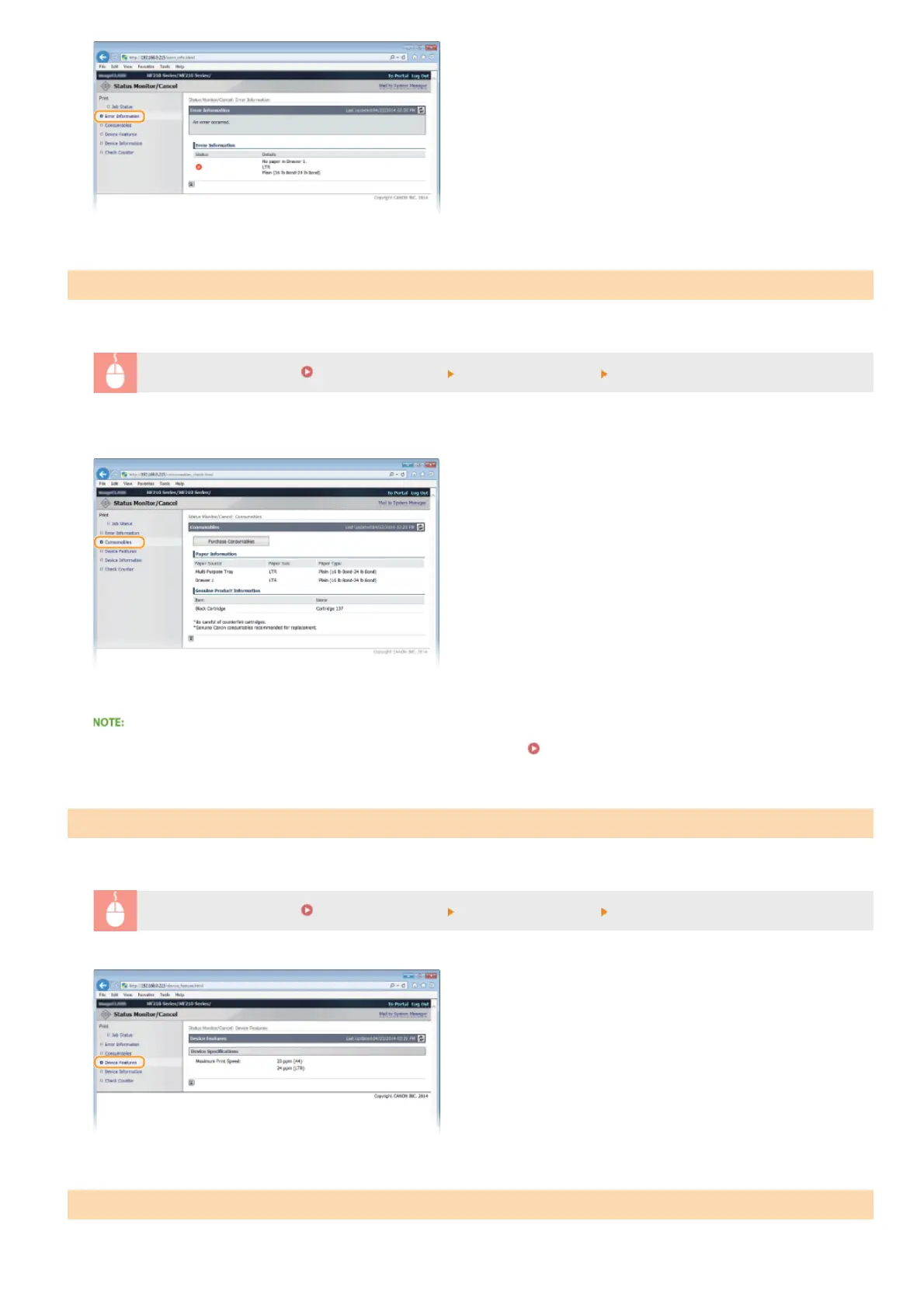
Paper size and type for the paper source, serial number for the toner cartridge, and other information is displayed.
Log on to the Remote UI (
Starting Remote UI) [Status Monitor/Cancel] [Consumables]
You can also click [Check Consumables Details] in Portal Page (main page) to display the screen for checking consumables.
Click [Purchase Consumables] to display the page for purchasing consumables.
To display [Purchase Consumables]
Set <Displ. Consumables Purchase Button (RUI)> to <On> in the display.
System Management Settings
The maximum print speed is displayed.
Log on to the Remote UI (
Starting Remote UI) [Status Monitor/Cancel] [Device Features]
Information about the machine and the system manager is displayed. This information is set in [System Management] on the
Checking Consumables
Checking Maximum Print Speed
Checking System Manager Information
㻞㻝㻡㻌㻛㻌㻟㻟㻢





 To Next Page