Preparation When Using the Printer
4 Load the paper.
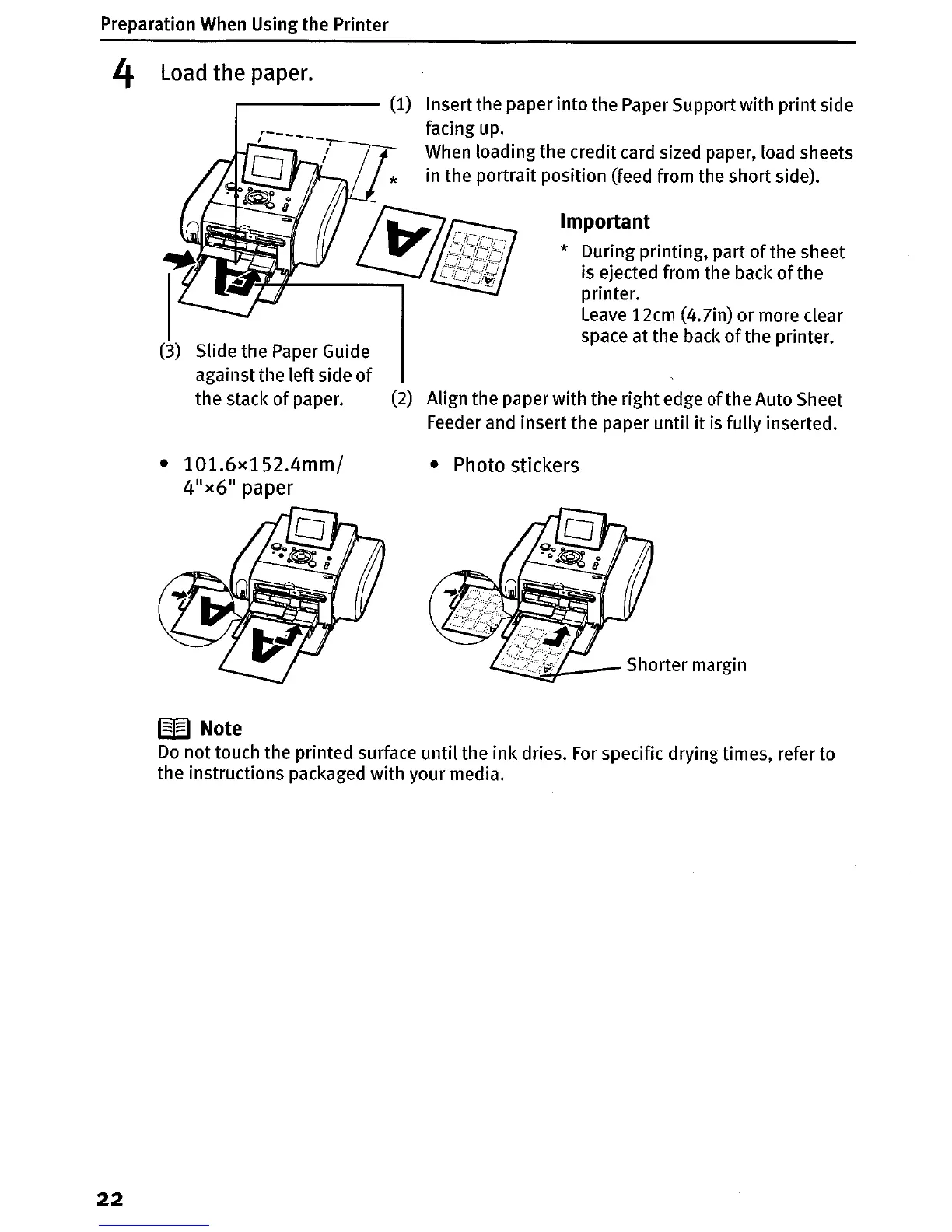
Important
* During printing, part
of
the sheet
is ejected from the back
of
the
printer.
Leave
12cm (4.7in) or more clear
space at the back
of
the printer.
(2) Align the paper with the right edge
of
the Auto Sheet
Feeder and insert the paper until
it
is fully inserted.
r-------
(1)
Insert the paper into the Paper Support with print side
facing up.
When loading the credit card sized paper, load sheets
in the portrait position (feed from the short side).
(3)
Slide the Paper Guide
against the left side
of
the stack
of
paper.
• 101.6x152.4mm/
4
1
x6" paper
• Photo stickers
Shorter margin
W
Note
Do
not touch the printed surface
until
the ink dries.
For
specific drying times, refer to
the instructions packaged with your media.
22












 To Next Page