Printing Photographs Directly from a Digital Camera
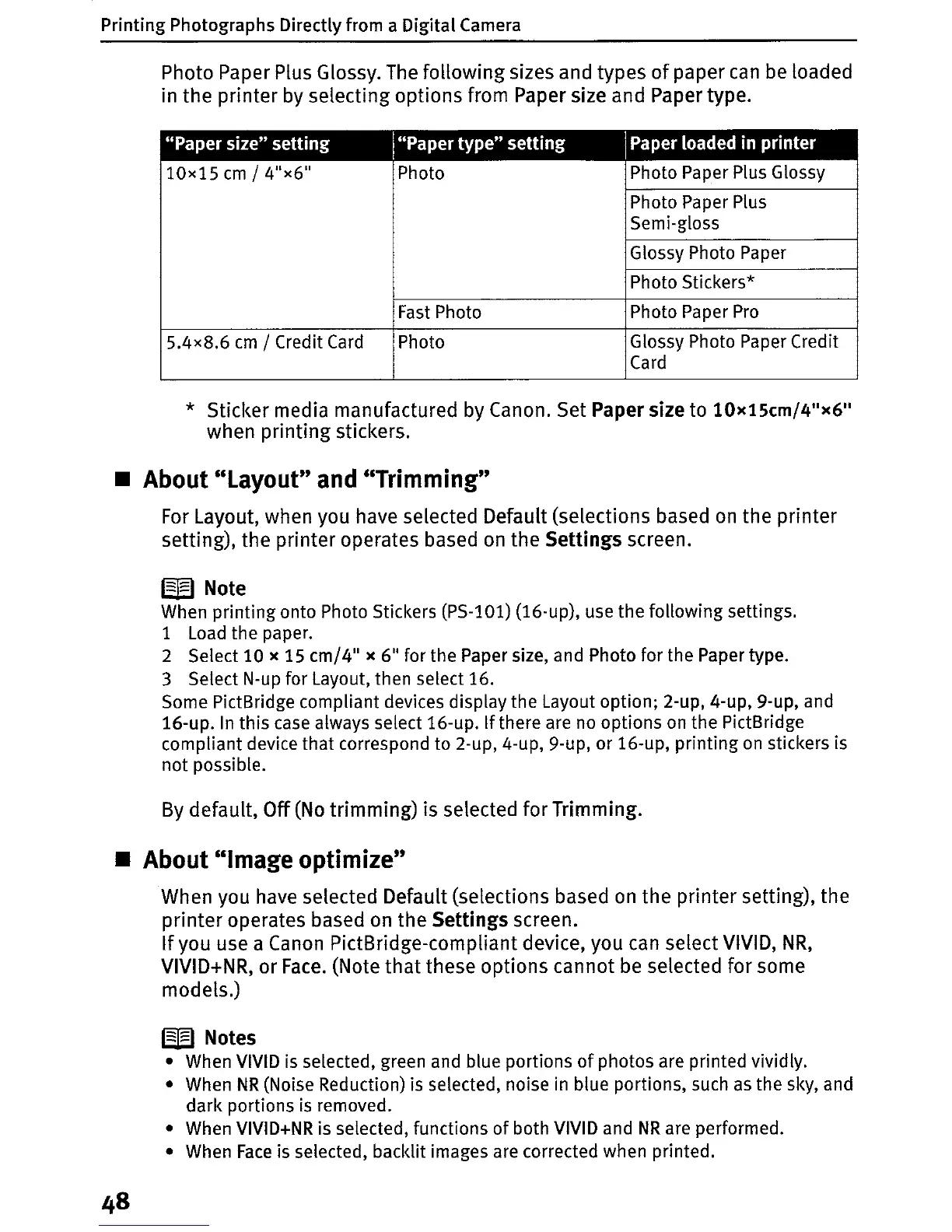
Photo Paper Plus Glossy.
The
following sizes and types
of
paper
can
be
loaded
in the printer by selecting options from Paper size and Paper type.
"Paper
size"
setting
I"Paper
type"
setting
IPaper loaded
in
printer
10x15
cm
/4"x6"
Photo
Photo Paper Plus Glossy
Photo Paper Plus
Semi-gloss
Glossy Photo Paper
Photo Stickers*
Fast
Photo
Photo Paper
Pro
5.4x8.6
cm
/ Credit
Card
Photo
Glossy Photo Paper Credit
Card
* Sticker media manufactured by Canon. Set Paper size to 10x15cm/4
t1
x6
11
when printing stickers.
• About "Layout" and "Trimming"
For
Layout, when you have selected Default (selections based
on
the printer
setting), the printer operates based
on
the Settings screen.
W Note
When
printing
onto Photo Stickers (PS-101) (16-up), use
the
following settings.
1
Load
the paper.
2 Select
10
x 15
cm/4"
x 6
11
for the Paper size, and Photo for the Paper type.
3 Select N-up for Layout, then select 16.
Some PictBridge compliant devices display the Layout option; 2-up, 4-up, 9-up, and
16-up.
In
this case always select 16-up. Ifthere are no options
on
the PictBridge
compliant device that correspond to 2-up, 4-up, 9-up, or 16-up, printing
on
stickers is
not
possible.
By
default,
Off
(No
trimming) is selected for Trimming.
• About "Image optimize"
When you have selected Default (selections based
on
the printer setting), the
printer operates based
on
the Settings screen.
If
you use a
Canon
PictBridge-compliant device, you can select VIVID,
NR,
VIVID+NR, or
Face.
(Note
that
these options cannot
be
selected for some
models.)
W Notes
• When
VIVID
is
selected, green and blue portions
of
photos are printed vividly.
• When
NR
(Noise Reduction) is selected, noise
in
blue portions, such
as
the sky, and
dark portions
is
removed.
• When VIVID+NR is selected, functions
of
both VIVID and
NR
are performed.
• When
Face
is selected, backlit images are corrected when printed.















 To Next Page