2.4 LPIM Installation and Removal
Live insertion of LPIM modules is not possible. Prior to installation,
the TGate/Router card (8325) or PAM (8425/8525) must be removed
(see Section 2.3).
2.4.1 LPIM Installation
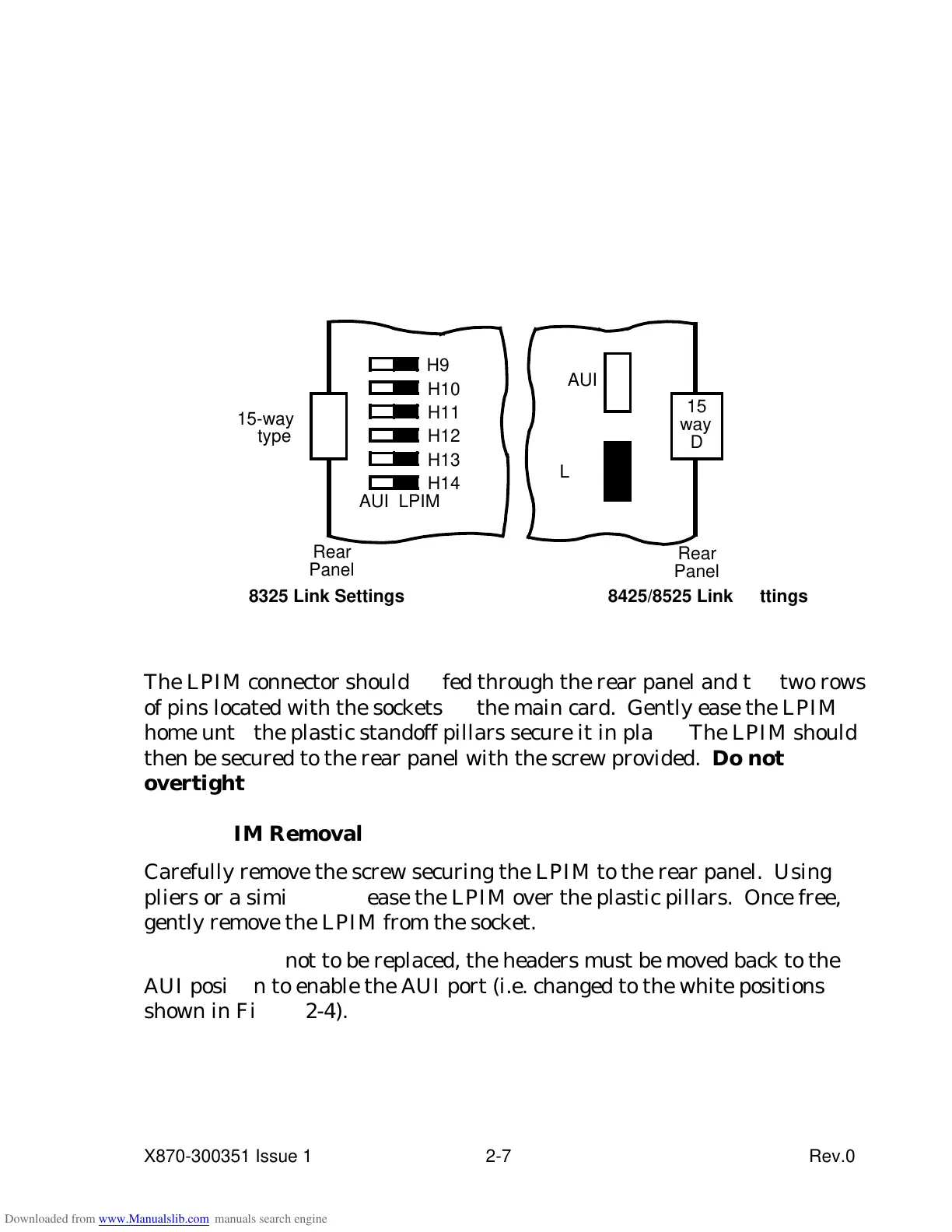
Before installing the LPIM the port must be selected by moving the links to
the positions shown in black in the relevant section of Figure 2-4.
Figure 2-4 AUI/LPIM Select Links
A
U
I
8425/8525 Link Settings
The LPIM connector should be fed through the rear panel and the two rows
of pins located with the sockets on the main card. Gently ease the LPIM
home until the plastic standoff pillars secure it in place. The LPIM should
then be secured to the rear panel with the screw provided. Do not
overtighten.
2.4.2 LPIM Removal
Carefully remove the screw securing the LPIM to the rear panel. Using
pliers or a similar tool, ease the LPIM over the plastic pillars. Once free,
gently remove the LPIM from the socket.
If the LPIM is not to be replaced, the headers must be moved back to the
AUI position to enable the AUI port (i.e. changed to the white positions
shown in Figure 2-4).
X870-300351 Issue 1 2-7 Rev.0



 To Next Page