2. Loosen the height control knob mounted on the right-hand loader upright.
3. Use the knob to move the limit switch bracket up or down as required until
the limit switch is just closed by the actuator on the lift arm. Tighten knob.
NOTE:
The limit switch may occasionally need adjustment. See page
134.
Return- To-Dig
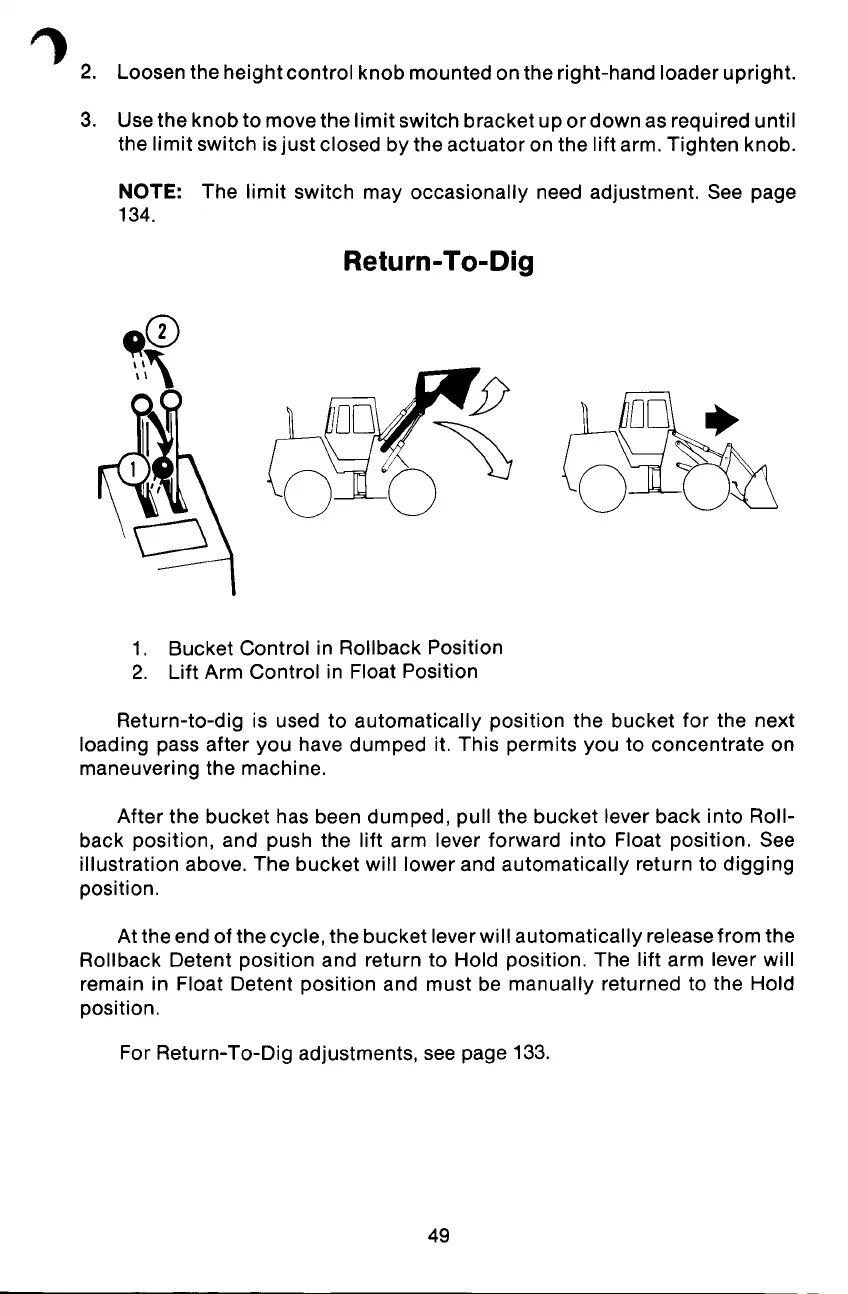
1. Bucket Control in Rollback Position
2. Lift Arm Control in Float Position
Return-to-dig is used to automatically position the bucket for the next
loading pass after you have dumped it. This permits you to concentrate on
maneuvering the machine.
After the bucket has been dumped, pull the bucket lever back into Roll-
back position, and push the lift arm lever forward into Float position. See
illustration above. The bucket will lower and automatically return to digging
position.
At the end of the cycle, the bucket leverwill automatically releasefrom the
Rollback Detent position and return to Hold position. The lift arm lever will
remain in Float Detent position and must be manually returned to the Hold
position.
For Return-To-Dig adjustments, see page 133.
49


 To Next Page