ROPS Cab Controls
•
o
o
0
BREAK7:'cD BREAKE:--cD
o
BREAKE~
o
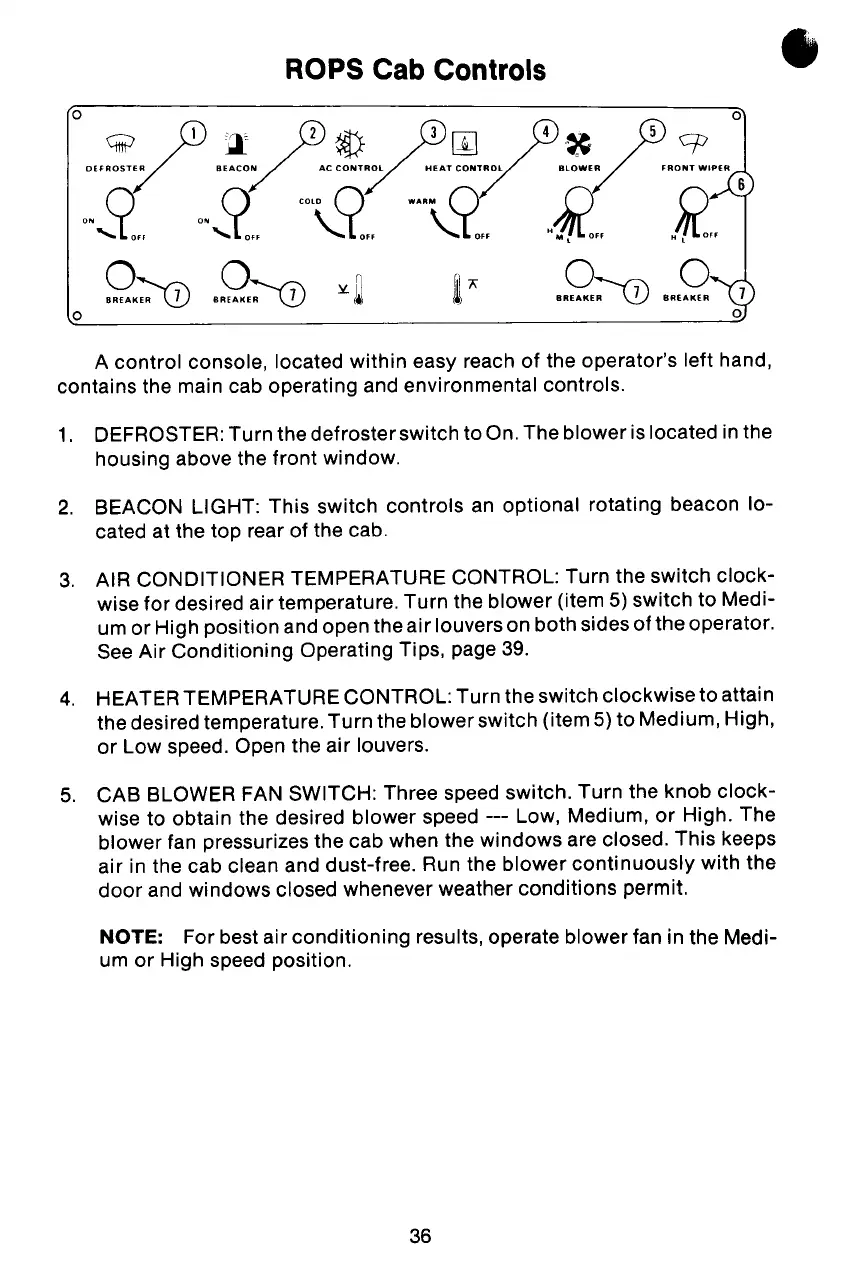
A control console, located within easy reach of the operator's left hand,
contains the main cab operating and environmental controls.
1. DEFROSTER: Turn the defrosterswitch to On. The blower is located in the
housing above the front window.
2. BEACON LIGHT: This switch controls an optional rotating beacon lo-
cated at the top rear of the cab.
3. AIR CONDITIONER TEMPERATURE CONTROL: Turn the switch clock-
wise for desired air temperature. Turn the blower (item 5) switch to Medi-
um or High position and open theair louvers on both sides of the operator.
See Air Conditioning Operating Tips, page 39.
4. HEATER TEMPERATURE CONTROL: Turn the switch clockwise to attain
the desired temperature. Turn the blower switch (item 5) to Medium, High,
or Low speed. Open the air louvers.
5. CAB BLOWER FAN SWITCH: Three speed switch. Turn the knob clock-
wise to obtain the desired blower speed --- Low, Medium, or High. The
blower fan pressurizes the cab when the windows are closed. This keeps
air in the cab clean and dust-free. Run the blower continuously with the
door and windows closed whenever weather conditions permit.
NOTE: For best air conditioning results, operate blower fan in the Medi-
um or High speed position.
36


 To Next Page